34
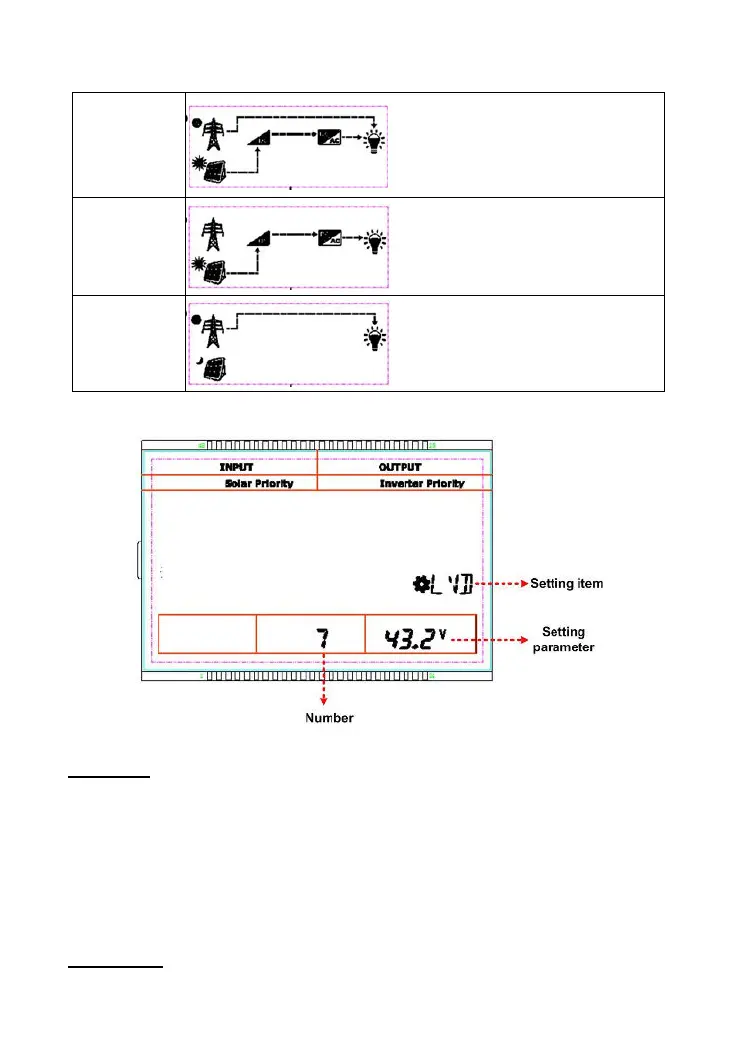
3.4.3 No battery mode
PV supplies the load together with the
utility.
The PV supplies the load alone.
The utility supplies the load alone.
3.5 Settings
1) Standard interface for common users
Operations
:
Step1:In the real-time interface, long press the SET/ENTER button to enter the standard interface.
Step2
:Press the UP/DOWN button to select the setting item.
Step3
:Long press the SET/ENTER button to enter the parameter setting interface.
Step4
:Press the UP/DOWN button to change the parameters.
Step5:Press the SET/ENTER button to confirm.
Step6:Press the ESC button to exit.
Setting items
:




 To Next Page