53
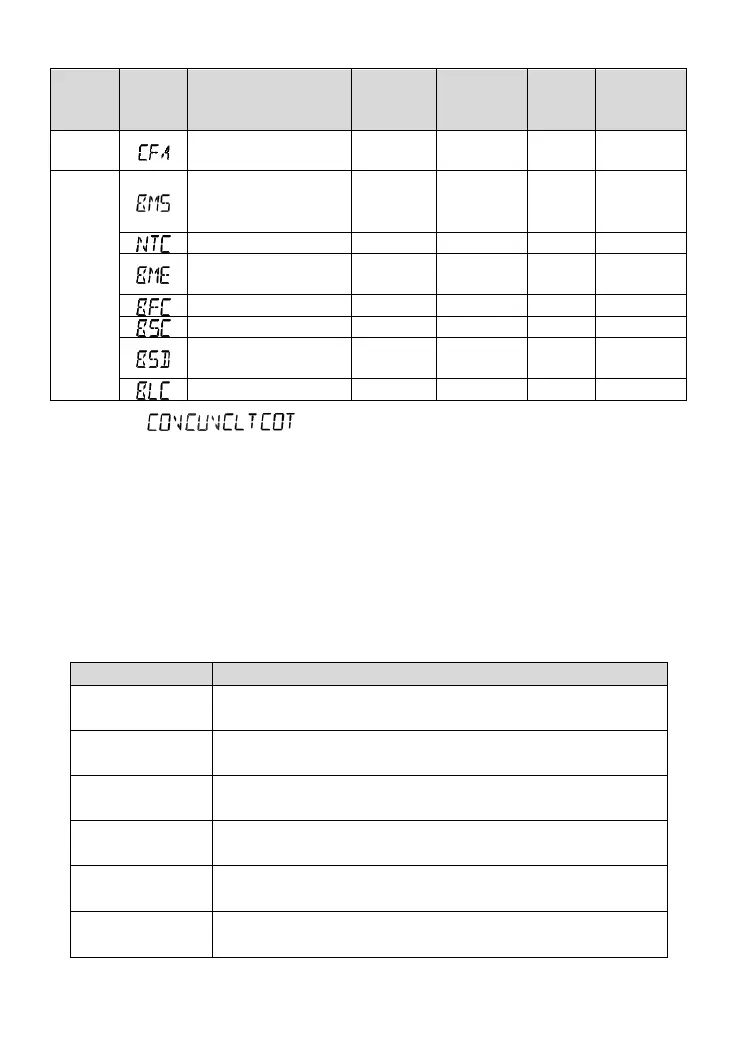
Communication fault
alarm
Other faults of the
battery management
system
BMS communication
error
(2)
(1) Faults of / / / are read from the BMS directly.
(2) Enable the BMS function first (Set item BEN to ON). When the BMS communication fails, the
UP-Hi automatically enters the no-battery mode and displays BME.
(3) When the battery is fully charged and the SOC reaches 100%, the charging process is stopped
and the BFC is displayed (without indicator and buzzer warning).
(4)
Enable the BMS function first (Set item BEN to ON). After reading the BMS charge/discharge
current threshold, the threshold value is adopted for working. The 12 local voltage points and
the threshold value cannot be set.
5.2 Solutions
Check whether the battery voltage is too high and disconnect the PV
modules.
Waiting for the battery voltage to resume to or above LVR point (low
voltage reconnect voltage) or changing the power supply method.
When the battery temperature declines to the overheating recovery
temperature or lower, the inverter/charger will resume working.
When the device temperature declines to the overheating recovery
temperature or lower, the inverter/charger will resume working.
① Please reduce the number of AC loads.
② Restart the device to recover the load output.
① Check carefully loads connection, clear the fault.
② Restart the device to recover the load output.




 To Next Page