30
Troubleshooting
The display is not hidden when you
press the [ ] button
The product may be set to Mode 3 in extended features.
Hold down the [ ] key and the [ ] button at the same
time to set Mode 1 or Mode 2.
➡"Extended Features" p.18
Cannot hear audio
• Check that the earphones are connected securely.
• Check that the volume is set correctly.
• Check that audio is being output from the output equip-
ment.
• You may not be able to use it depending on the type of
standard earphones you are using, such as earphones
with a switch.
Cannot adjust the brightness of the screen
• If the product gets too hot, the image brightness may be
decreased to protect the product.
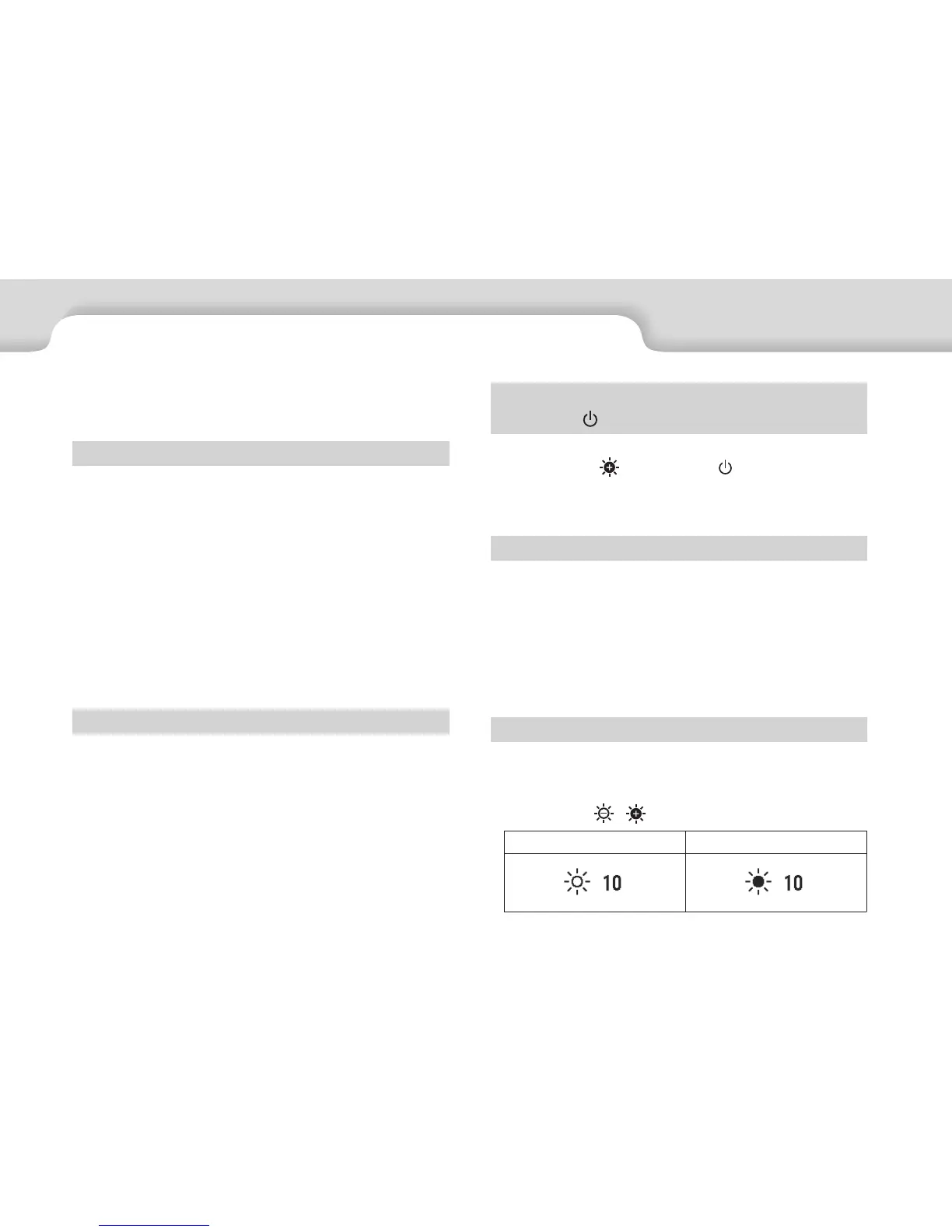
You can check if the brightness has been limited by
pressing the [ / ] keys.
Normal operation Brightness limited
If you think a malfunction has occurred, check the fol-
lowing.
No image is displayed
• Check of any cables are disconnected.
• If the LED indicator flashes orange for more than three
seconds, an error has occurred.
➡"Part Names and Functions" p.10
Unplug the dedicated micro-USB power supply cable or
the USB Type-C cable that is supplying the power, wait
for a while, and then reconnect.
• If images are not displayed by a USB Type-C connection,
check that the connected equipment supports video
output by USB Type-C. This product supports DisplayPort
Alternate mode (DP ALT mode) for USB Type-C.
Images are fuzzy
• Reconnect the cables.
• Restart the connected equipment.


 To Next Page