Viewing and Playing Images, Audio, and Video 23
Chapter 3
Viewing and Playing Images, Audio, and Video
After you have copied files from a memory card, you can
view or play them in various ways. This chapter explains
how to view images and play audio and video files on your
P-2000 and on a TV or projector.
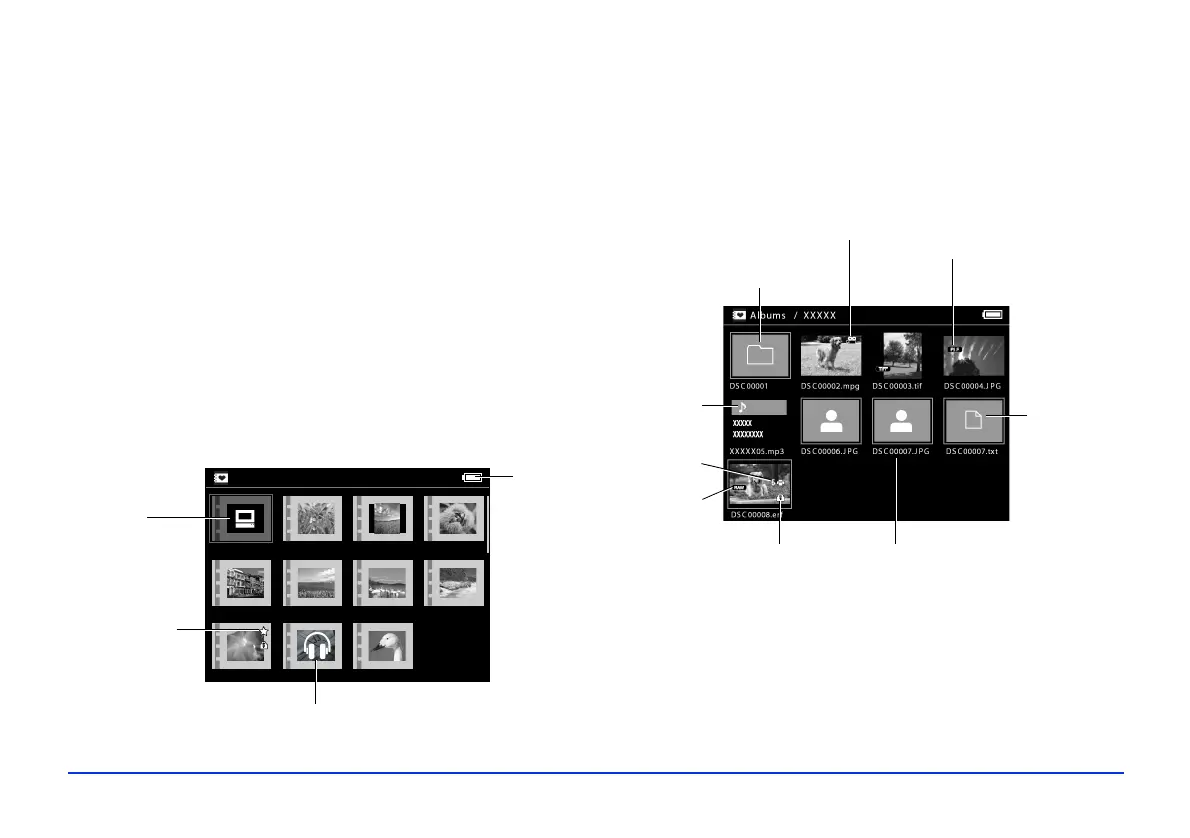
Screen Icons
The following illustrations identify the icons that appear on
the screen:
* P.I.F. is the abbreviation for Print Image Framer,
which lets
you add frames to your images. Some Epson digital cameras
support this feature.
Albums
PC_DATA Scenery Flower Travel
Album1 Travel2 New Album3
Photo Favorite Album4
PC_DATA
folder
Album set as a
shortcut
A folder that includes audio
Battery
status
Locked
file
Audio file
RAW file
File with P.I.F.
™
frame
Unsupported
data file
Video
Image
selected
for printing
Unsupported
image file
Folder copied
from a computer



 To Next Page