Getting Started 9
About the AC Adapter
The P-2000 comes with an AC adapter. Use the adapter to
charge the battery and when the P-2000 is connected to a
computer or printer. You might also want to use it whenever
possible to view videos or photos, so you can save battery
power.
Warning:
Use only the AC adapter provided, which is designed for the
P-2000. Using another adapter could cause fire, electrical shock,
or injury.
Do not use the AC power cord or the adapter for any purpose
other than powering the P-2000.
To prevent fire or electric shock, do not cover the AC adapter
with a blanket or similar covering.
Do not connect the AC adapter when the battery is not installed;
this can damage the P-2000.
Do not remove the AC adapter from this device during
operations. You can, however, connect the adapter during
operations.
Installing the Battery
The P-2000 comes with a Lithium-ion battery. Follow these
steps to install it:
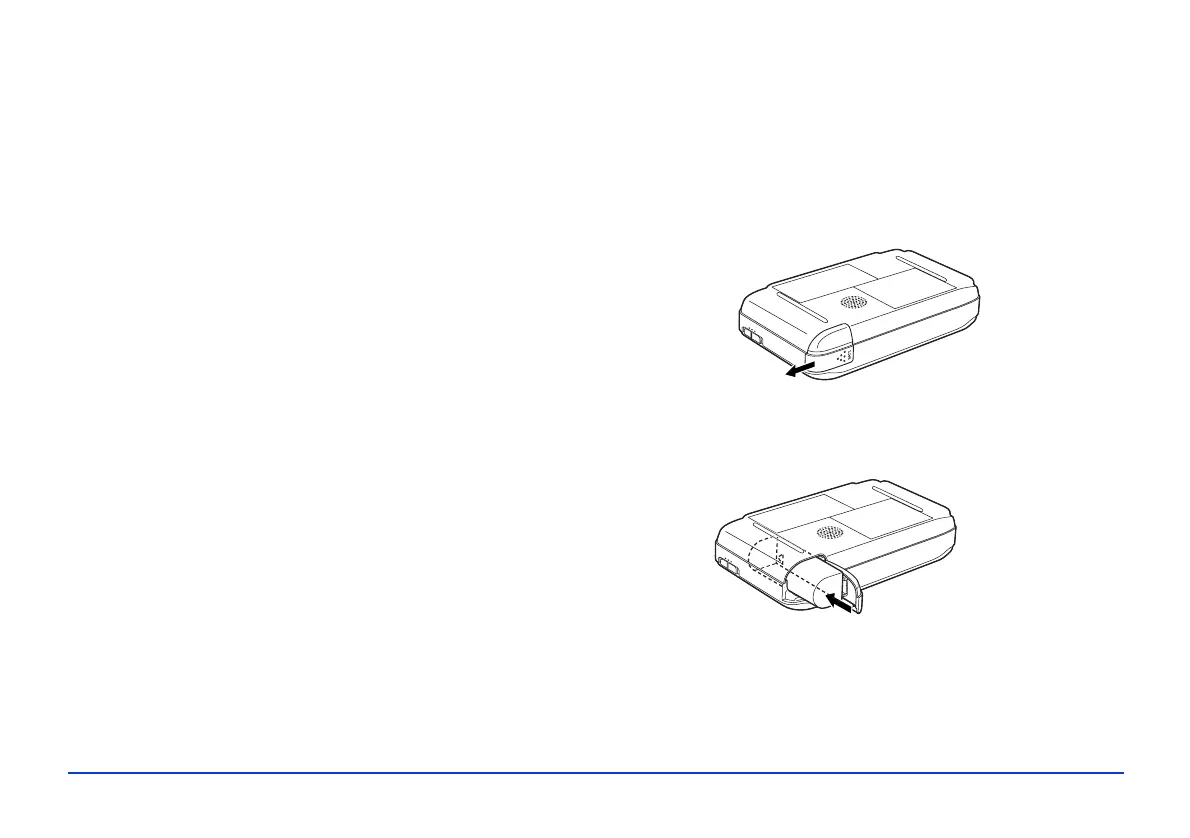
1 Turn the P-2000 upside down and slide the battery
cover to the left to open it.
2 Insert the battery into the compartment as shown. Make
sure the gold contacts on the battery go in first.



 To Next Page