Maintenance and Troubleshooting 56
Printing Problems
Updating the Firmware and Printer
Driver
Epson will occasionally update the P-2000 firmware. You
can download the latest version from Epson’s Support web
site:
http://support.epson.com. Instructions for updating the
firmware in your P-2000 will be included with the
download information.
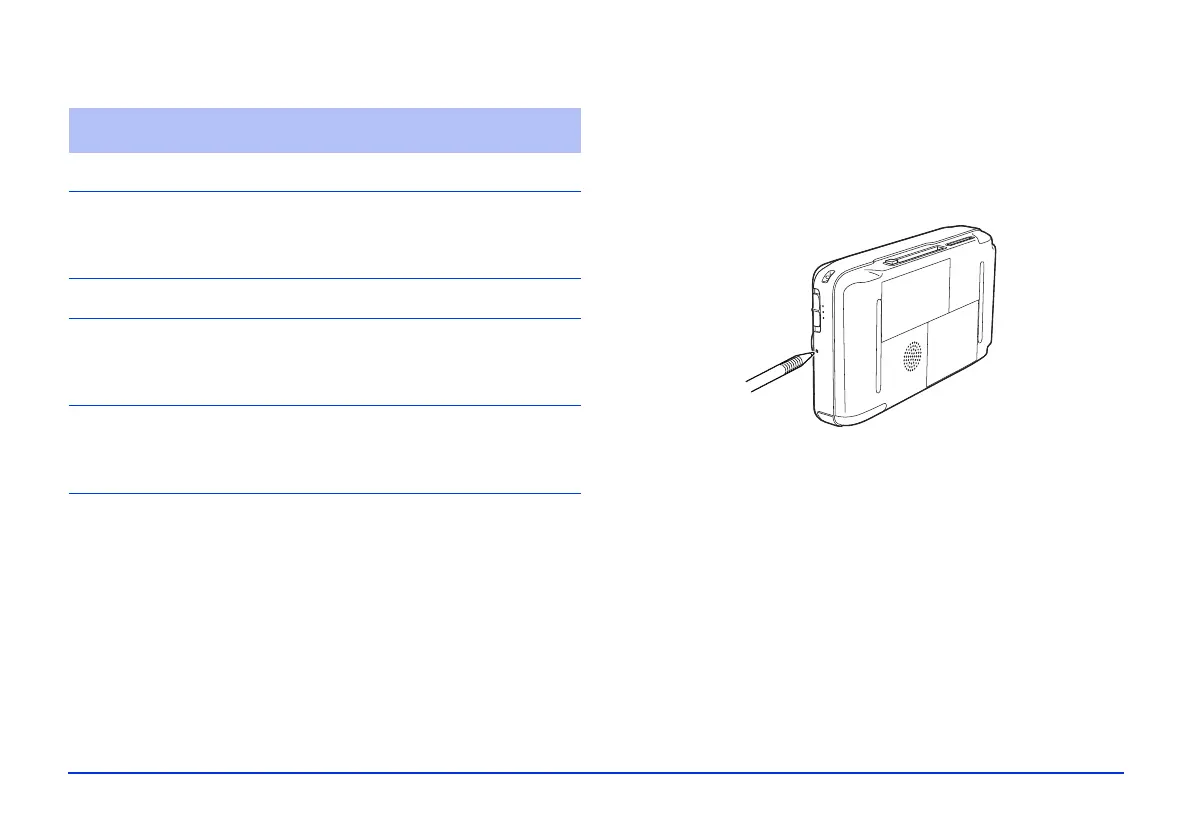
Resetting the P-2000
If the P-2000 locks up, stops working, or you want to
restore the default values, you can reset it.
Press the
Reset button with a thin object.
The P-2000 shuts off, resets its default values, and comes
back on.
You cannot print.
Cause What to do
The printer is not supported. See “Connecting the P-2000 to a
Printer” on page 43 to make sure
your printer is supported.
The printer’s power is off. Turn on the printer.
The USB cable is not
connected correctly.
See “Connecting the P-2000 to a
Printer” on page 43 and reconnect
the cable.
You cannot print a JPEG
image.
Make sure the JPEG image does
not exceed 4600 pixels in either the
vertical or horizontal direction.



 To Next Page