Maintenance 9. Troubleshooting
208 RC700 / RC700-A Rev.23
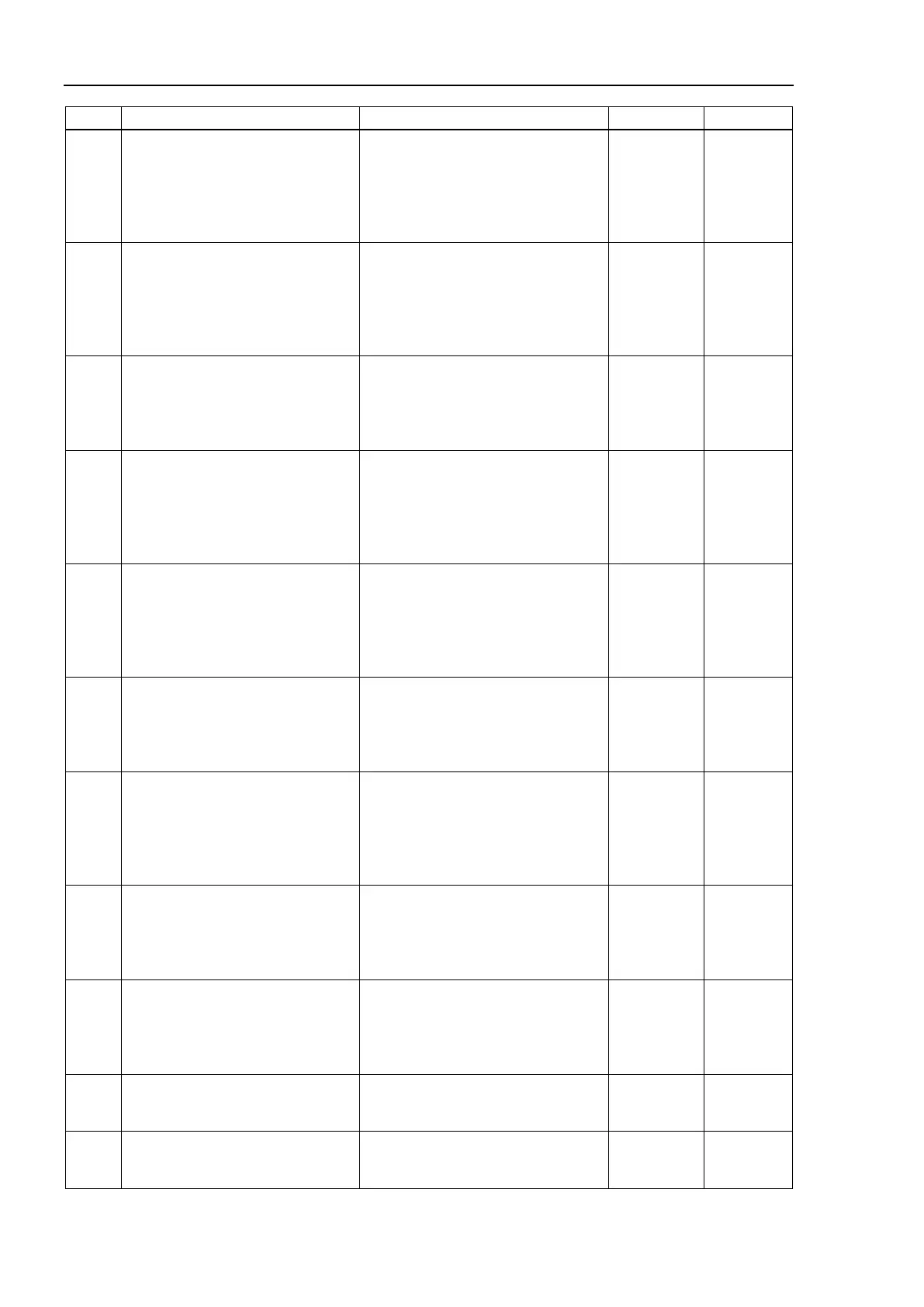
No. Message Remedy Note 1 Note 2
2880
Failed to initialize the Force Sensor
I/F board.
Check connection.
Check connection of the controller
and Force Sensor I/F board.
Reboot the controller.
Please inquire with us if a similar
error occurs even after rebooting the
2881
Failed to initialize the Force Sensor
I/F board.
Check connection.
Check connection of the controller
and Force Sensor I/F board.
Reboot the controller.
Please inquire with us if a similar
error occurs even after rebooting the
2882
Detected two boards: Force Sensor
I/F board and RS-232C board.
If using the Force Sensor I/F board,
RS-232C board is available up to
Remove the Force Sensor I/F board
or the second board of RS-232C
board.
2883
Detected two boards: Force Sensor
I/F board and RS-232C board with
the second board setting.
If using the Force Sensor I/F board,
return the setting to the first board
Return the setting to the first board of
RS-232C board.
2884
Failed to initialize the Force Sensor
I/F board.
Check connection.
Check connection of the controller
and Force Sensor I/F board.
Reboot the controller.
Please inquire with us if a similar
error occurs even after rebooting the
2885
Sensor 3 and 4 of Force Sensors
are enabling.
If using Force Sensor I/F board,
disable the sensor 3 and 4 of Force
Disable the sensor 3 and 4 of the
Force Sensor.
2886
Failed to communicate with Force
Sensor I/F board and Force Sensor.
Check connection of the Force
Sensor.
Check connection of the Force
Sensor I/F board and Force Sensor.
Reboot the controller.
Please inquire with us if a similar
error occurs even after rebooting the
2887
Detected Force Sensor I/F board
and Force Sensor I/F unit.
Remove either Force Sensor I/F
board or Force Sensor I/F unit.
Unable to use the Force Sensor I/F
board and Force Sensor I/F unit at
the same time.
Remove the Force Sensor I/F board
or Force Sensor I/F unit.
2888
Unsupported Force Sensor is set.
Check the configuration.
Firmware version may be old.
Check whether the firmware version
is supported and update it as
2900
Failed to open as server for the
Ethernet port.
Check whether the Ethernet port is
set properly. Check whether the
Ethernet cable is connected properly.
2901
Failed to open as client for the
Ethernet port.
Check whether the Ethernet port is
set properly. Check whether the
Ethernet cable is connected properly.



 To Next Page