Maintenance 9. Troubleshooting
242 RC700 / RC700-A Rev.23
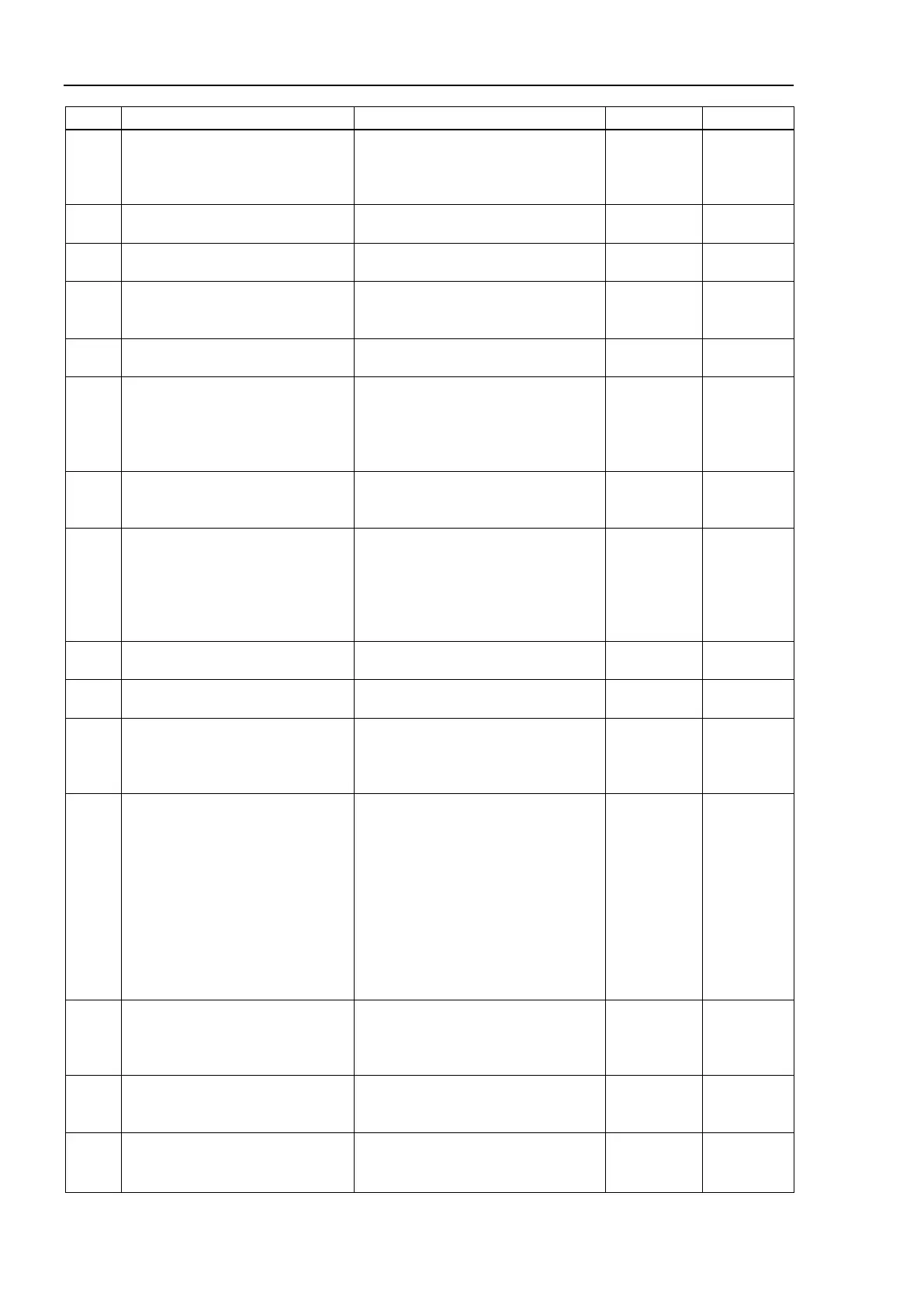
No. Message Remedy Note 1 Note 2
4082
Pulse Generator Board error was
detected during operation.
Check the PG board.
Check the connection with the motor
driver.
4083 MCAL did not complete in time.
Set PG parameter so that MCAL can
complete within 120 seconds.
4084
Limit Sensor error was detected
during operation.
Check the limit sensor.
4085
Failed to change to specified
location.
Initialize the controller firmware.
4086
Cannot execute because it is not
Change to the dry run mode and
4087 Failed to format the playback file.
Check the amount of free space of
the computer.
Reboot the computer.
Reinstall the RC+.
4089
HealthRBStart to HealthRBStop is
Set the time interval from
HealthRBStart to HealthRBStop to be
within 1 to 3600 seconds.
- -
4090
HealthRBStop is executed without
HealthRBStart.
Execute HealthRBStop after
executing HealthRBStart.
This error also occurs when
HealthRBStop is executed again
without executing HealthRBStart after
- -
4091
Specified analog I/O channel does
Check the channel number. Mount
the analog I/O option board.
4092
Specified analog output channel is
used for a speed data output.
Execute after stopping the speed
output of the specified channel.
4093
If the motion is paused during the
singularity-avoiding, the motion
cannot resume. Abort the motion
Abort the motion command.
4094
The current position is out of the
motion range.
Either J1 or J2 axis is out of the
motion range. Follow the
procedures below and move the robot
within the motion range.
・Use Pulse command and JTran to
move the robot within the motion
range.
・Move the robot within the motion
range manually.
(This error only occurs in RS series
4099
Servo error was detected during
operation.
Check if a 5000 number error is
occurring in the system history. If
the error is occurring, take measures
4100
Communication error in motion
control module. Cannot calculate
the current point or pulse.
Reboot the controller.
Initialize the controller firmware.
4101
Communication error in the motion
control module. Cannot calculate
the current point or pulse.
Reboot the controller.
Initialize the controller firmware.
Replace the controller.



 To Next Page