Maintenance 9. Troubleshooting
RC700 / RC700-A Rev.23 261
5511
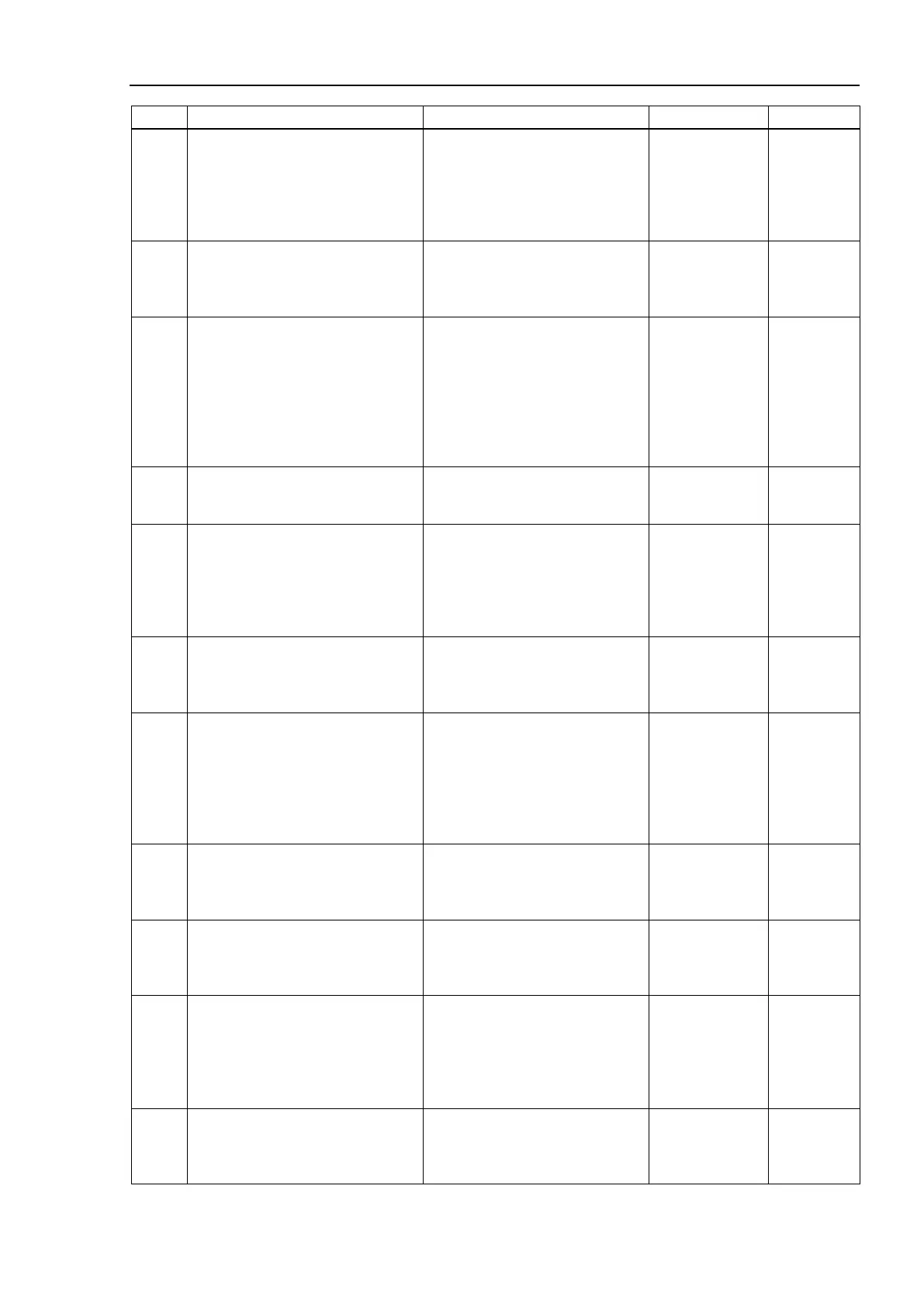
Coordinate transformation error in
force control.
Check whether the robot moves
outside of the motion range.
Check whether the coordinate out
of the motion range is specified.
Check whether the robot moves
outside of the motion range
during the execution of force
5520
Impedance parameter error.
Check the combination of Mass,
Damper, and Spring
Check the combination of Spring,
Damper, and Mass. Check
whether the Mass property is too
small for the Damper property.
5521
The coordinate system mode other
than the custom mode is specified
for the Force Sensor which is not
associated with the robot.
Check configuration of the Force
Sensor or the coordinate system
mode.
Check association with the robot.
Check if the direction other than
the Custom coordinate is
specified for the Orientation
property of the force coordinate
system object for the sensor
which is not associated with the
5522
Undefined data is selected.
Check if the selected data is
Check if the specified parameter
is defined.
5523
The parameter which cannot be
continued when the CF continues
force control is specified.
Check the Force Control Object
and the Force Coordinate System
Check the force control object
and the force coordinate object
which are used by the motion
commands before and after
continuing the force control by the
5530
The specified time has passed after
resetting the Force Sensor.
Execute the Reset property of the
Execute the Reset property for
the Force Sensor object.
5531
Approached the singularity point
while executing force control.
Avoid the singularity point when
using force control.
Check whether the coordinates
near the singularity is specified.
Check whether the robot moves
to the vicinity of the singularity
during the execution of force
control. Or, review the
installation position of the robot.
5532
Buffer for Force Sensor averaging
is saturated.
Shorten the time interval from
AvgForceClear to AvgForce.
Shorten the time interval between
AvgForceClear and AvgForce to
be shorter than a minute.
5533
The continuing time for CF to
execute force control has passed.
To continue force control, use
Check whether the interval of the
motion commands is one minute
or less.
5535
SCARA robot cannot execute force
control if the Orientation property of
Base, Tool, Local, and FCS
objects, or V and W of the current
command position are other than 0.
Set “0” to the Orientation property
or V and W of the current
command position for Base, Tool,
Local, and FCS objects.
5536
Force control is not supported for
this robot model.
Check the robot model and the
controller firmware version.
Check if the specified robot is
correct.
Check if the Controller firmware
supports the robot model.



 To Next Page