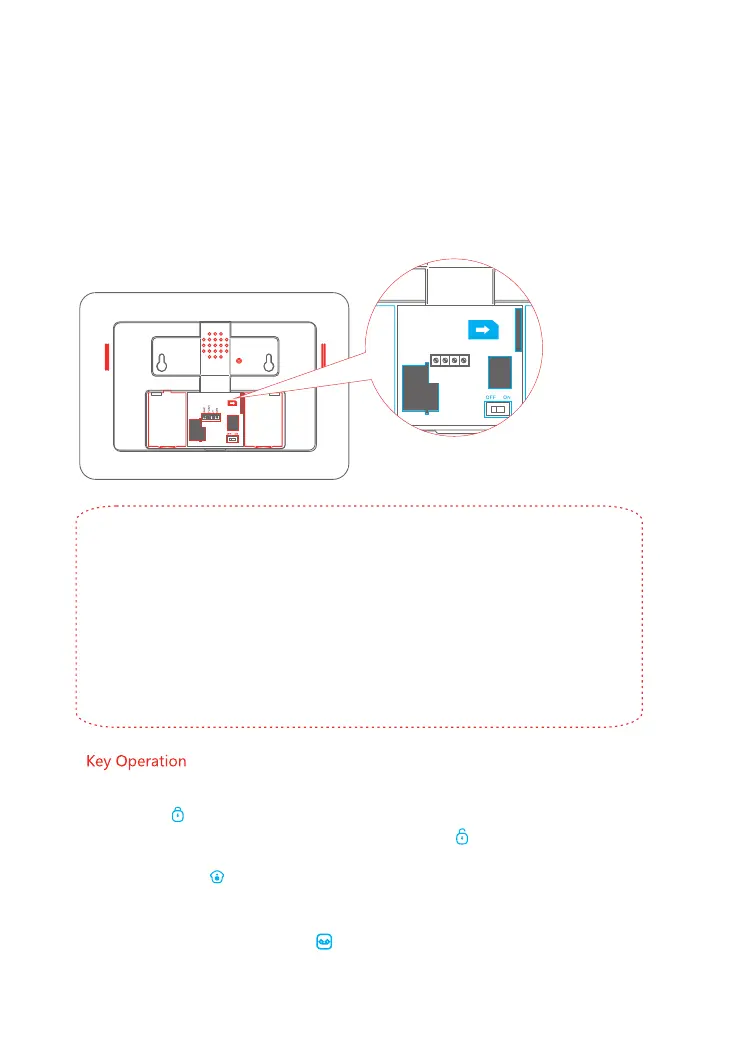
Note: A GSM SIM Card with basic functions (calling, answering, SMS and caller display) is
required. If an App is used to control the alarm system via the GPRS network, it is
recommended that you sign up to a GPRS data plan in order to minimise running costs.
If no SIM card is inserted, the Control Panel can only send alarm notifications by telephone calls
via the landline (PSTN) and users cannot remotely control the Control Panel with the App. All
other functions will be fully operable.
SIM Card requirement: 2G GSM SIM Card with calling, SMS, GPRS data and caller display
functions.
Insert a SIM Card
1. Switch off the Control Panel.
2. IMPORTANT: Remove the (default) code permanently from the SIM Card
3. Turn off the Voicemail function (if it is enabled)
4. Insert the SIM Card (with credit) into the card slot taking care to note the orientation
of the SIM Card as shown.
5. Switch the Control Panel back on, it will now search for a GSM signal.
This step can be ignored if the GSM function is not required...
06
1. SOS: When pressed, the System will alarm immediately
2. Arm: [ ] Press to arm your system. All the Sensors are now armed.
3. Disarm: [ ]Enter the password (default setting: 1234) and press . All Sensors except those
set to a 24-H zone are now inactive.
4. Home Arm: [ ] Press to part arm the system. All Sensors will be active except those set to
home mode allowing freedom of movement in selected areas
5. Call: For Making Phone Calls, please refer to Page 7.
6. Record Voice Memo: [ ]Press and hold for 3 seconds. A voice memo of up to 10-seconds
can be left. Press once to listen to the recorded voice memo.



 To Next Page