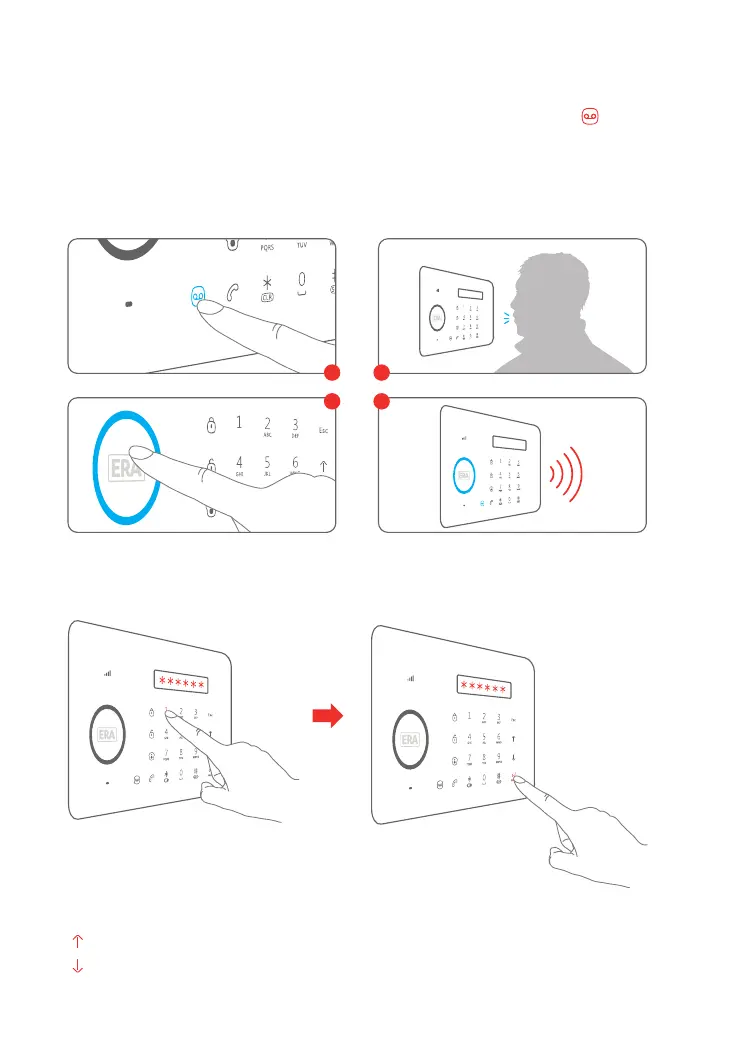
Voice Memo
1
3
2
4
Function Setting
Input the admin code (Default: 123456), then press to enter the Setting Menu. [Enter]
Up
Down
Enter Confirm
Back to last step Esc
To record a Voice Memo of up to 10 seconds press the [Record Voice Memo ]
button for 3 seconds. The ‘Play Voice Memo’ circle will flash to indicate that a message
has been recorded. To listen to a Voice Memo touch the center of the circle. The LED
indicator will clear down once the voice memo has been played. The voice memo can
be replayed by touching the centre of the circle again. Voice Memos are not stored, a
new Voice Memo will over-write the previous Voice Memo
08



 To Next Page