Alarm Functions
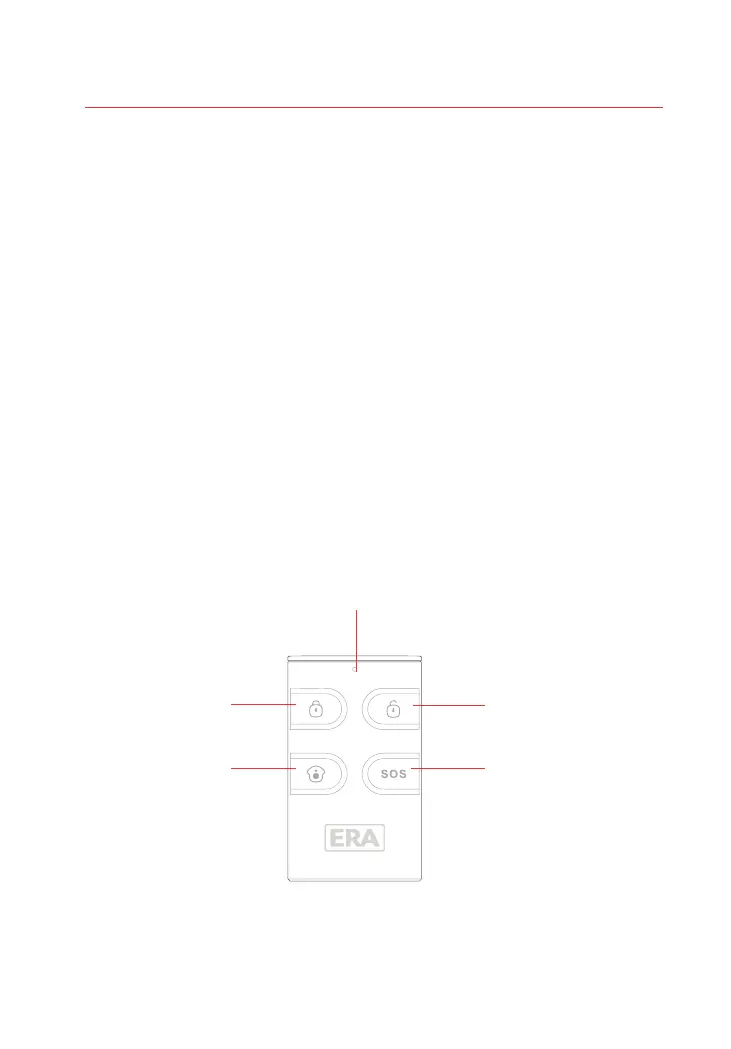
Remote Control
The Remote Control allows you to quickly and conveniently Arm and Disarm your
Alarm System.
In the event of an emergency (when in or near your property), pressing the SOS
button will trigger an alarm condition on the Control Panel and external Siren (if fitted).
Overview
09
Disarm
SOS
Part Arm
(Home Arm)
Arm
Status Indicator
1. If GSM/GPRS functionality is enabled, when the system is disarmed by an RFID Tag,
the Alarm will send an SMS/Push notification to the first stored Phone Number i.e.
“TAG 01 Disarm” .
2. The Alarm System Settings can be viewed via the E11 App or by sending an SMS
“00" to the SIM card in the Control Panel.
3. The Alarm can send an Arm/Disarm/Part-Arm notification via SMS to the first stored
number. To enable this function, which by factory default is ‘disabled’, send an SMS “21"
to the SIM card in the Control Panel. To revert to this function being ‘disabled’ send an
SMS .“20"



 To Next Page