How to use this device
10/2020 1020217-00A Operating instructions – 45/96
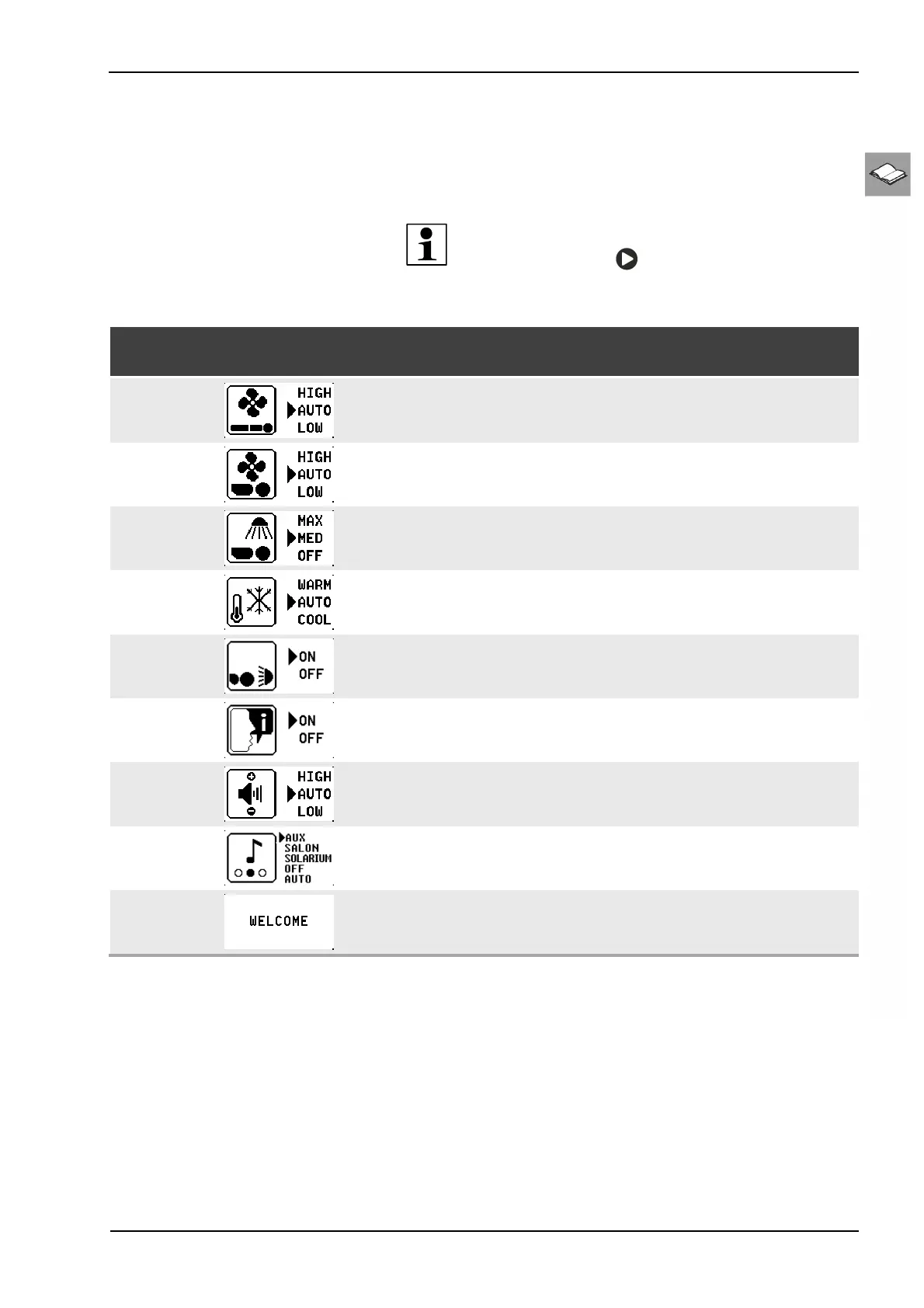
12.5.2 User settings overview
User settings overview
All of a device's available functions can be pre-set on the control panel. Fine
adjustment is carried out during use.
NOTE:
Pressing and holding
for 3 seconds opens the 'User set-
tings' overview.
Function Pictogram selection /
key sequence
Description /
display
Body fan
Pre-select low or high cooling or set to automatic.
Face fan
Pre-select low or high cooling or set to automatic.
Facial tanner
Select maximum or medium power or switch off.
Temptronic/
Air conditioning
Pre-select low or high temperature or set to automatic.
Shoulder tanner
Switch the shoulder tanner on or off
Voice Guide
Switch the Voice Guide on or off
Volume
Basic volume setting: Loud, quiet or automatic.
Audio system
Select the audio system or switch off
Welcome
Welcome text in standby mode



 To Next Page