How to use this device
48/96
NOTE:
Pressing and holding
button for 3 seconds activates the
demo mode. This allows you to demonstrate the following
functions without tanning.
NOTE:
If no button is pressed within 8 seconds, the settin
s return to
default mode.
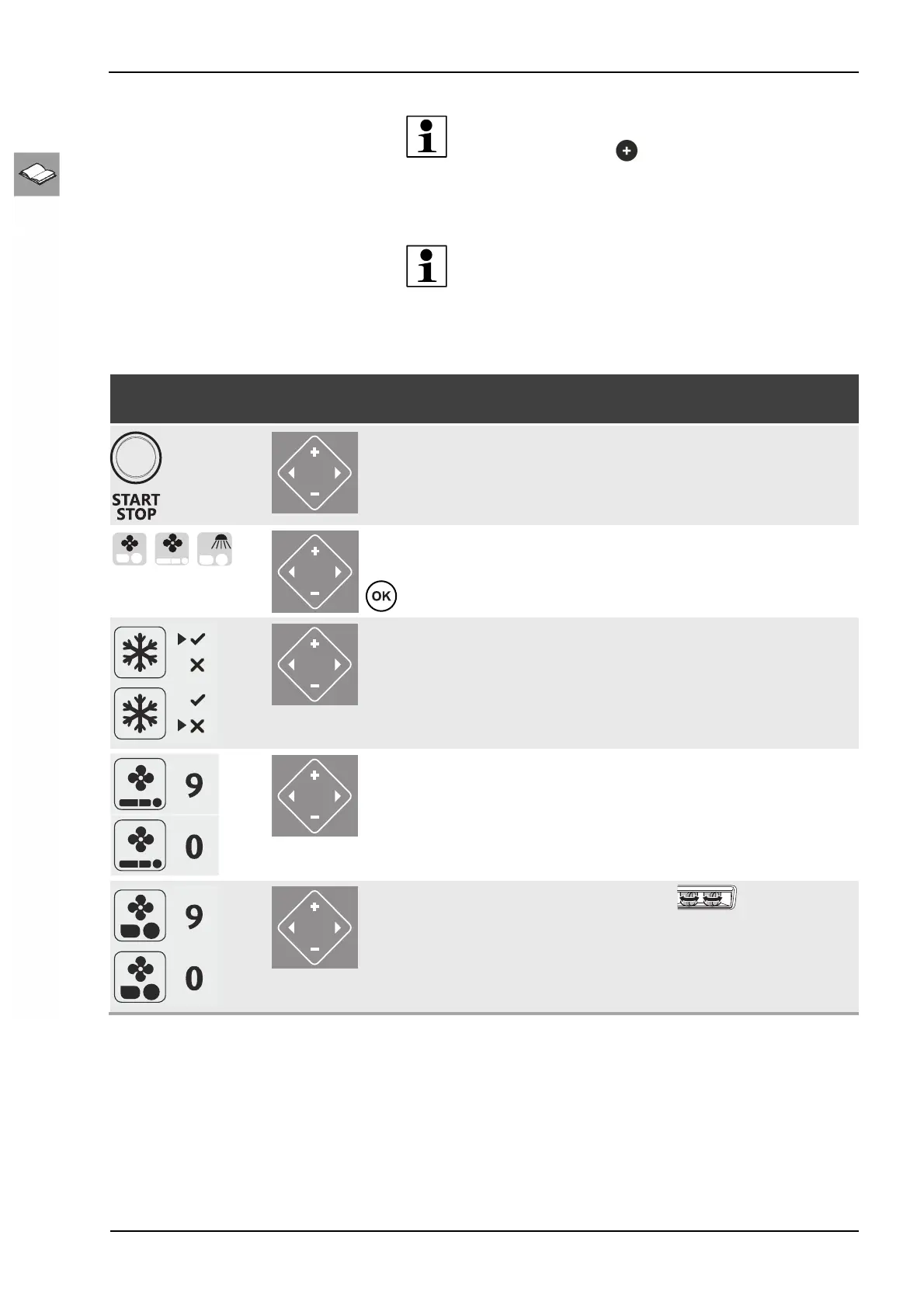
12.6.3 Description
Pictogram selection /
key sequence
Navigation Description / Display Information
START/STOP
Switches the lamps on /
off during the tanning session.
The process is interrupted.
The tanning time continues
to run if the lamps are
switched off during tanning
session.
Function selection
face fan, body fan,
facial tanner
To switch the air conditioning
AC PLUS unit off:
Press the minus button for 3 seconds
To switch the air conditioning unit on:
Press the plus button for 1 seconds
During tanning the air condi-
tioning can only be switched
back on after 3 minutes.
Regulate the body fan,
levels 0-9
Regulate the face fan,
levels 0-9
The face cooling
air nozzles can be adjusted
manually.



 To Next Page