How to use this device
10/2020 1020217-00A Operating instructions – 49/96
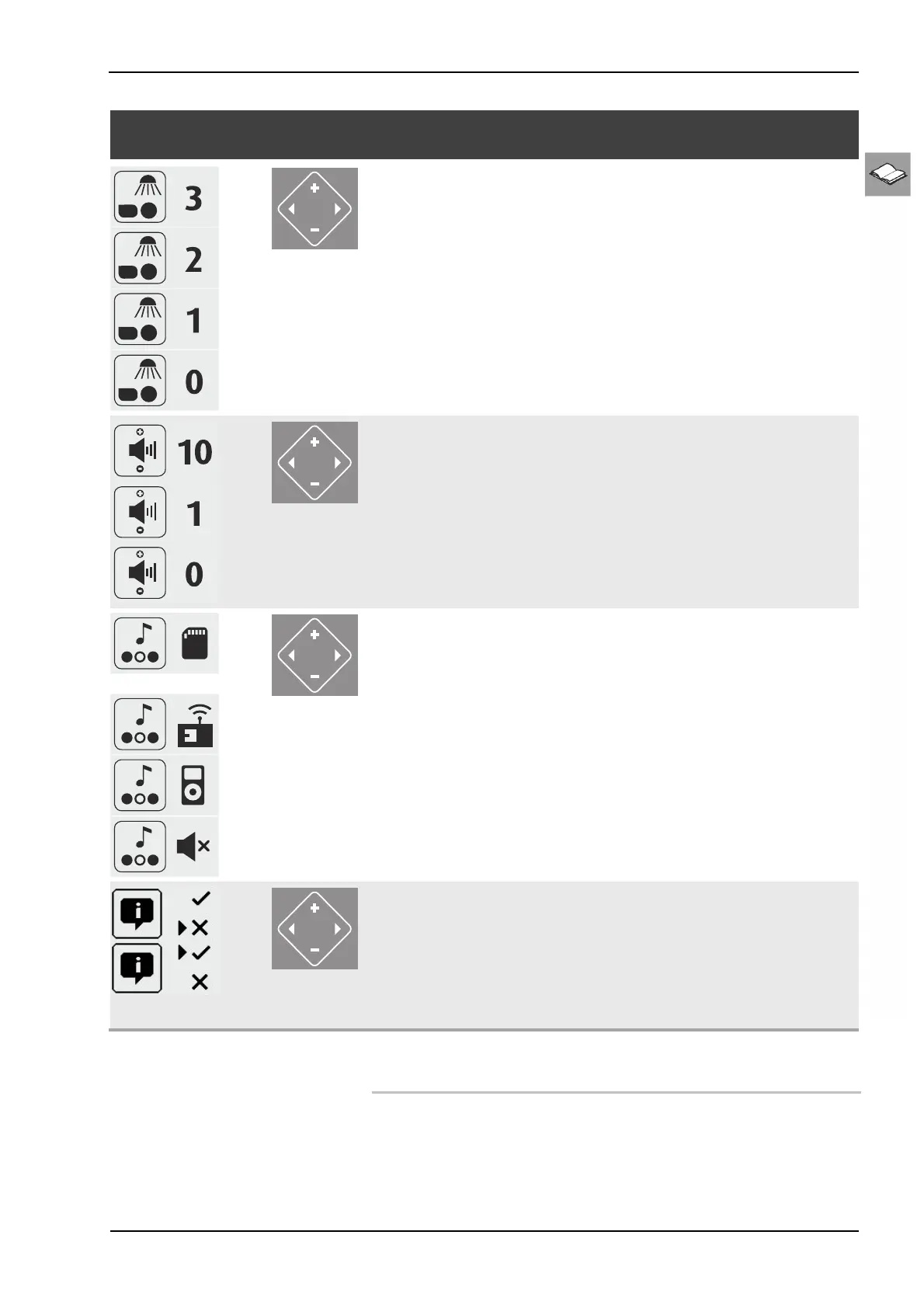
Pictogram selection /
key sequence
Navigation Description / Display Information
Regulate the facial tanner,
Levels 0-3
Switch off facial tanner:
Press the minus button for 3 seconds
Switch on facial tanner:
Press the plus button for 1 seconds
1 minute until maximum
power, then returns to previ-
ous settin
before last switch
off.
Adjust volume:
Levels 0 - 10
Audio system
SD card selection:
Press the plus button
Studio channel selection:
Press the plus button
Select own music (MP3 player) AUX:
Press the plus button
Switch off the audio system:
Press the minus button
The +/- buttons can be used
to select titles for internal
music in demo mode and
during tanning.
Switch off Voice Guide:
Press the minus button
Switch on Voice Guide:
Press the plus button
The voice guide provides
acoustic device operation
assistance and is only avail-
able if an audio system is
fitted. Voice Guide is
switched on b
default durin
stand-by and tanning.
12.7 Operating display of the sensor
Not applicable for this device.






 To Next Page