GBGB
GBGB
GB
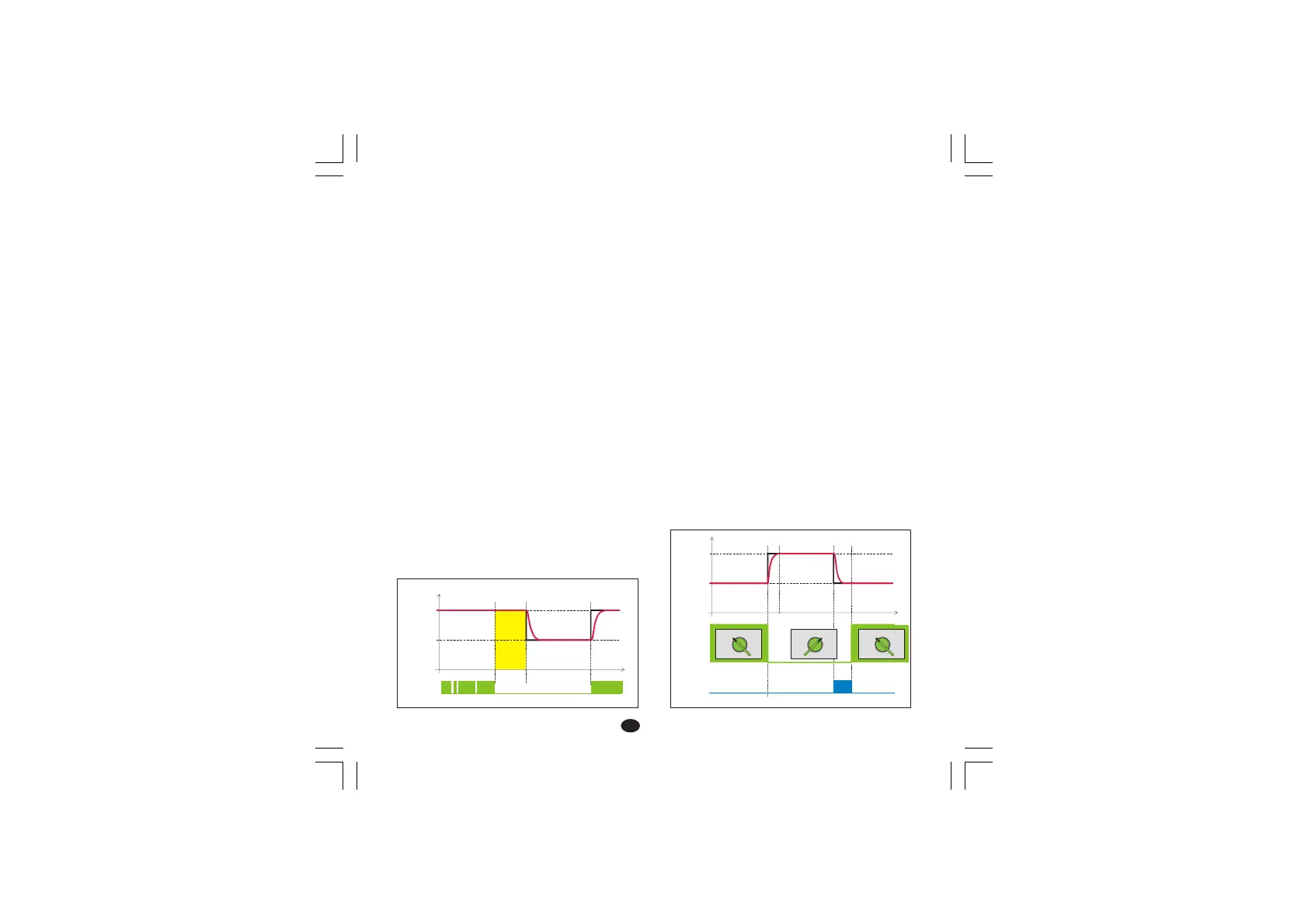
Timer mode 2 [P22=6]Timer mode 2 [P22=6]
Timer mode 2 [P22=6]Timer mode 2 [P22=6]
Timer mode 2 [P22=6]
When the contact is closed, the instrument
controls using SP as operative set point.
When the contact has been opened, the
instrument selects SP2 as operative set point and
starts the time count down.
When the time count is equal to 0 the instrument
comes back to the SP set point and the output 2
will be energized.
The Out 2 reset will be made when the logic input
will be closed again.
LME display managementLME display management
LME display managementLME display management
LME display management: when the instrument
starts the time count down, the upper display
shows the measured value while the lower display
shows time count down.
LDE display managementLDE display management
LDE display managementLDE display management
LDE display management: when the instrument
starts the time count down, the display shows the
time count down.
Pushing s pushbutton it is possible to display the
measured value.
NOTENOTE
NOTENOTE
NOTE: for both instruments, when the time is
finished the instrument comes back to the normal
display mode.
2) Using the ! and # pushbuttons, set the
desired value.
3) When the desired value is reached, DO NOT
press any pushbutton, the new set point will
become operative after 2 seconds after the
pushbuttons were last pressed and the
instrument will return to the “normal display”.
If during this procedure the modification is not to
be saved, press the FUNC pushbutton
immediately (within 2 seconds); the instrument
automatically returns to the normal display without
saving the new set point.
5.7 Timer modes description5.7 Timer modes description
5.7 Timer modes description5.7 Timer modes description
5.7 Timer modes description
Timer mode 1 [P22=5]Timer mode 1 [P22=5]
Timer mode 1 [P22=5]Timer mode 1 [P22=5]
Timer mode 1 [P22=5]
If the logic input remains in open condition for more
than a programmed time the instrument goes
automatically to a stand by temperature (SP2).
The time count is reset when the logic input is
closed.
LME display managementLME display management
LME display managementLME display management
LME display management: the upper display
shows the measured value while the lower display
shows the operative set point.
LDE display managementLDE display management
LDE display managementLDE display management
LDE display management: the display shows the
measured value.
Pushing s pushbutton it is possible to display the
operative set point.
SP2
SP
Programmed
time
Time
Output 2
OFF
OFF ON OFF
Contact
Closed Open
Closed
Stop Run Stop Run Stop Run
Closed
SP
SP2
Open
Time
Logic input
Closed
Open
Programmed
time
17
Lxe-p17-C00-Bgb.pmd 28/01/2004, 15:571



 To Next Page