6 CONTROL PANEL
0463 605 001
- 36 -
© ESAB AB 2018
6 CONTROL PANEL
General safety regulations for handling the equipment can be found in the "Safety
precautions" section in the "SAFETY" chapter of this manual. General information
about operation can be found in the "OPERATION" chapter of this manual. Read both
chapters thoroughly before you start using the equipment!
NOTE!
After power-on has completed the main menu appears on the user interface.
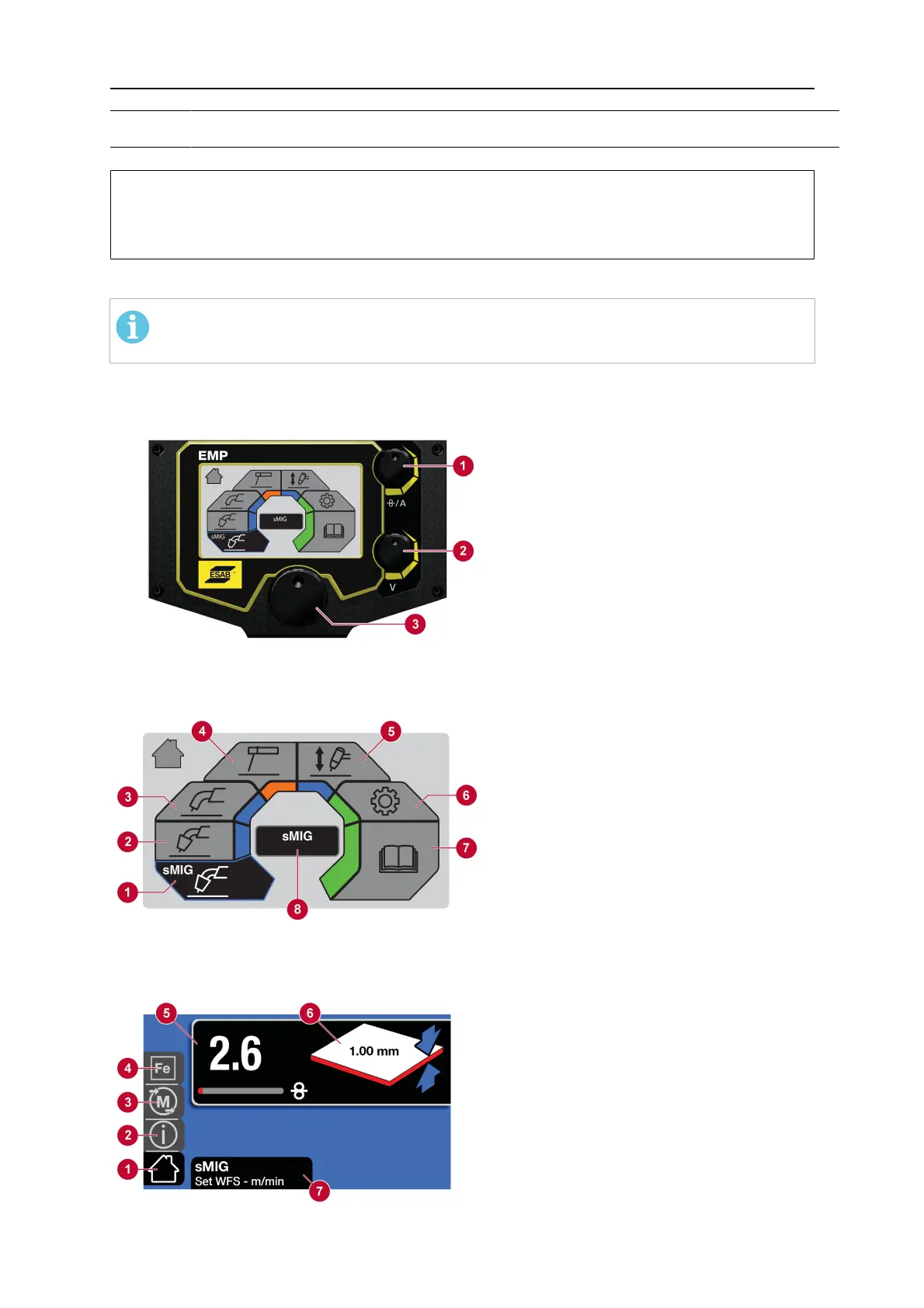
6.1 How to navigate
1. Upper control knob
a) Set current output value
b) Set wire-feed speed
2. Lower control knob
a) MIG Voltage Selection
b) sMIG Voltage Trim
c) MMA Mode: ARC
ON/OFF
3. Menu navigation: Pushtoselect
6.2 Main menu
1. sMIG mode
2. Manual MIG mode
3. Flux-cored (MIG/MAG) mode
4. MMA mode
5. Lift-TIG mode
6. Settings
7. User manual
8. Dialogue box
6.3 sMIG mode: Basic
1. Home screen
2. Information
3. Memory
4. Material selection
5. Wire-feed speed selection
6. Material thickness indicator
7. Dialogue box



 To Next Page