Chapter 7 - Troubleshooting
7.1. Electrical and Mechanical Troubleshooting
This guide addresses the most common service issues. Unless there is a note to limit the applicability of the
points raised, the point applies to all AC2 series. For more troubleshooting or service information contact your
local Esco Distributor.
Hardware:
• DVM (Digital Voltage Meter).
Note: An analog meter can be used for troubleshooting, but cannot be used for motor voltage measurement.
• Phillips screwdriver.
• Insulated jumper cables.
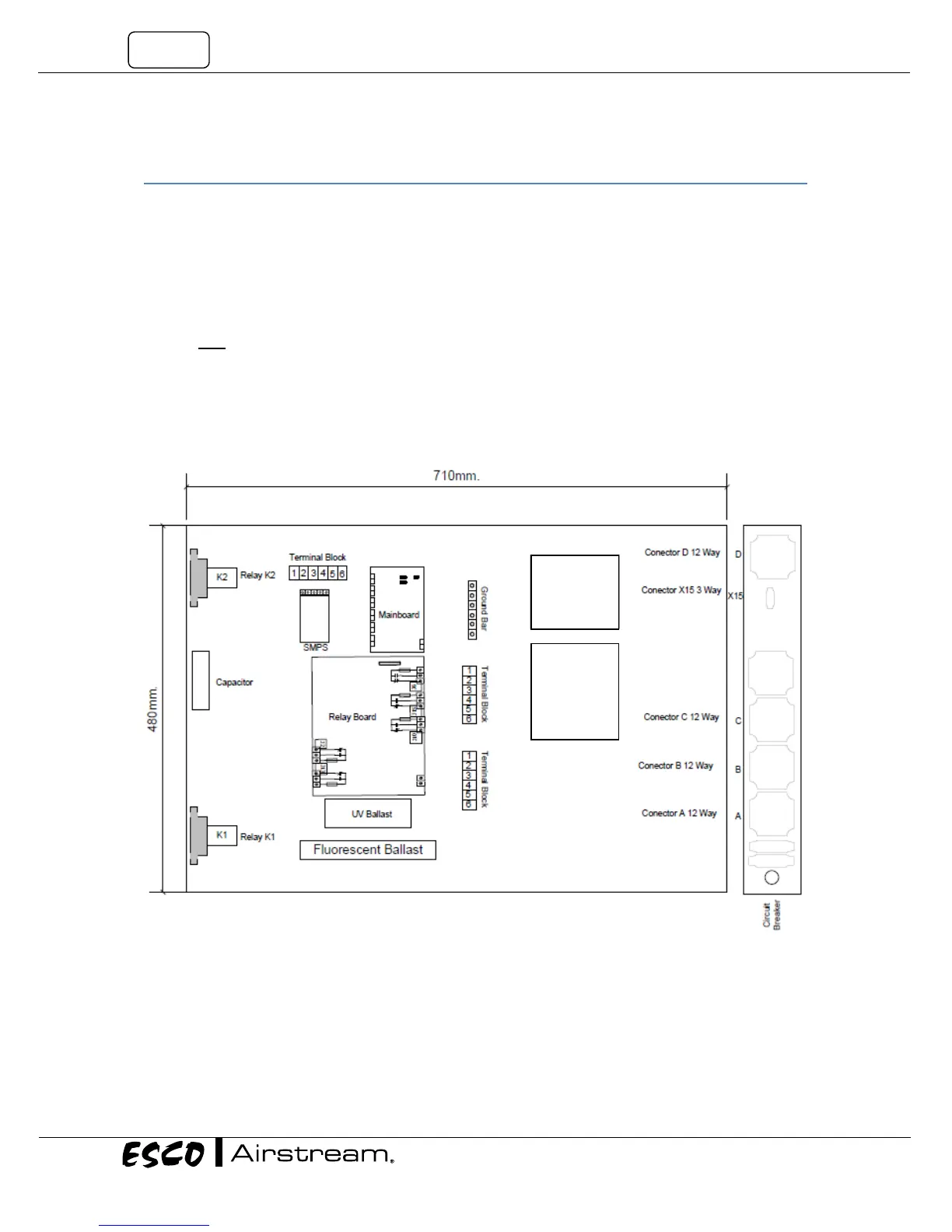
The Electrical Panel and Component Layout:
Open the front panel, the electrical panel is located on the back of the panel. A red cover is used to cover the
electrical panel located on the back of the front panel of AC2-xNy model. The component layout is as followed
(please note that the layout is the same regardless of the power rating).
Figure 7.1. Layout Electrical Box in AC2-xEy, AC2-xSy, AC2-xGy and AC2-xDy
Speed
Control
For D and
G only
Speed
Control


 To Next Page