Problem 7: Light always OFF
Cause Corrective Action
Sash in SASH
ALARM state
• Is the Light LED on the front panel ON?
• If the light does not turn on, press the Light button and make sure the sash is in the
Normal operating position (Ready Position Normal Operating height).
Note: The sash must be at the Normal Operating position.
• Is the cabinet in Warm Up period?
Note: The fluorescent light will not light if the cabinet is in Warm Up period unless
the cabinet is in Quick Start Mode.
• Move the sash to Ready position (normal operating height).
• Switch on the light by pressing LIGHT button on the membrane.
• If the LED is ON the keypad and main board are functioning correctly.
• If fluorescent light does not light with the window in the proper position Proceed to
the next step
• If the LIGHT LED still does not light, skip to Ready magnetic switch Issues in this
table.
Burned out
fluorescent tube
• Replace the faulty fluorescent tube.
• Fluorescent tubes are located inside the blue panel.
• The white lamp holder can be pulled off from the tubes.
Defective
Fluorescent ballast
or Relay Board
issues
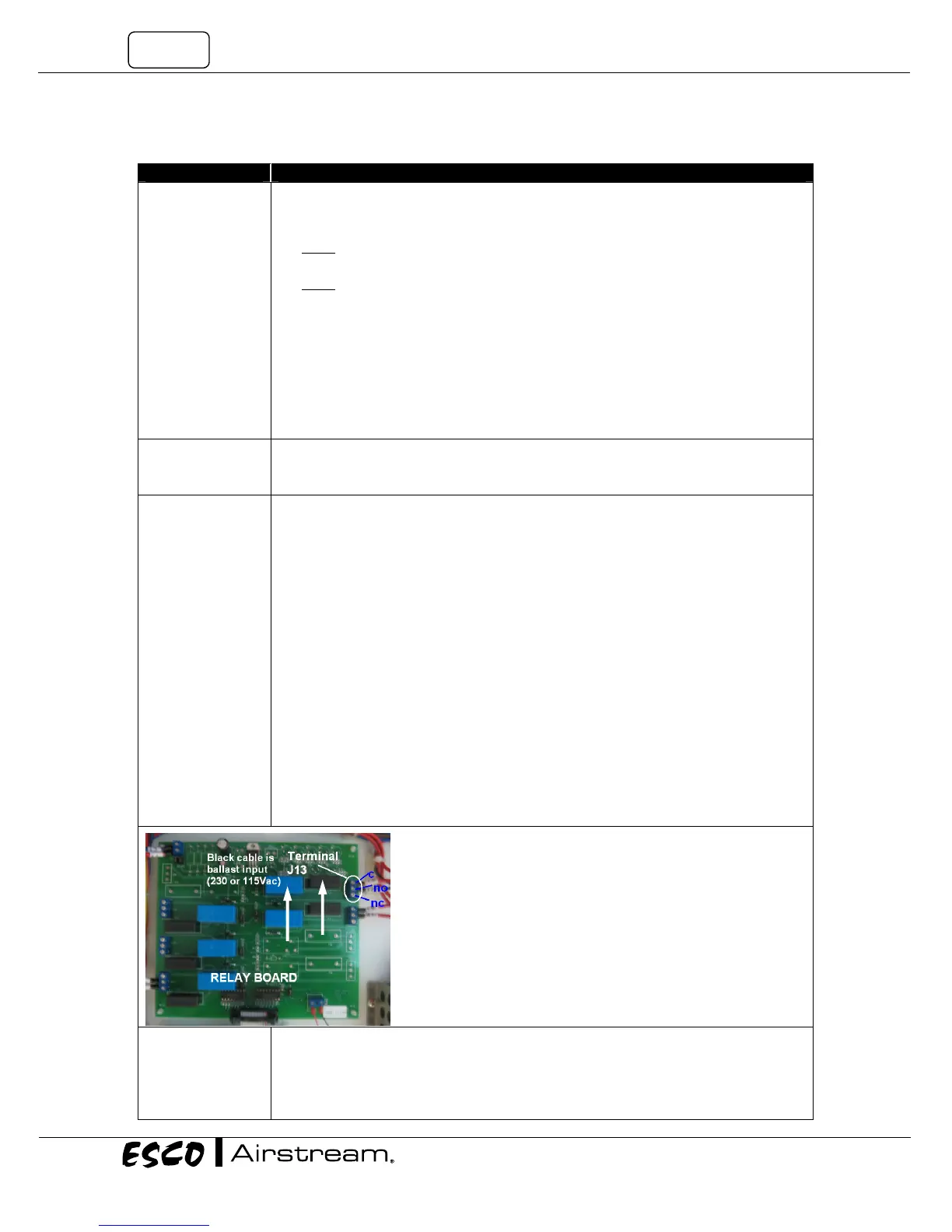
Check incoming voltage to the Relay board.
• Locate LS7 circuit and measure AC voltage between BLUE (NEUTRAL) terminal block
and the end terminal (with Red cable) on the three terminal strip (J13 on relay
board).
• If there is voltage to the end terminal (Terminal with cable), check the central
terminal (Normally Open Circuit) to the BLUE (NEUTRAL) terminal block.
• No voltage at the central terminal indicates a blown fuse or the circuit is not
energized.
• Check Fuse F7 on relay board. See Figure 7-1 below.
• If fuse F7 is blown, as temporary solution, use F5 (spare) to replace F7.
• If fuse F7 is good, check the voltage between the BLUE (NEUTRAL) terminal block
and the end terminal on the LS7 circuit (J13 on relay board).
• Voltage at the end terminal with no cable indicates the F7 fuse is good and the
circuit is not energized.
• Make sure the LIGHT LED is on.
• If the ballast has power and the bulbs are new the problem is either connections or
the ballast.
• Check Connector C connections. If there are no lose terminals, replace the ballast.
Ready magnetic
switch Issues
• With the LIGHT LED ON and the sash at the Normal operating position (Ready)
• Does the Display indicate “SASH: OK” or “SASH: NO!”
• “SASH: NO!” indicates the sash is not at the proper position and the LIGHT LED
should not be on. This indicates a main board problem or a magnetic switch
detection problem.
F7
LS7


 To Next Page