MAW
®
User Manual Rev. 3.0
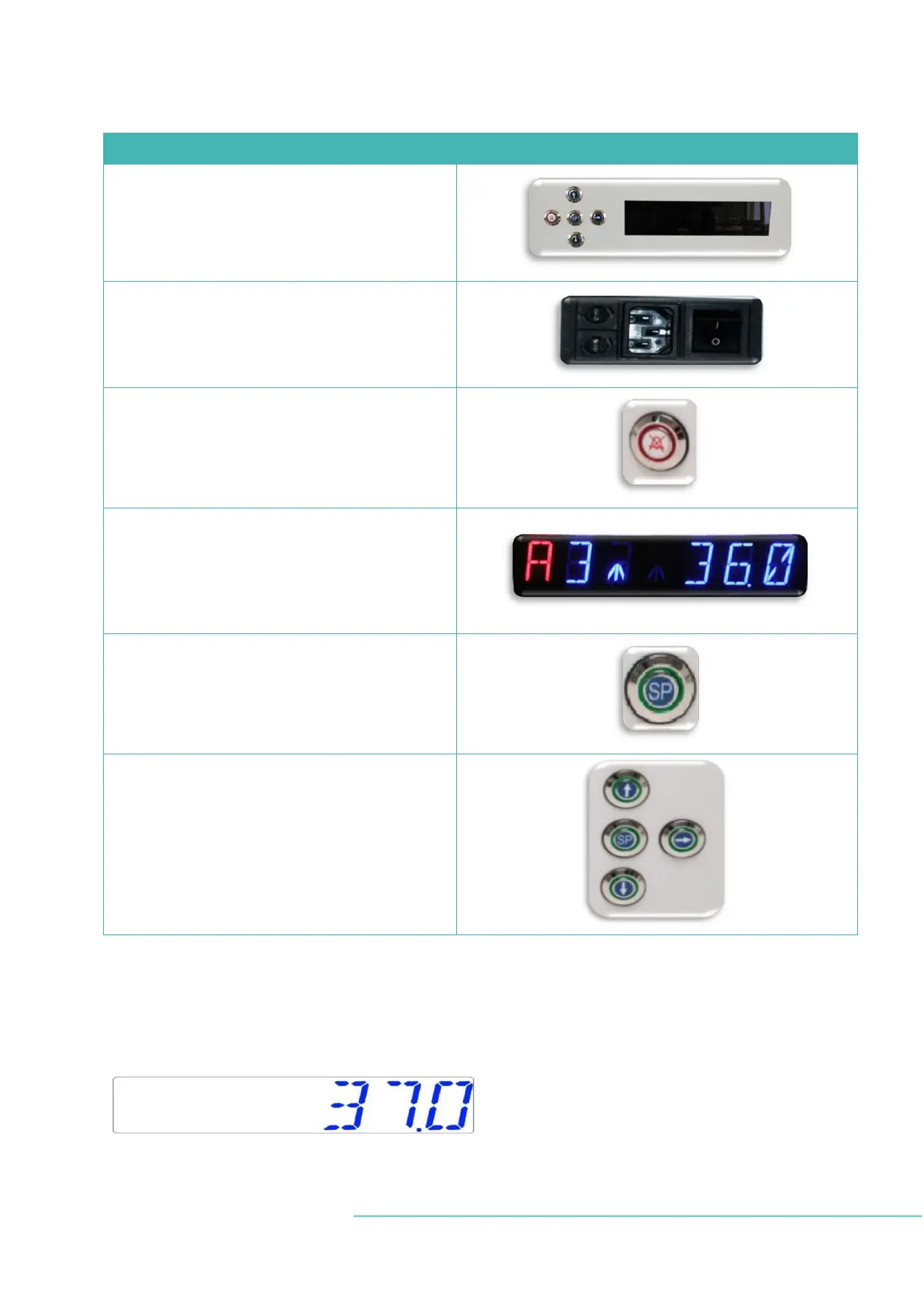
Table 13.1 Main keys and their purposes
ON/OFF
Located in the REAR of the unit
Alarm key
– It is used to mute an audible alarm and visually
indicates the alarm condition by a flashing red cir-
cle of light. The audio alarm will automatically
come back on after 5 min. It can be muted again.
Display panel
– It shows the information on the current status of
the unit. The display consists of 7 high brightness
16-segment LEDs. The first red LED indicates a user
warning. Other 6 blue LEDs are used to display nor-
mal operating conditions.
Setpoint
– It is used to select items on the menu to change
their status. It is also used to change temperature
and gas setpoints.
Arrow keys UP, DOWN & RIGHT
- They are used to navigate through the menu as
well as change temperature and gas concentration
values.
13.1 Activating the heat and gas flow controls
Heat and gas control systems are activated using the ON/OFF switch under the tabletop.
Soon after the system activation, the main display will show the actual temperature.
Change the display reading into the GAS FLOW, then press the RIGHT key.


 To Next Page