IP Camera (C5900) User Manual
Forwarding is also called port mapping or virtual server differing from brands, but the settings are
much the same.
From the computer connected to the router, first open your Web browser. Then enter the router's
address for network administration in the Web address field and hit return (Enter) to reach the
router's home page. Many routers are reached by either the Web address "http://192.168.1.1" or
http://192.168.0.1. Consult your router's documentation to determine the exact address for your
model.
The router's home page will ask you for a username and password. If you have yet changed them,
both could be found in the router's documentation. If you have changed them and could not
remember, you have to reset your router into factory default settings and do all the operations all
over again.
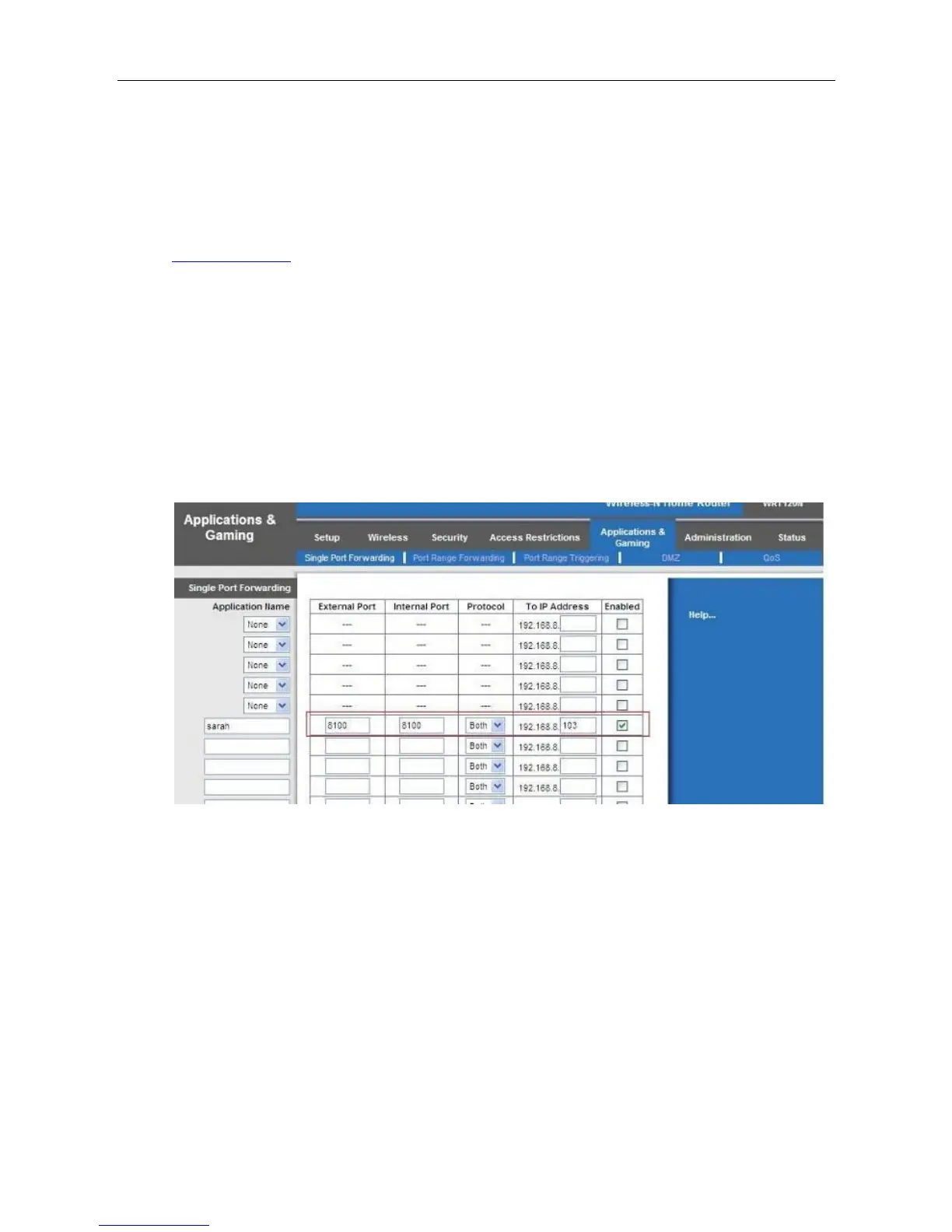
Take CISCO Linksys for example :
Its inner web address is 192.168.1.1. Login your router; find the right place to do port forwarding.
You can do single port forwarding. Set as the following picture. (Figure 3.7.2-1)
Figure 3.7.2-1
You can also choose port range forwarding. In order to forward the port successfully, we
recommend you can set both of the start port and end port as the same port number. Add the
camera’s LAN IP and port (Figure 3.7.2-2) in the list of port forwarding page.



 To Next Page