www.ets-lindgren.com EMCenter Controls and Connectors
19
5.0 EMCenter Controls and Connectors
Never disconnect the fiber optic cables when
one of the lasers is active.
See Manual Control of the EMCenter on page 25 for information on
using the touchscreen controls.
Front Panel
S
TATUS
I
NDICATORS
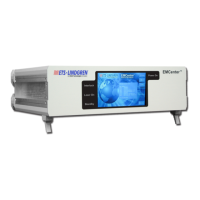
There are four status indicators on the front panel of the EMCenter™ Modular
RF Platform:
Interlock—Illuminates if the external interlock is open, or if one of the
plug-in card interlocks encounters an interlock error.
Laser On—Illuminates if at least one of the lasers in one of the cards
is active.
Standby—Illuminates when the EMCenter is in standby mode.
Power On—Illuminates when the EMCenter is turned on.


 To Next Page