EN 06
Quick Mapping and Floor Plan
Navigation
Set Up No-Go Zone and Virtual Wall (Available on the App Only)
Schedule Cleaning
Select a Cleaning Mode
Quick mapping helps RoboVac to learn the correct learning path and the environment of your home easily. A floor
plan will be built after cleaning.
To create a complete floor plan:
1
Open your doors so that RoboVac can map each room. You can also block off certain areas that you don't
want RoboVac to enter, which can improve the success rate of Quick Mapping.
2
Remove any objects that may be in the way or that might entangle RoboVac.
• Do not remove the Charging Station after a floor plan is created.
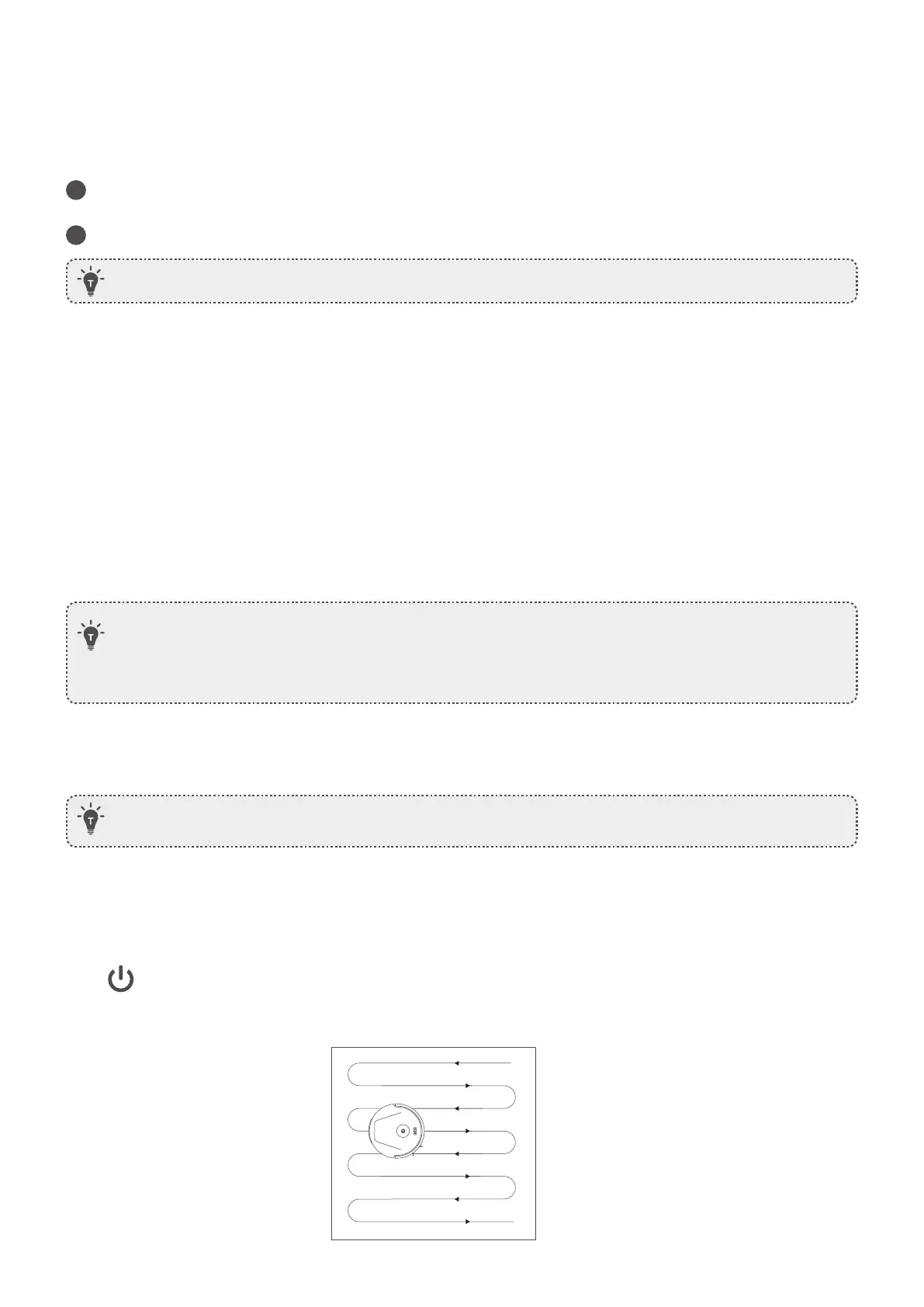
Once auto cleaning starts, RoboVac moves from the Charging Station, automatically scans to update maps,
intelligently determines its cleaning route, and divides the space into zones. The cleaning paths are planned along
the walls, following a Z-shaped cleaning method to complete the cleaning of each zone successively.
With the eufy Clean app, you can set up a “No-Go Zone” or “Virtual Wall” as a restricted area. This eliminates the
need to use physical barriers, including boundary strips. This feature is only designed for dividing the cleaning
zones, not for isolating hazardous areas.
With the eufy Clean app, you can schedule RoboVac to start cleaning at a particular time.
You can select multiple cleaning modes via the eufy Clean app.
Press to start cleaning in Auto Mode.
After startup, RoboVac moves from the Charging Station and automatically determines its cleaning route, cleaning
the edges first and following a Z-shaped cleaning path. When cleaning is finished, RoboVac automatically returns
to the Charging Station.
• No-Go Zone: RoboVac will not enter the zone to vacuum.
• Virtual Wall: RoboVac will not cross the virtual wall.
• To set a virtual wall, RoboVac must initially perform a cleaning run to create a floor plan.
• Although a virtual wall is set, RoboVac may still enter the restricted zone due to repositioning failure or
abnormal sensors.
• Moving the device or changing the environment may lose the virtual wall and cause the mapping to fail
and rebuild.
• You can set the time and customize cleaning schedules from Sunday to Saturday on the eufy Clean
app. This function is only available on the app.
Auto-Cleaning








 To Next Page