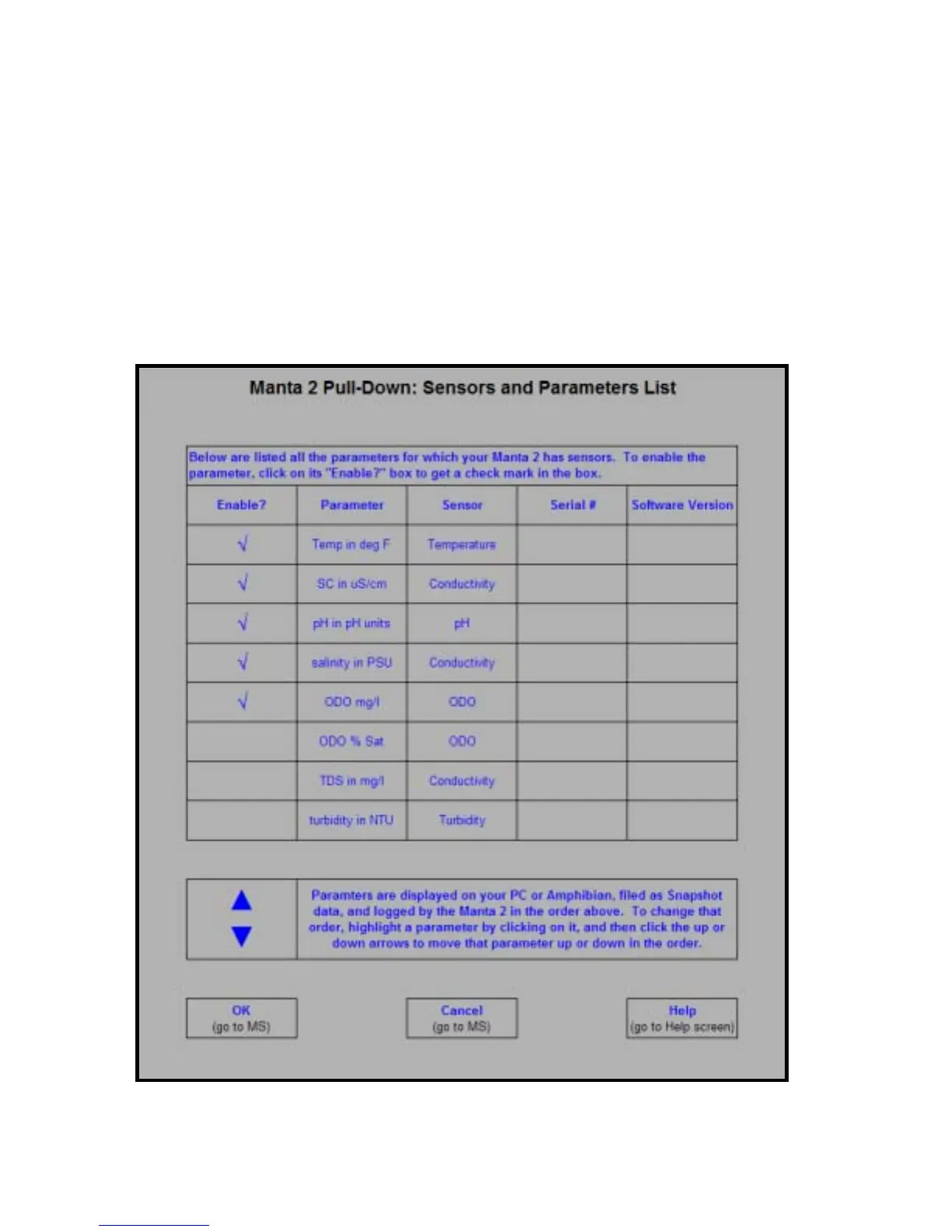
D5 Sensors and Parameters List
A sensor is a basic sensing element, like a thermistor. A parameter is a type of data derived from
that sensor, like degrees Fahrenheit and degrees Centigrade. This screen lists all the parameters
supported by the Manta 2, and you enable these parameters by clicking in the box (to the left of the
parameter name) to produce the check mark. Clicking on a box with a check mark removes the
check mark and disables that parameter. Note that if you enable a parameter but don’t have a sensor
for that parameter, it would be a huge coincidence if the data were accurate.
The order of the enabled parameters in this list is the order in which the parameters will appear in
your PC or Amphibian Main Screen, the order in which they will appear in logging files, and the order
in which they will appear in Snapshot files. You can change the parameter order by clicking on it (i.e.
highlighting it) and then moving it up or down by clicking on the up- and down-arrows at the bottom of
the screen.
19


 To Next Page