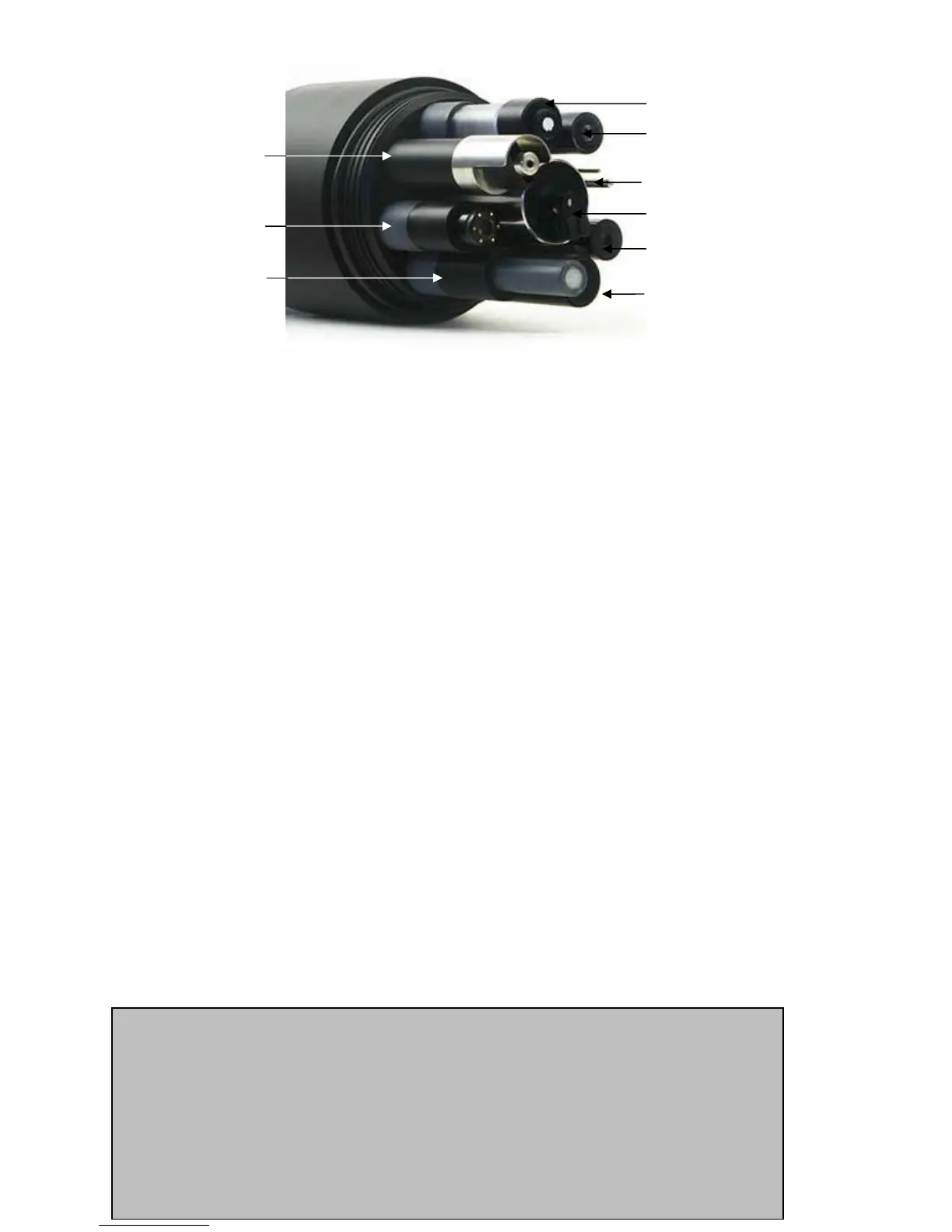
reference
electrode
pH electrode
temperature
turbidity
conductivity
Depth
circulator
dissolved
oxygen (Clark)
ISE
E1 The Difference between Sensors and Parameters
A sensor is a basic element, like a thermistor or a pH glass electrode. Each sensor has one or more
parameters. For instance, we use a thermistor to measure both Temperature °F and Temperature °C
– that’s one sensor with two parameters. A conductivity sensor can be read as Specific Conductance
µS/cm, Specific Conductance mS/cm, Total Dissolved Solids mg/l, and Salinity (PSS) – that’s one
sensor with four parameters.
E2 Basics of Parameter Calibrations
Calibration is simply telling the instrument what it should be reading by checking it with a calibration
solution of known value. Here’s the general procedure:
1) Clean the sensor and perform any necessary sensor-specific maintenance.
2) Select a calibration standard whose value is similar to the values you expect to see in the
field. For example, calibrate with a 1413 µS Specific Conductance standard if you expect to
see Specific Conductances between 500 and 1000 µS in the field. Don’t calibrate with a sea
water standard. For best results, use fresh calibration solutions, and discard once they have
been used.
3) Rinse sensors thoroughly (more than once may be required) with DI (deionized) water,
especially if you have been using other calibration solutions to calibrate other parameters.
Shake the transmitter vigorously to remove traces of old calibration solutions – repeat if
necessary.
4) Rinse the sensors twice with a small quantity of your calibration standard. Discard the used
calibration standard.
5) Immerse the sensor in the calibration standard; this is usually accomplished with the Manta
2’s calibration cup. Secure your Manta with the sensors pointing up, and fill the calibration
cup with your calibration standard. Make sure the standard covers the sensor entirely, and
that it also covers the thermistor for those parameters that are temperature-compensated.
6) Select the parameter to be calibrated from the menu in the Manta 2 Control Software user-
interface software. First, enter the cal value and press enter; when the reading has stabilized,
press enter to calibrate. The Manta 2 will report the resulting Sensor Response Factor
(SRF); then press Y to accept the calibration, N to back up one step, or Exit to leave the
sensor uncalibrated.
7) You’re done.
23
How do I choose my calibration standards?
For best results, choose a calibration standard whose value is close to what you expect to see
in the field. For example, if you are monitoring in fresh water, calibrate with a low conductivity
solution – not a seawater standard. If your waters tend toward the acidic, calibrate with a 4-
buffer instead of a 10-buffer.
If you are moving your multiprobe across wide ranges of water conditions, you may wish to
recalibrate to match the new situations. For instance, if you are measuring a clear lake during
the morning and a high-sediment stream in the afternoon, you should consider recalibrating at
noon with a high-turbidity standard.



 To Next Page