Disassembly
Removing the System Memory 2 - 7
2.Disassembly
Removing the System Memory
1. Turn the computer OFF, remove the battery (page 2 - 6).
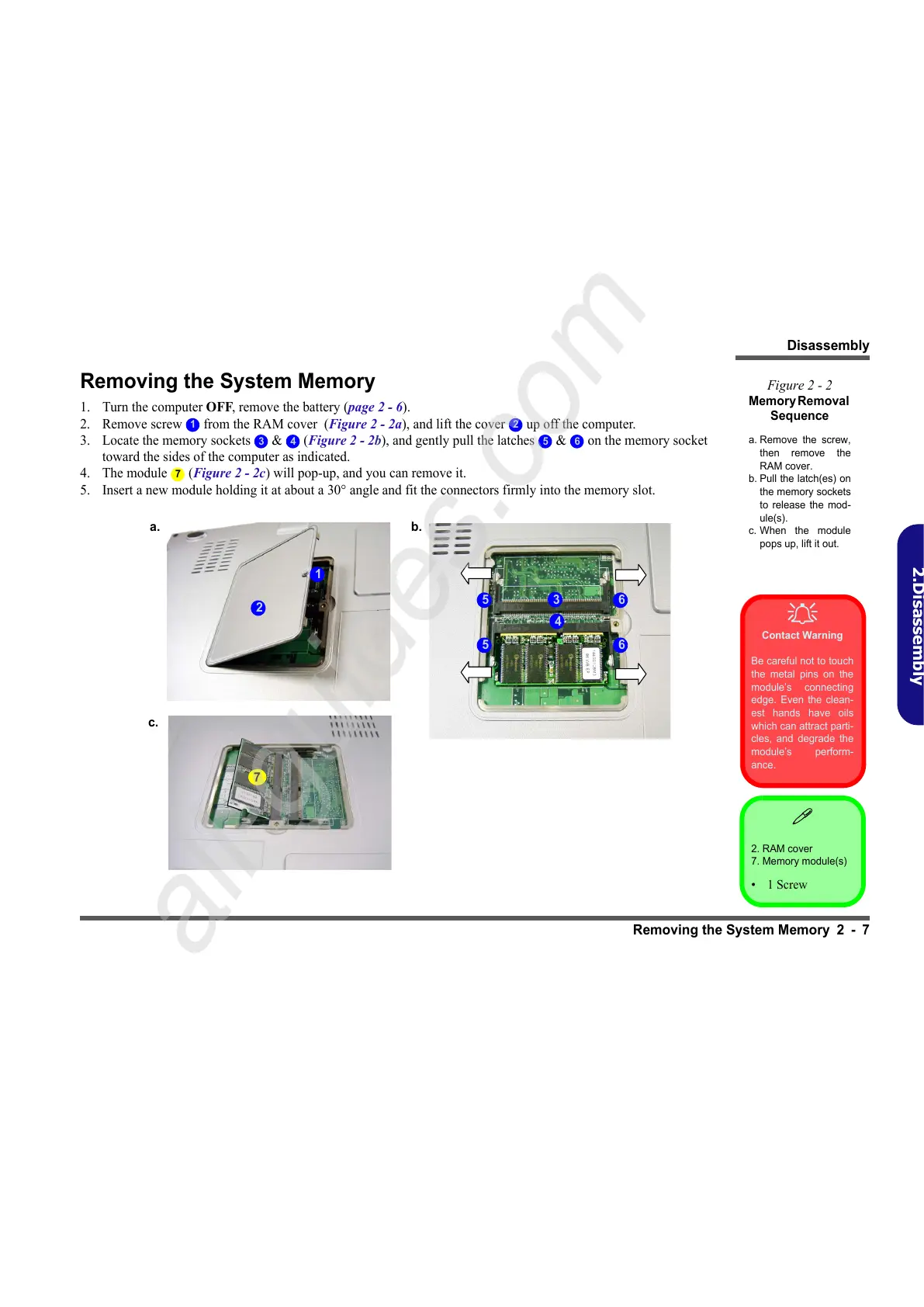
2. Remove screw from the RAM cover (Figure 2 - 2a), and lift the cover up off the computer.
3. Locate the memory sockets & (Figure 2 - 2b), and gently pull the latches & on the memory socket
toward the sides of the computer as indicated.
4. The module (Figure 2 - 2c) will pop-up, and you can remove it.
5. Insert a new module holding it at about a 30° angle and fit the connectors firmly into the memory slot.
Figure 2 - 2
Memory Removal
Sequence
a. Remove the screw,
then remove the
RAM cover.
b. Pull the latch(es) on
the memory sockets
to release the mod-
ule(s).
c. When the module
pops up, lift it out.
2. RAM cover
7. Memory module(s)
•1 Screw
Contact Warning
Be careful not to touch
the metal pins on the
module’s connecting
edge. Even the clean-
est hands have oils
which can attract parti-
cles, and degrade the
module’s perform-
ance.
1 2
3 4 5 6
7
3
a.
2
1
b.
4
6
7
c.
5
65



 To Next Page