Disassembly
2 - 12 Removing the Modem
2.Disassembly
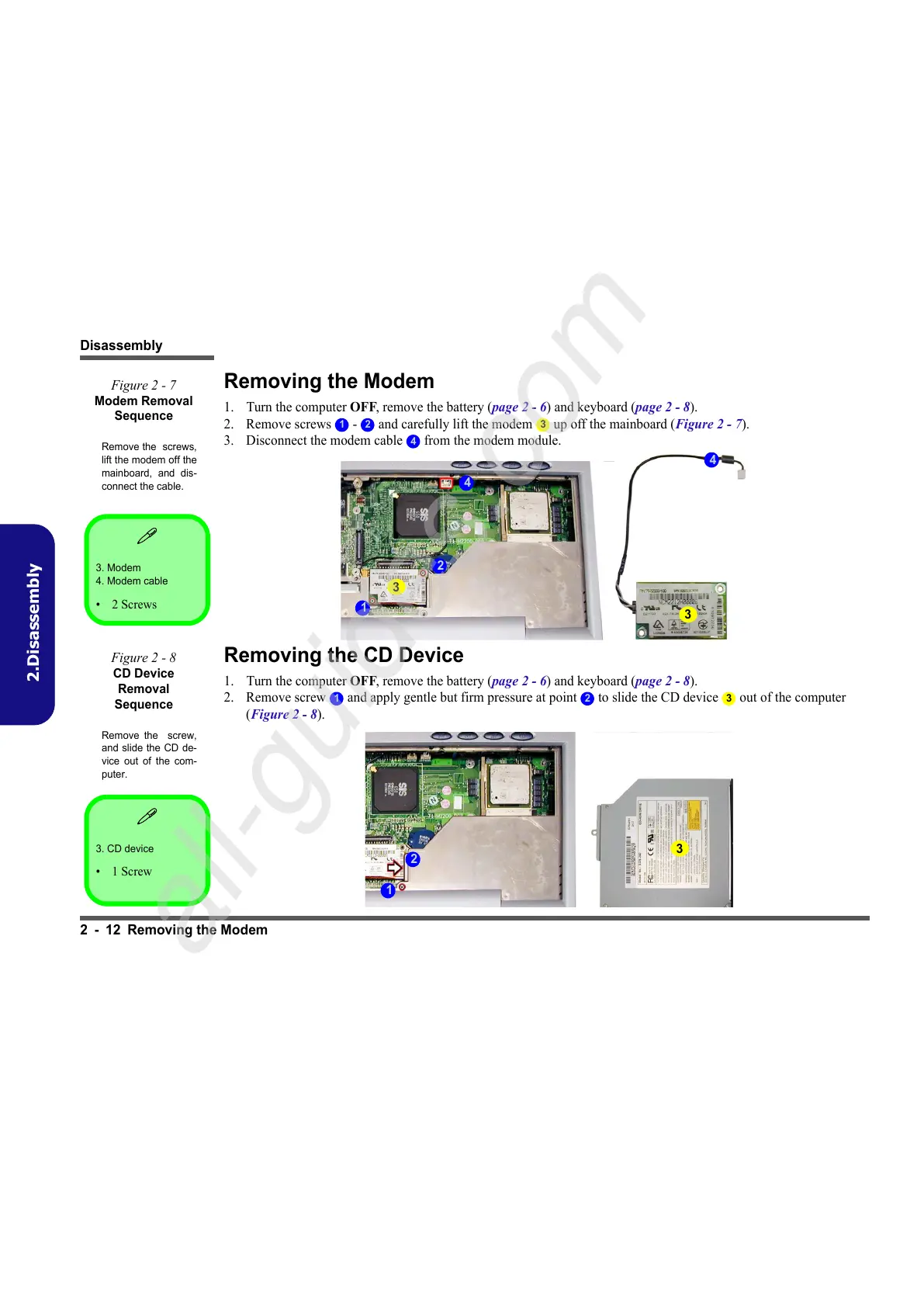
Removing the Modem
1. Turn the computer OFF, remove the battery (page 2 - 6) and keyboard (page 2 - 8).
2. Remove screws - and carefully lift the modem up off the mainboard (Figure 2 - 7).
3. Disconnect the modem cable from the modem module.
Removing the CD Device
1. Turn the computer OFF, remove the battery (page 2 - 6) and keyboard (page 2 - 8).
2. Remove screw and apply gentle but firm pressure at point to slide the CD device out of the computer
(Figure 2 - 8).
3. Modem
4. Modem cable
•2 Screws
Figure 2 - 7
Modem Removal
Sequence
Remove the screws,
lift the modem off the
mainboard, and dis-
connect the cable.
1 2 3
4
3
3
4
1
4
2
3. CD device
•1 Screw
Figure 2 - 8
CD Device
Removal
Sequence
Remove the screw,
and slide the CD de-
vice out of the com-
puter.
1 2 3
3
1
2



 To Next Page