Disassembly
2 - 8 Removing the Keyboard
2.Disassembly
Removing the Keyboard
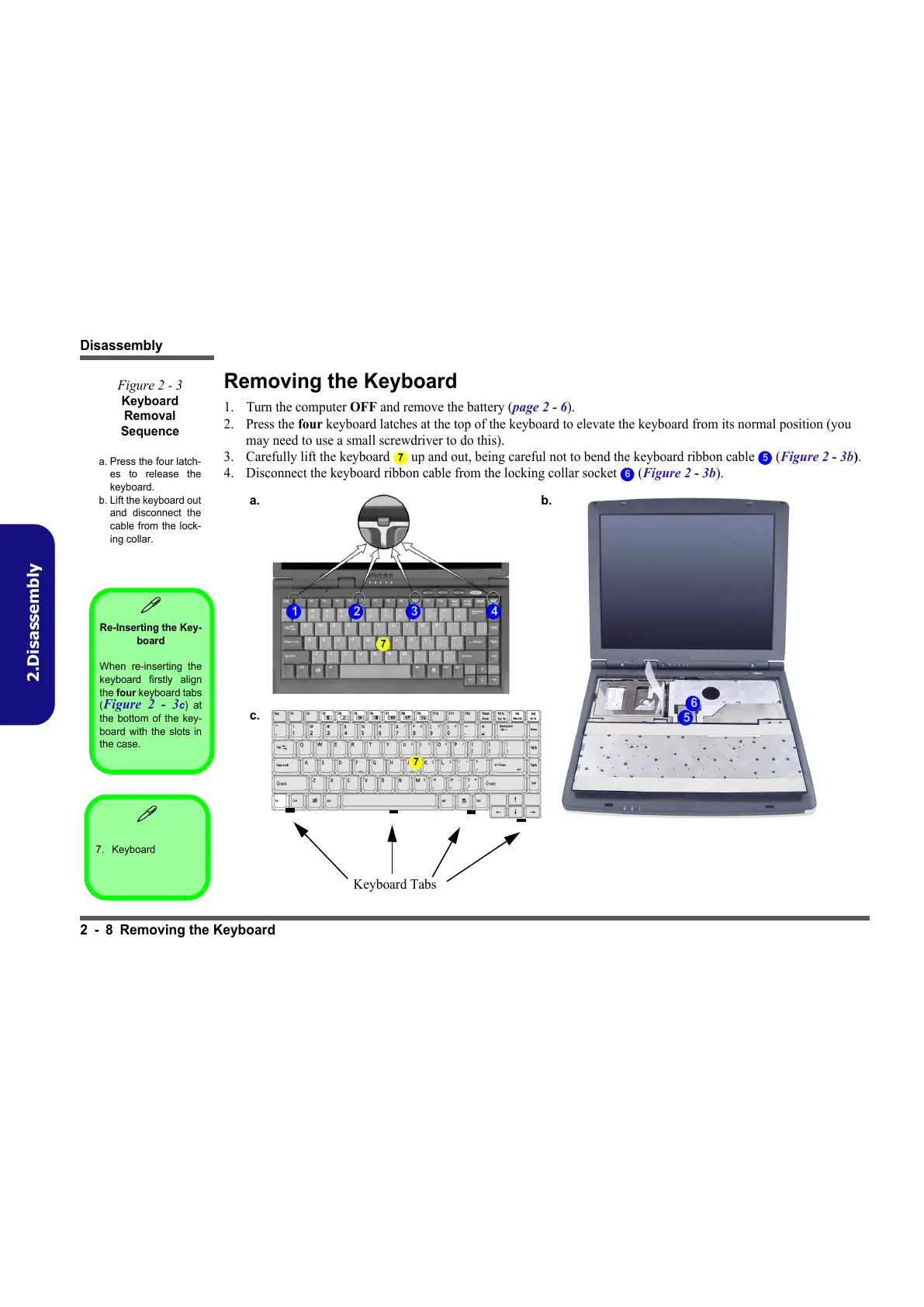
1. Turn the computer OFF and remove the battery (page 2 - 6).
2. Press the four keyboard latches at the top of the keyboard to elevate the keyboard from its normal position (you
may need to use a small screwdriver to do this).
3. Carefully lift the keyboard up and out, being careful not to bend the keyboard ribbon cable (Figure 2 - 3b).
4. Disconnect the keyboard ribbon cable from the locking collar socket (Figure 2 - 3b).
Figure 2 - 3
Keyboard
Removal
Sequence
a. Press the four latch-
es to release the
keyboard.
b. Lift the keyboard out
and disconnect the
cable from the lock-
ing collar.
7 5
6
a.
1 2
b.
5
3 4
c.
Keyboard Tabs
6
7
7
7. Keyboard
Re-Inserting the Key-
board
When re-inserting the
keyboard firstly align
the four keyboard tabs
(
Figure 2 - 3c) at
the bottom of the key-
board with the slots in
the case.



 To Next Page