Disassembly
2-16
2.Disassembly
Removing the Mainboard
1. Remove the battery (page 2 - 6), keyboard (page 2 - 8), HDD assembly (page 2 - 9), CPU (page 2 - 10), modem
(page 2 - 12), CD device (page 2 - 12), bottom case (page 2 - 13) and FDD assembly (page 2 - 15).
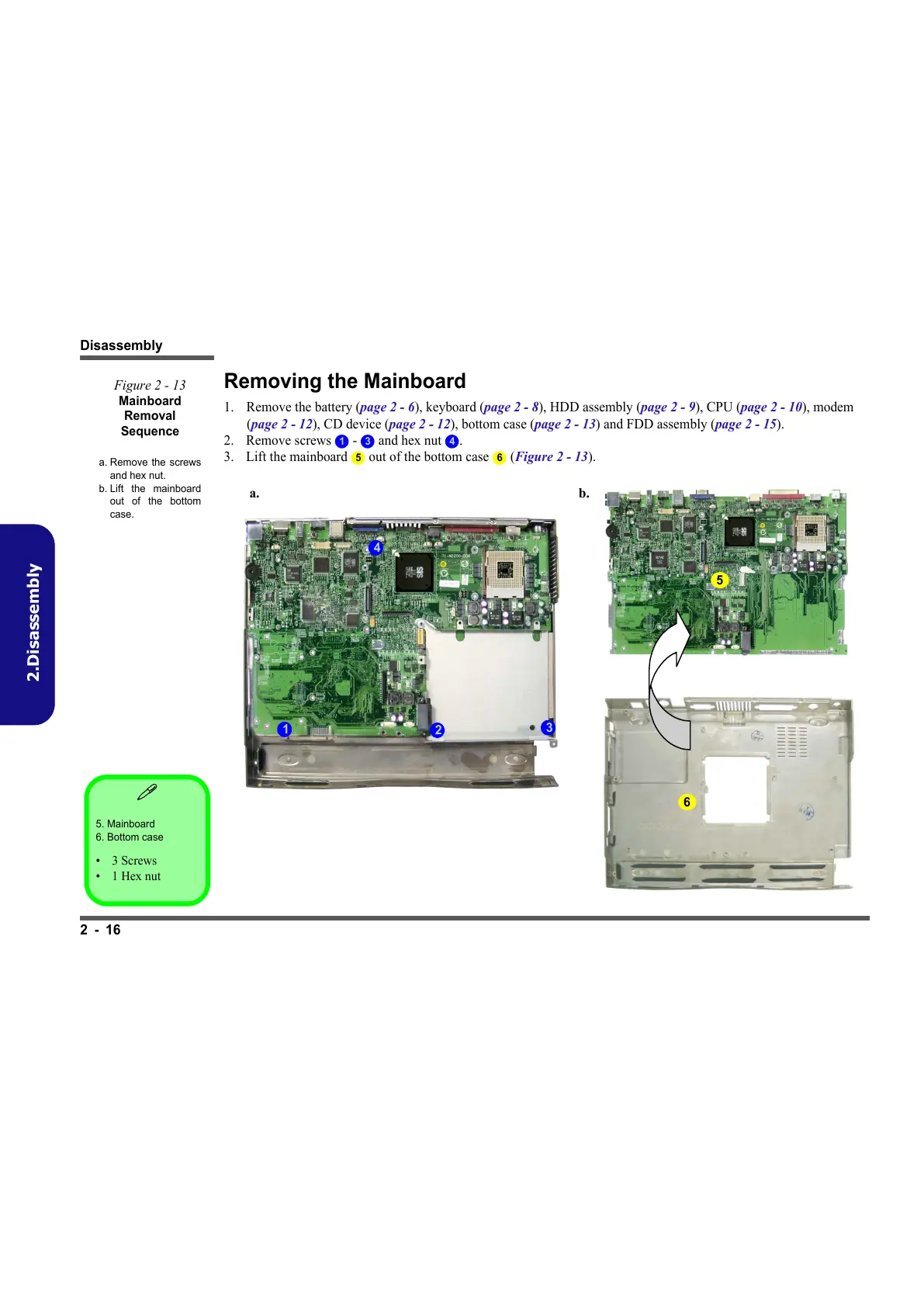
2. Remove screws - and hex nut .
3. Lift the mainboard out of the bottom case (Figure 2 - 13).
5. Mainboard
6. Bottom case
•3 Screws
•1 Hex nut
Figure 2 - 13
Mainboard
Removal
Sequence
a. Remove the screws
and hex nut.
b. Lift the mainboard
out of the bottom
case.
1 3 4
5 6
5
1
3
2
4
6
a. b.



 To Next Page