Euroscan MX1 13
Document number: EN-301-1:UD - based on Firmware version 1.033 and forward
2.8.3 PDA connection
The module has also the ability to connect with a PDA. To use this feature a PDA first has to make a pairing to
the module. The module will recognize this pairing and store it in its memory. From now every minute the module
tries to connect to the paired PDA. It is possible you are not able to make a connection to the Bluetooth module.
The module will handle a LAP connection at that moment. It is not possible to make an incoming connection if the
module has made an outgoing one. This is a limitation of the Bluetooth chip.
Making a connecting goes as following:
• Open the Bluetooth manager of your PDA.
• Explore for a new device.
• Pair the device and enter the correct pin code.
• An outgoing connection will be made if the correct pin code is entered. Close this connection.
The Bluetooth module will automatically connect to your PDA from now. You can start for example the
EuroSTATE program and connect. If the connection is available the screen will be updated.
Only one connection at the time can communicate with the recorder. A LAP connection has a higher priority than
a PDA. So if the module is handling a LAP connection the PDA won’t be able to update its temperature values.
2.9 GPS-Antenna placement in MX1 recorder
In a Euroscan MX1 recorder could be up to three antennas. One for Bluetooth-, one for GPS- and one for iGPRS-
signals. All these signals are high-frequency. For good working, some setup conditions are needed.
• Always mount the MX1 recorder as high as possible, but never mount it on the roof of a truck or trailer!
• A good mounting location has as less as possible metal elements in the neighborhood. Too many metal
objects can cause bad wireless performance!
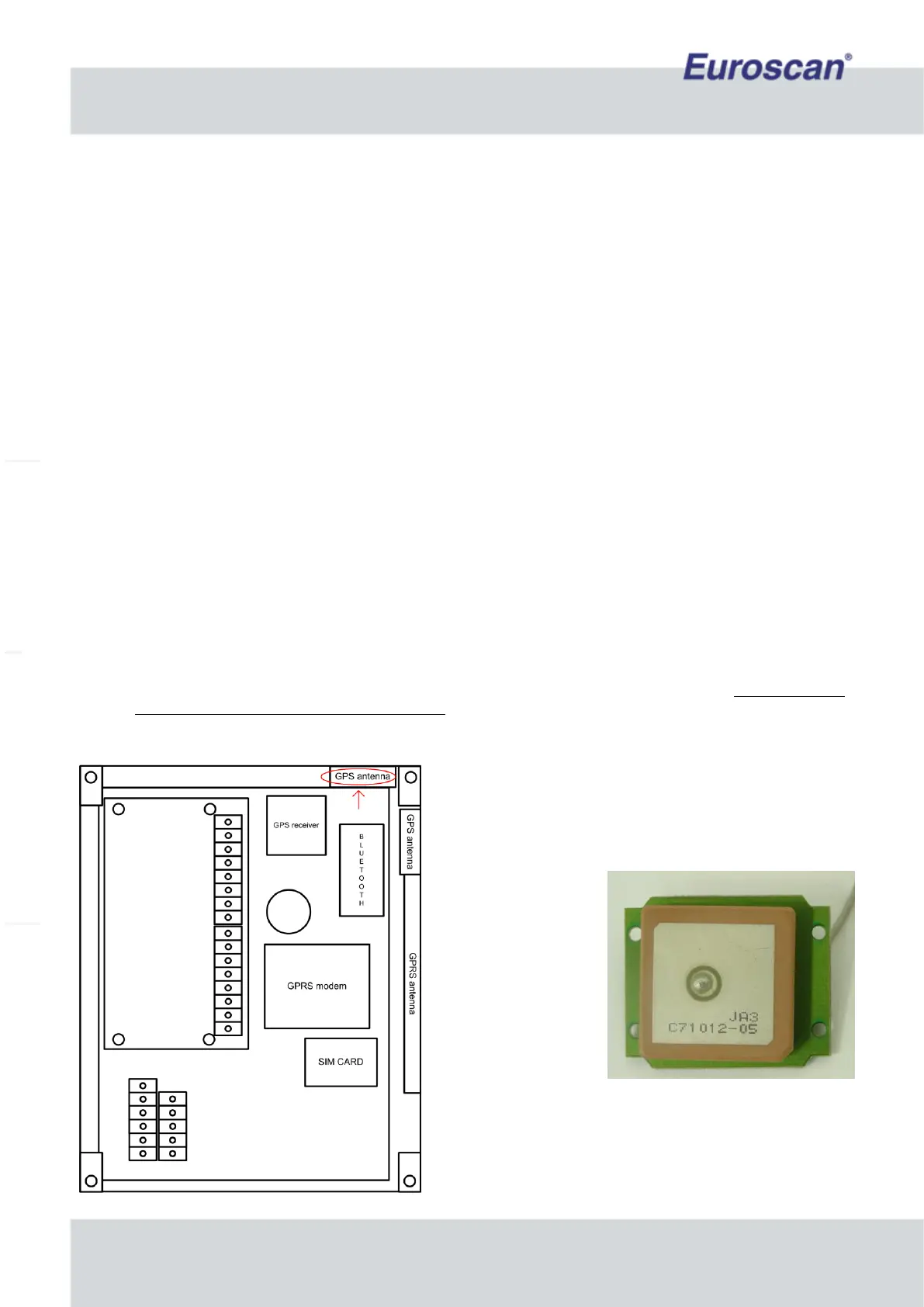
• Make sure the GPS antenna is mounted horizontal, so use the correct antenna-module holder in the box.
When the MX1 recorder is mounted vertical, place the GPS
antenna in the red marked area. See the picture on the left.
Fig. 11 The GPS antenna
Fig. 10 Location of GPS-antenna with vertical
recorder mounting


 To Next Page