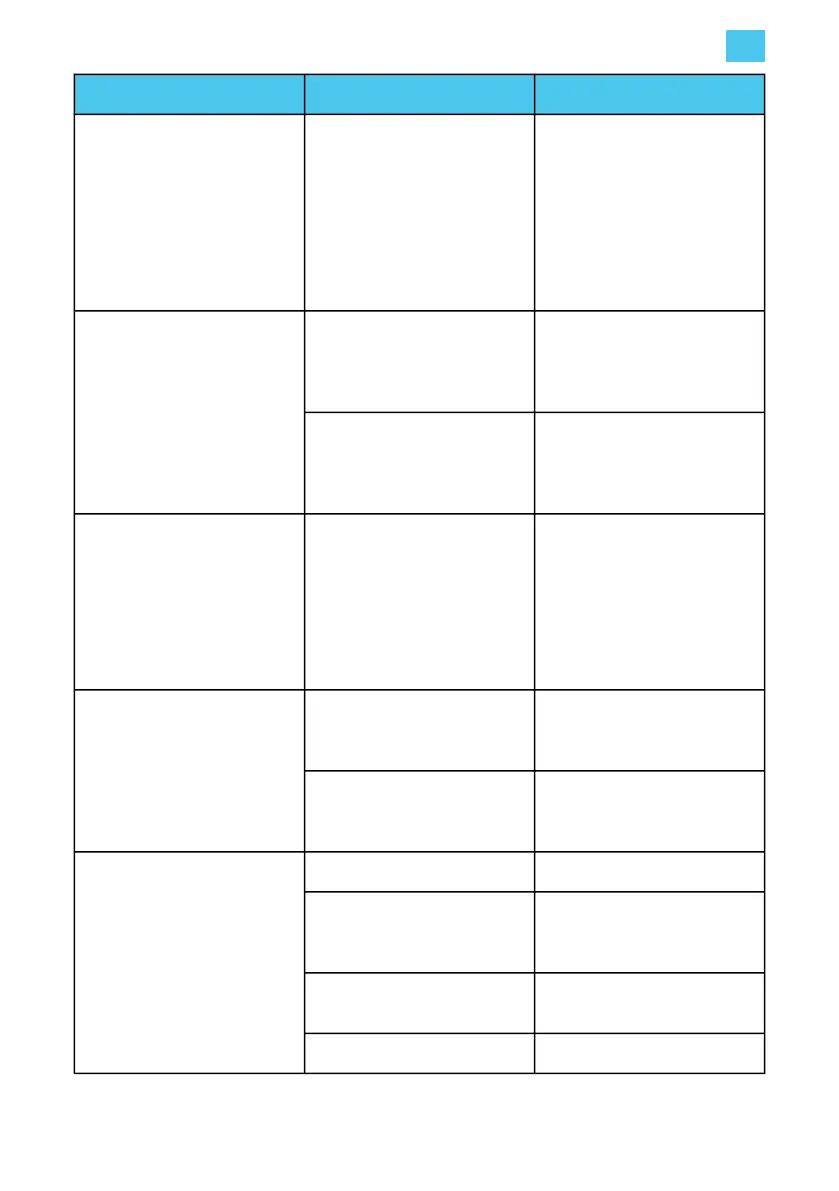
Problem Possible cause Solution
Charging station does not emit
clear tone when main power
supply is switched on.
Power supply wiring is not
connected correctly to the
installer box.
• Check for correct voltage
on the input terminals of
the installer box.
• Ensure all wire and plug
connections are secure,
especially on the installer
box.
LED ring flashes red
immediately when the card is
held against the reader. Error
code E1 is shown on the
touchscreen.
Charge card is not authorized
for charging at this charging
station.
Check that the charge card is
authorized for use on public
chargers. (Check by card
holder.)
There is no communication
with the CMP.
Use the EVBox Connect App to
check that the Hub station has
a connection to the cellular or
Wi-Fi network.
LED ring shows constantly red. Grounding fault.
• Check that the electrical
installation is correctly
grounded.
• If necessary, add
additional grounding
closer to the installation.
In a Hub-Satellite installation,
one or more LED rings
constantly flash red.
Crossed connection in one of
the satellite RS485
connections.
Examine RS485 wiring and
connections.
No connection with the Hub
charging station.
Check the RS485 wiring and
connections between all
charging stations in the group.
LED ring always shows yellow.
Vehicle is fully charged. Disconnect the charging cable.
Charging station is waiting for
vehicle.
Check that the charging cable
plug is inserted into the vehicle
correctly. (Check by user.)
Vehicle is on a timer.
Change the setting of the timer
in the vehicle. (Done by user.)
The charging cable has a fault. Replace the charging cable.
5. Operation instructions
EN
41



 To Next Page