1
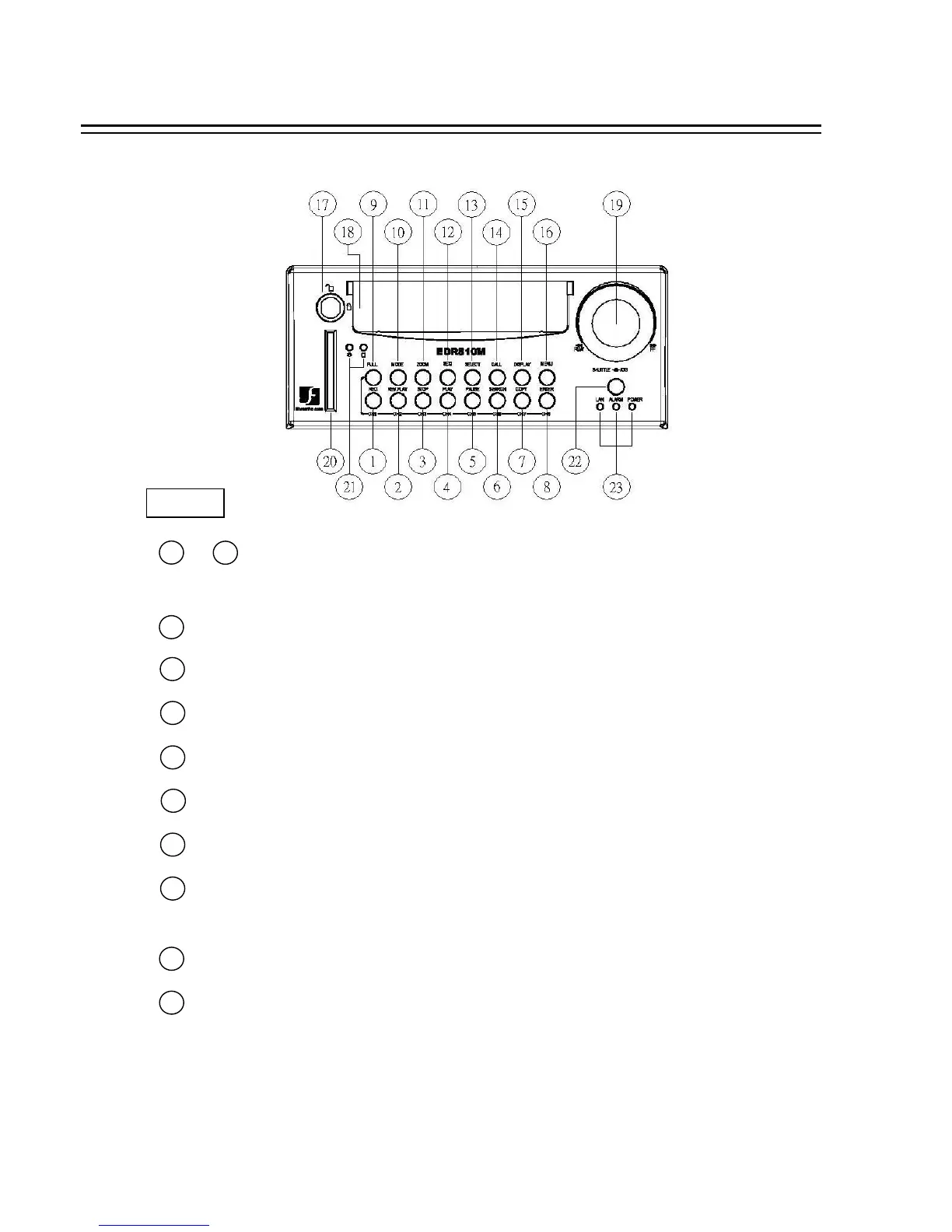
1.3 FRONT PANEL KEYPADS
KEY
2
3
4
7
6
5
8
9
CH1 / REC: Press this key to start instant recording.
CH2 / REV. PLAY: Reverse Play Back.
CH3 / STOP: Press this key to stop recording and playing back.
CH4 / PLAY: Play Back.
CH5 / PAUSE: Press this key to pause the playback picture.
CH6 / SEARCH: Press this key to enter the SEARCH MENU.
CH 7 / COPY: Press this key to start to copy video stream under PAUSE mode into
Compact Flash card.
CH8 / ENTER: Press this key to enter items , or jump to next subentry in the menu setting.
Channel Key: Press FULL+Channel Key (CH1~CH8) to display video image in the full screen
format the picture of the corresponding will fill the whole screen of the monitor display.
1
8
~
FULL: Press this key and channel Key at the same time to switch to full screen in both live mode and
play back mode. Press “MODE” to exit full screen.
11














 To Next Page