For the best possible satisfaction of customer requirements, Evolis provides a complete range of
technical assistance services.
(See section 3 – Customer Assistance)
1. Printer Control Panel
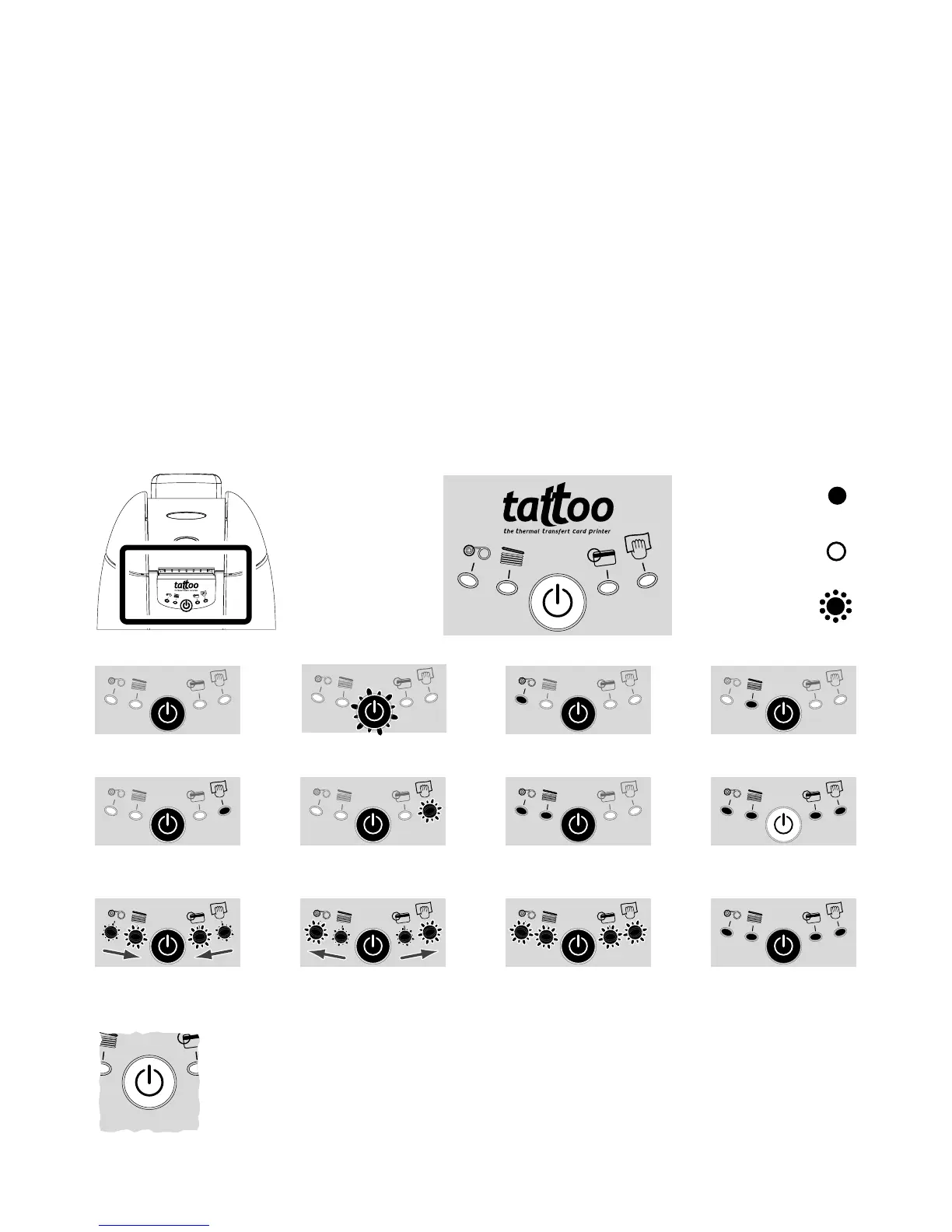
Refer to the following conditions to determine the status or the current activity of your printer.
The control panel warning lights are shown in one of the following conditions:
22
4.
Chapter 4
The push button returns the control panel to its original status after processing the
following situations:
– MECHANICAL PROBLEM
– MAGNETIC ENCODING ALERT
– CARD EJECT
It also enables:
– The printing of a test card
– The running of a cleaning process
– The switching off of the printer
PRINTER READY PROCESSING
END OF RIBBON NO CARD
INTERNAL PRINTER
PROBLEM
PRINTER-CLEANING ALERT
(after 500 inserted cards)
SWITCHED ON
SWITCHED OFF
FLASHING
Assistance
PRINTER-CLEANING ALERT
(after 600 inserted cards)
MECHANICAL
PROBLEM
CARD INSERTION
SIGNAL
CARD TO BE
TAKEN OUT
COOL DOWN
MODE
PRINTER COVER
OPENED



 To Next Page