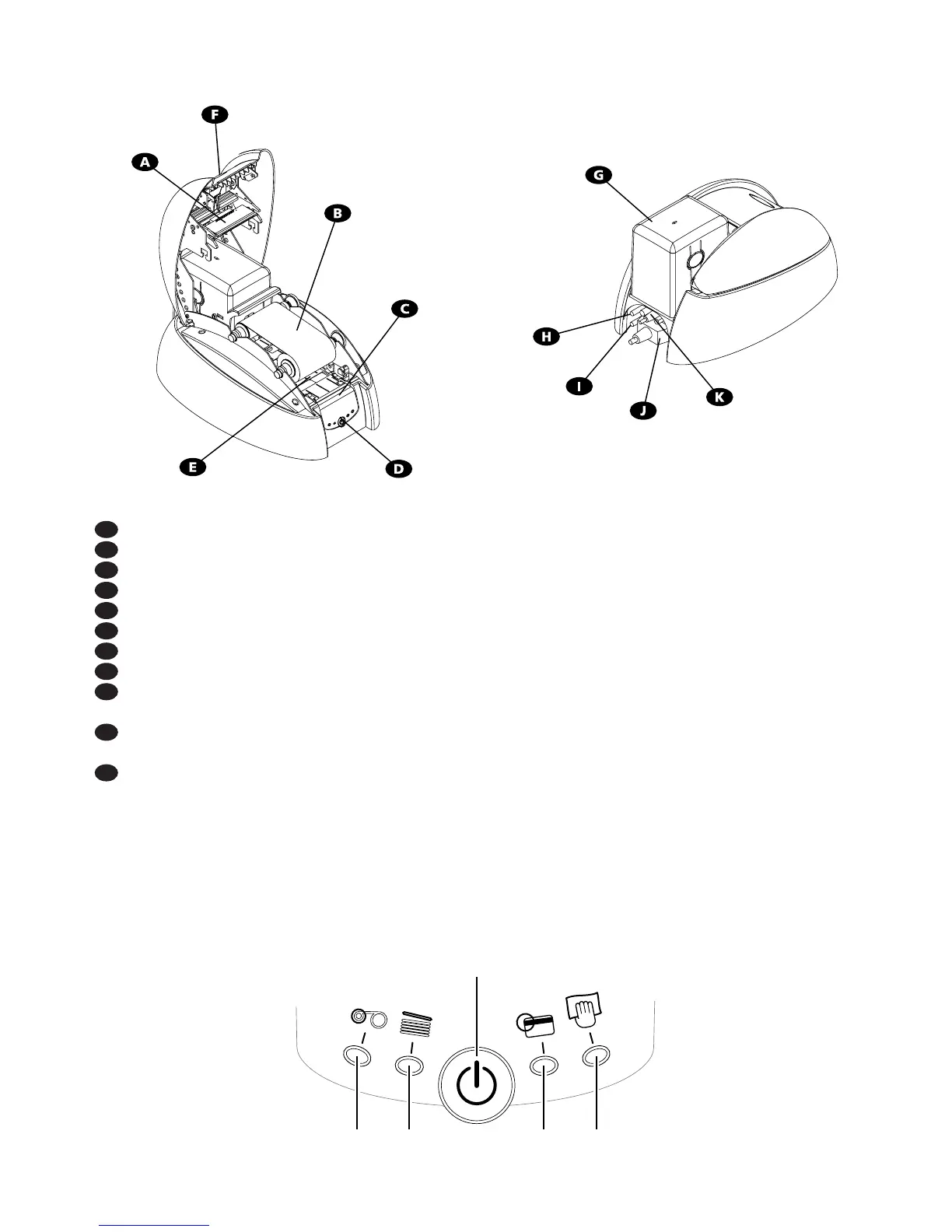
Description of the printer : Functions
A Thermal Transfer Print Head For printing cards.
B Media Thermal Transfer Monochrome Ribbon.
C Control Panel Shows the printer activity.
D Push Button Shows the printer activity (power ON/OFF)
E Cleaning Roller Removes any dust before printing the cards.
F Cover Lever Allows the printer cover to be opened.
G Card Feeder Holds the cards to be printed.
H Electrical connector For connecting the printer to the power supply.
I USB Port (optional) Enables data to be received and sent from and to the
computer.
J Parallel Port Enables data to be received and sent from and to the
computer.
K Serial Port (optional) Enables data to be received and sent from and to the
computer.
Printer control Panel
There is a Control Panel on the front part of the printer.
Four warning lights are associated with symbols showing the activity during printing.
These lights show :
6
2. Description of the printer and its functions
Push
button
Ribbon
end
No
card
Magnetic
encoding
alert
Cleaning
signal



 To Next Page