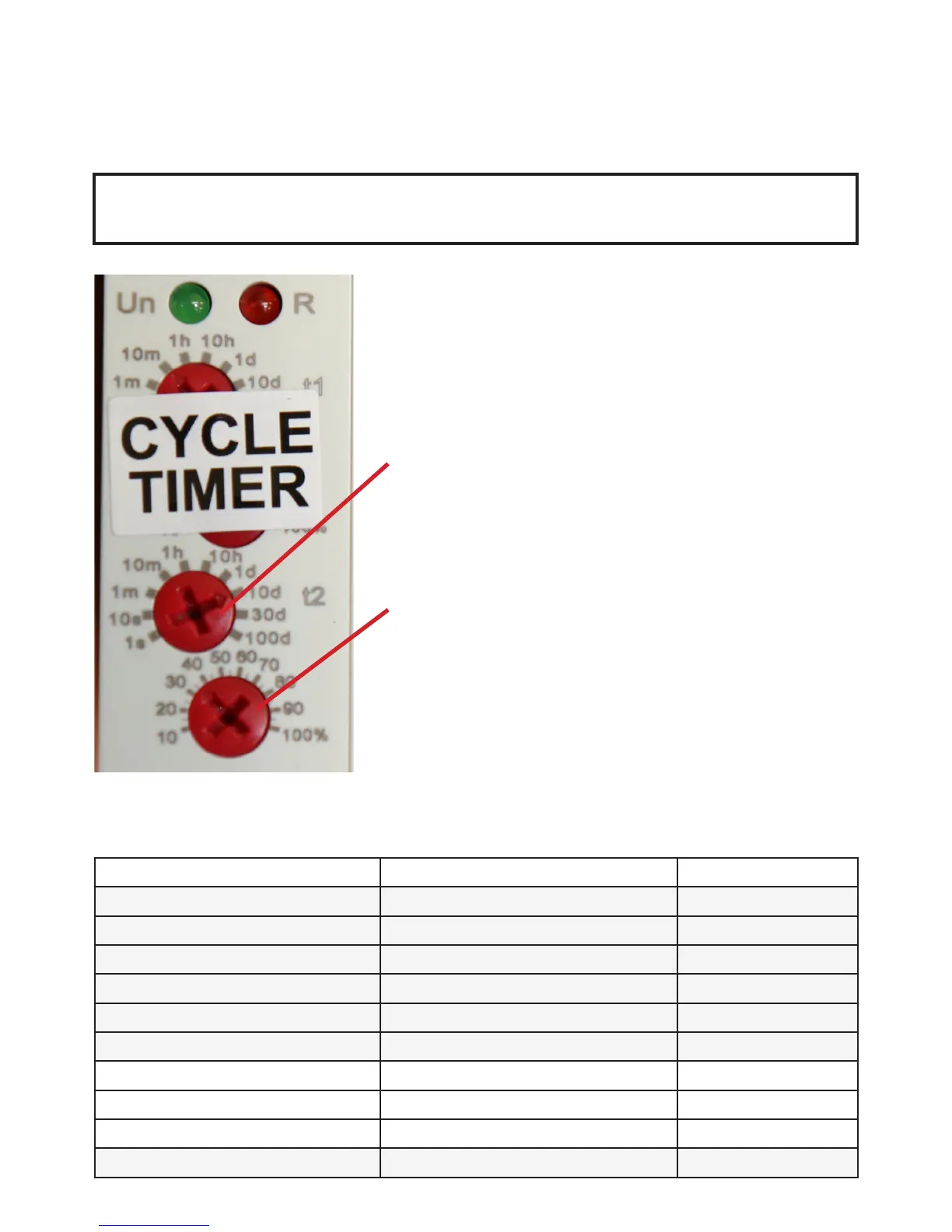
THE CYCLE TIMER EXPLAINED
THE CYCLE TIMER IS FACTORY SET TO INITIATE
A CLEANING CYCLE ONCE EVERY 3 DAYS
ONLY ADJUST SCREW A AND B ON THE CYCLE TIMER.
NEVER ADJUST ANY OTHER TIMER SCREW.
This cleaning cycle is programmed by turning the bottom 2
red screws on the cycle timer block. Each screw head has
an arrow which should point towards the correct digit you
require.
SCREW A - This screw sets the number of times the cycle
can be initiated in any period from one day
through to 10 days on a coarse scale.
NEVER SET SCREW A AT LESS THAN 1 h
SCREW B - This screw sets a fine division within the
coarse scale.
EXAMPLE - To enable the EazyPod Automatic to clean
your EazyPod once every 3 days SCREW A points to 10 d
(a coarse period of 10 days) and SCREW B points to 30
(30%). This instructs the timer to carry out 1 clean every
3 days.
DIGIT DISPLAYED ON TIMER DESCRIPTION USAGE
1 s 1 second DO NOT USE
10 s 10 seconds DO NOT USE
1 m 1 minute DO NOT USE
10 m 10 minutes DO NOT USE
1h 1 hour DO NOT USE
10 h 10 hours DO NOT USE
1 d 1 day Can be used
10 d 10 days Can be used
30 d 30 days Can be used
100 d 100 days DO NOT USE
THE CYCLE TIMER EXPLAINED
KEY TO SYMBOLS ON THE CYCLE TIMER DISPLAY
19



 To Next Page