/30
Be sure to select the right wheel and gear combination you
are riding with, as this will give you an accurate speed and trip
distance display on your remote. The wheel and gear settings
are displayed in the top left corner of the LCD screen.
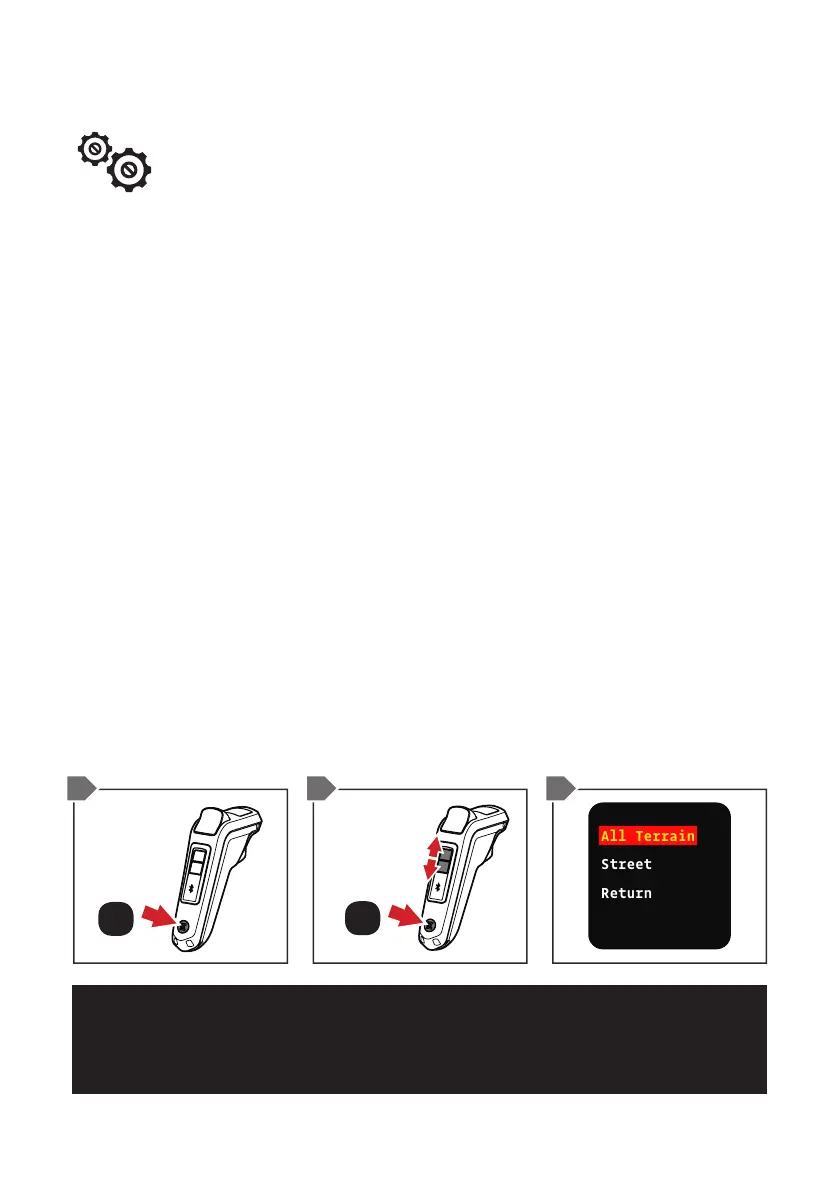
1. From the default screen, double-tap the ON/OFF BUTTON.
This will now display the menu screen.
2. Wheel Setting will be the rst option, press the ON/OFF
BUTTON to select it. The LCD screen will display All Terrain
wheel and gear sizes and Street wheel and gear sizes.
Conrm if you are using either All Terrain wheels or Street
wheels, then move the highlighted box to your selection by
pressing either MODE 1 or MODE 2 BUTTON then press the
ON/OFF BUTTON.
3. Use the MODE BUTTONs to scroll through to the correct
wheel and gear size. Press the ON/OFF BUTTON to select
correct wheel and gear option. Once selected you will now be
back in the default screen.
CHANGING WHEEL AND GEAR SETTINGS
NOTE – THE STREET BOARDS ALL COME WITH 32T GEAR AS STANDARD. THE
AT BOARDS COME WITH 66T GEAR AS STANDARD. OTHER GEAR SIZES AND
WHEELS ARE AVAILABLE ON EVOLVE WEBSITES.
SCROLL
ON / OFF
ON / OFF
x1
x2
1 2/3 2


 To Next Page