/33
You have the option to change the skateboard battery
percentage display to a skateboard battery bar if you prefer.
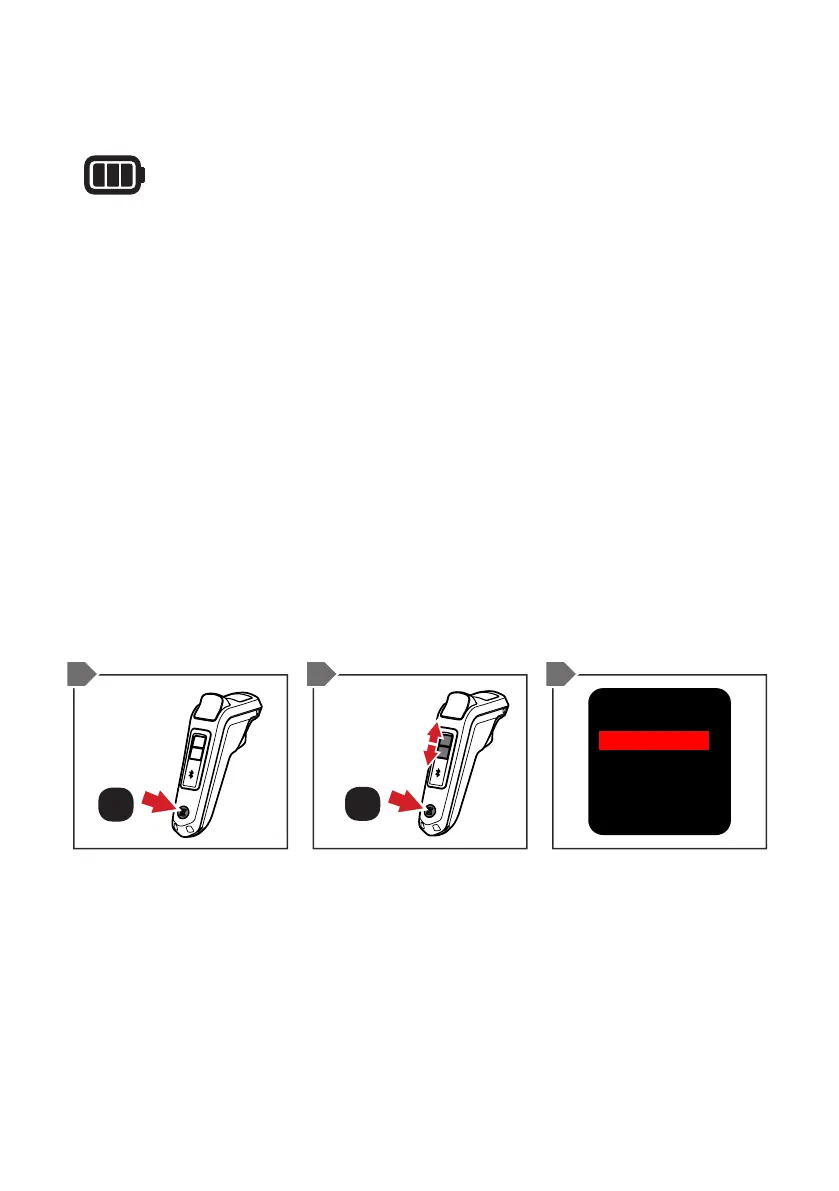
1. Double-tap the ON/OFF BUTTON. This will now display the
menu screen.
2. Scroll down by pressing the MODE 2 BUTTON until you
reach ‘Options’, then press the ON/OFF BUTTON.
3. Use the MODE BUTTONs to scroll through to the ‘Battery’
selection then press the ON/OFF BUTTON to change from
‘Dig’ (percentage) to ‘Bar’ or vice versa.
4. Scroll down by pressing the MODE 2 BUTTON until you
reach ‘Return’, then press the ON/OFF BUTTON. This will
take you back to the default screen with the new battery
display.
CHANGE BATTERY INDICATOR DISPLAY
TIP - As you ride your skateboard and use your remote, the
skateboard battery meter and remote battery meter will slowly
deplete. If you ride up hills, accelerate heavily, and ride over
grass you should expect the battery to drain faster than if you
were riding on flat, smooth surfaces. To get the longest ride
times, ride holding a set speed, avoiding start/stop riding. This is
the most efficient way to ride.
SCROLL
ON / OFF
ON / OFF
x1
x2
Unit: km
Battery: Bar
DeadMan: ON
Powersave: ON
Return
1 2/4 3


 To Next Page