Page
Data log is a feature of the local temperature monitoring accessory. For
more information on activating local temperature monitoring visit
Downloading Data
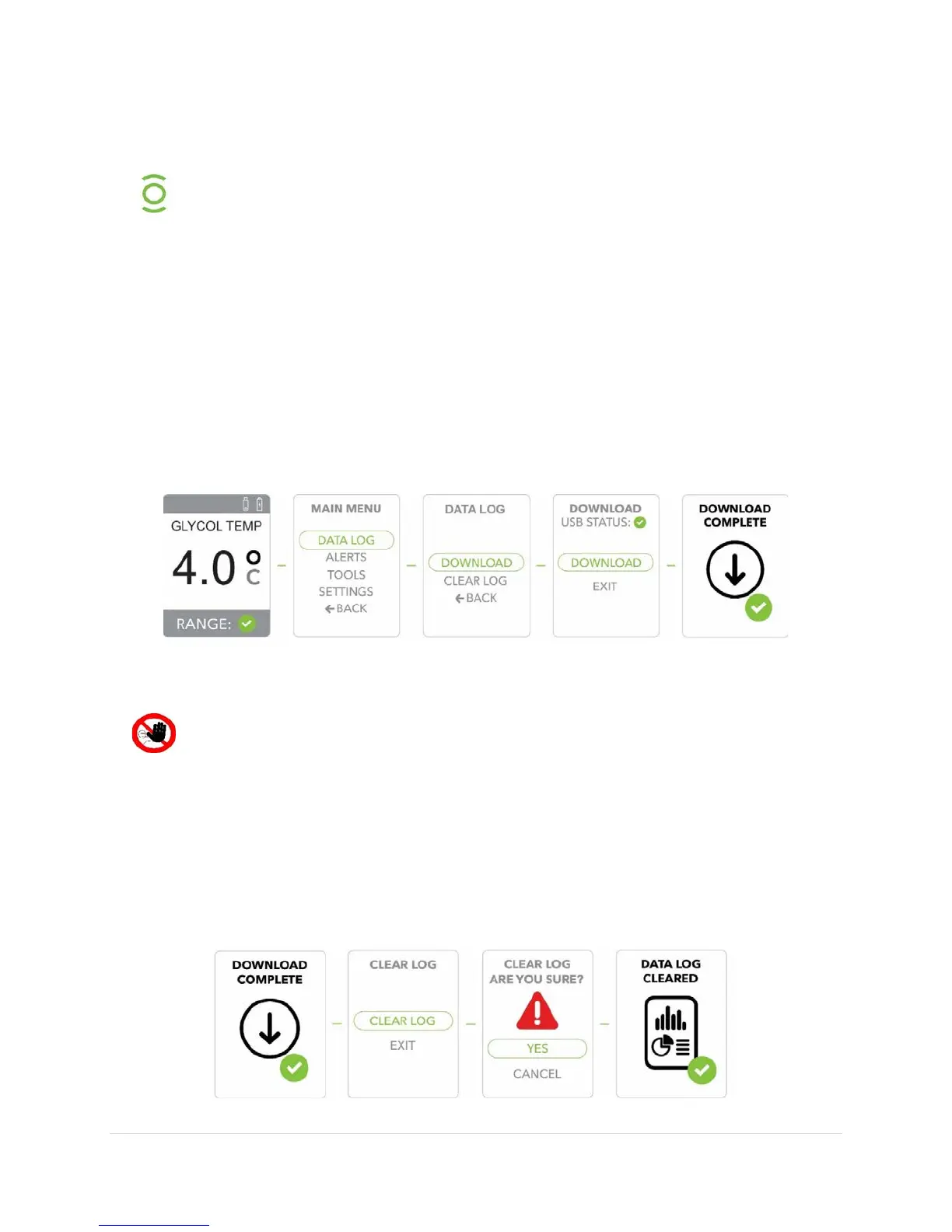
1) Insert a USB memory device (not included) and confirm that the USB icon appears in
the
of the display indicating that the drive is functioning.
2) Press the
button to display the
3) Press the
button to confirm/select
4) Press the
button to select
.
5) Press the
button to confirm
and
.
6) When the
is complete (this will only take a few seconds), the display will
show
. The display will continue to the
screen.
Clearing the Data log (After downloading)
Clearing the log erases the memory and once erased, the data cannot be
recovered.
1) Once the
has completed the
screen will appear.
2) Press the
button to select
.
3) Once
is selected you will see the
screen.
4) Press the
button to select
or use the Scroll button to
and
press the
button to confirm.
5) Once the data has cleared you will see the
screen and then revert
to the default screen.


 To Next Page