Page
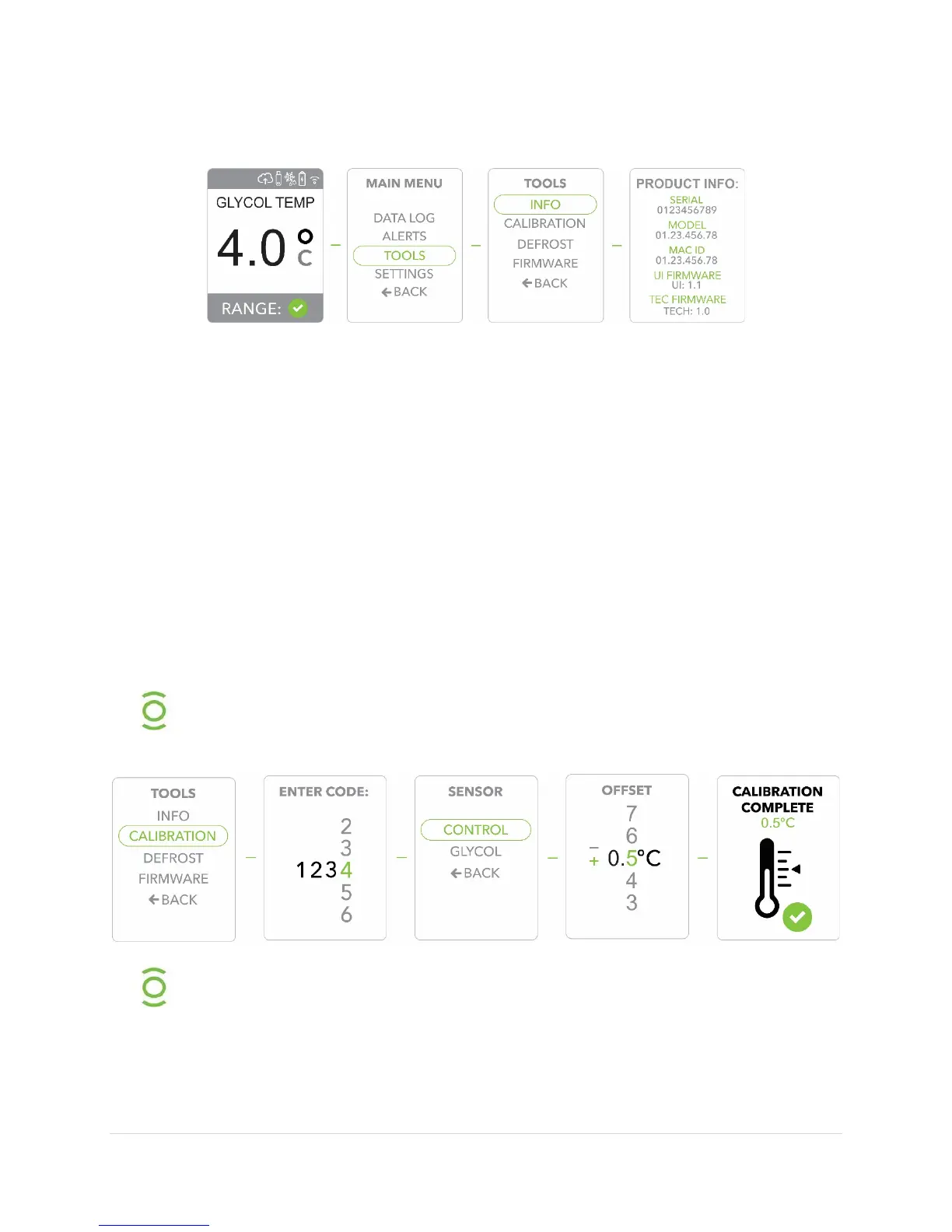
4) The display will then show the important product information. It’s advisable to record
this information to have handy if ever needed.
Calibrating the Unit
1) Press the
button to display the
2) Use the
buttons to move to the
option, Press the
button
to confirm/select
.
3) Scroll to the
option, Press the
button to confirm/select
4) Use the
buttons to enter the last
digits of the product
(see
/
) one number at a time, each time pressing the
button to
confirm.
5)
to either
(to calibrate the
) or to
(to calibrate the
)
and press the
button to confirm/select
or
.
6)
to enter the desired
offset and press the
button to
confirm/select the
offset
7) After a few seconds you will see confirmation of
.
When Calibrating, it is recommended to Calibrate the Control sensor first
and allow time for the system to equilibrate before making any adjustments
An example of calculating an offset value: Your NIST certified temperature
reading is 3.7 °C, the unit reading is 4.2 °C, the offset would be -0.5 °C.


 To Next Page