Page
3)
to
, Press the
button to confirm/select
4)
to set the
to
or
and the
button to
confirm/select your choice.
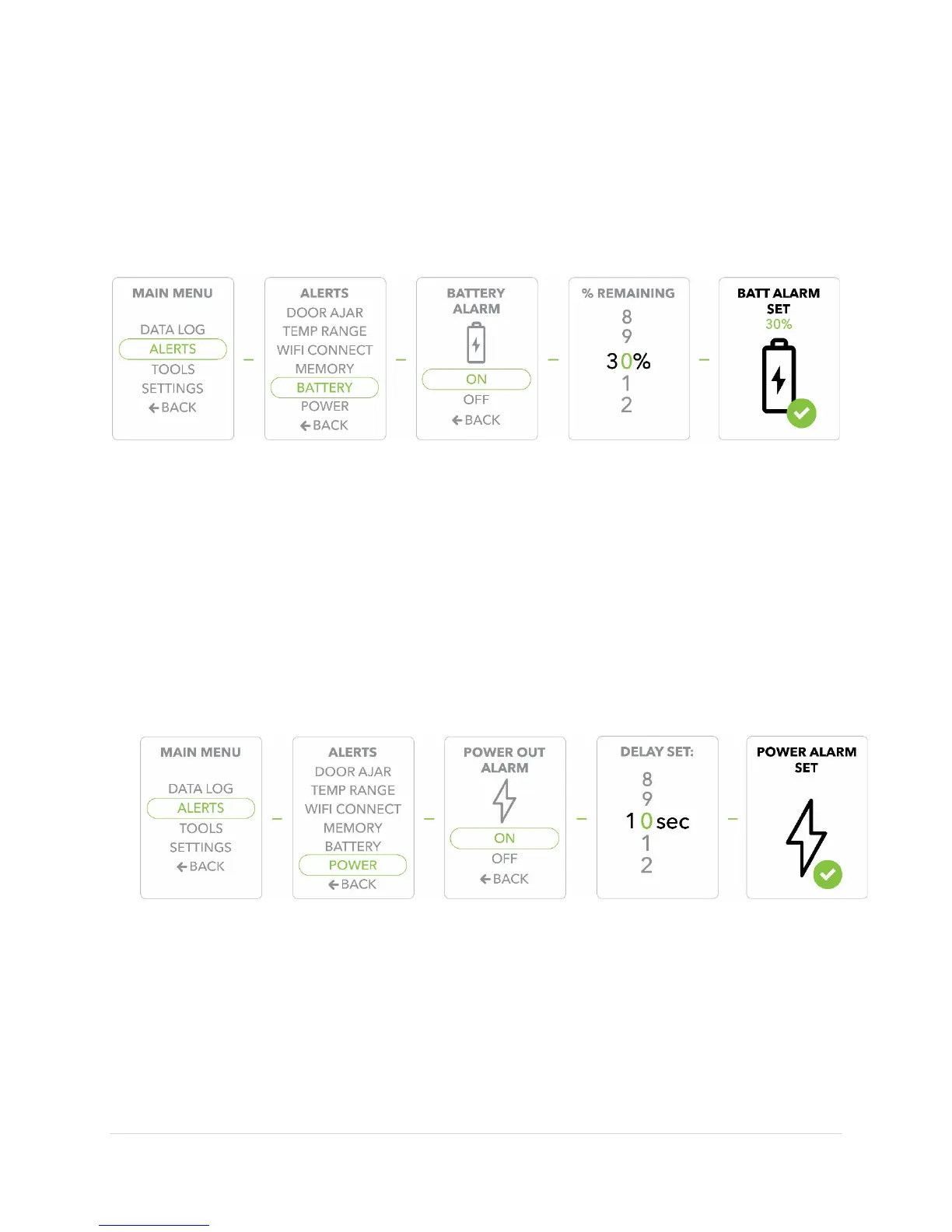
5) Use the
buttons to move through the numbers to set the remaining battery
strength, and use the
button to confirm/select your choice.
6) When the
is set, your last display will be
. The display
will revert to the default screen.
Adjusting the Power Alert
1) Press the
button to display the
2) Use the
buttons to move to the
option, Press the
button
to confirm/select
3)
to
, Press the
button to confirm/select
4)
to set the
to
or
and the
button to
confirm/select your choice.
5)
to move through the numbers to set the delay and use the
button to confirm/select your choice.
6) When the
is set, your last display will be
. The display
will revert back to the default screen.
Obtaining Important Product Information
1) Press the
button to display the
2) Use the
buttons to move to the
option, Press the
button
to confirm/select
.
3) Press the
button to confirm/select
.


 To Next Page