Page
7) You will be able to view the downloaded data in Excel™ and format as desired.
8) Select
,
. Name and save your file in the format of your choice (.csv or .xls)
then you can manipulate and analyze the information in table or a graph as desired.
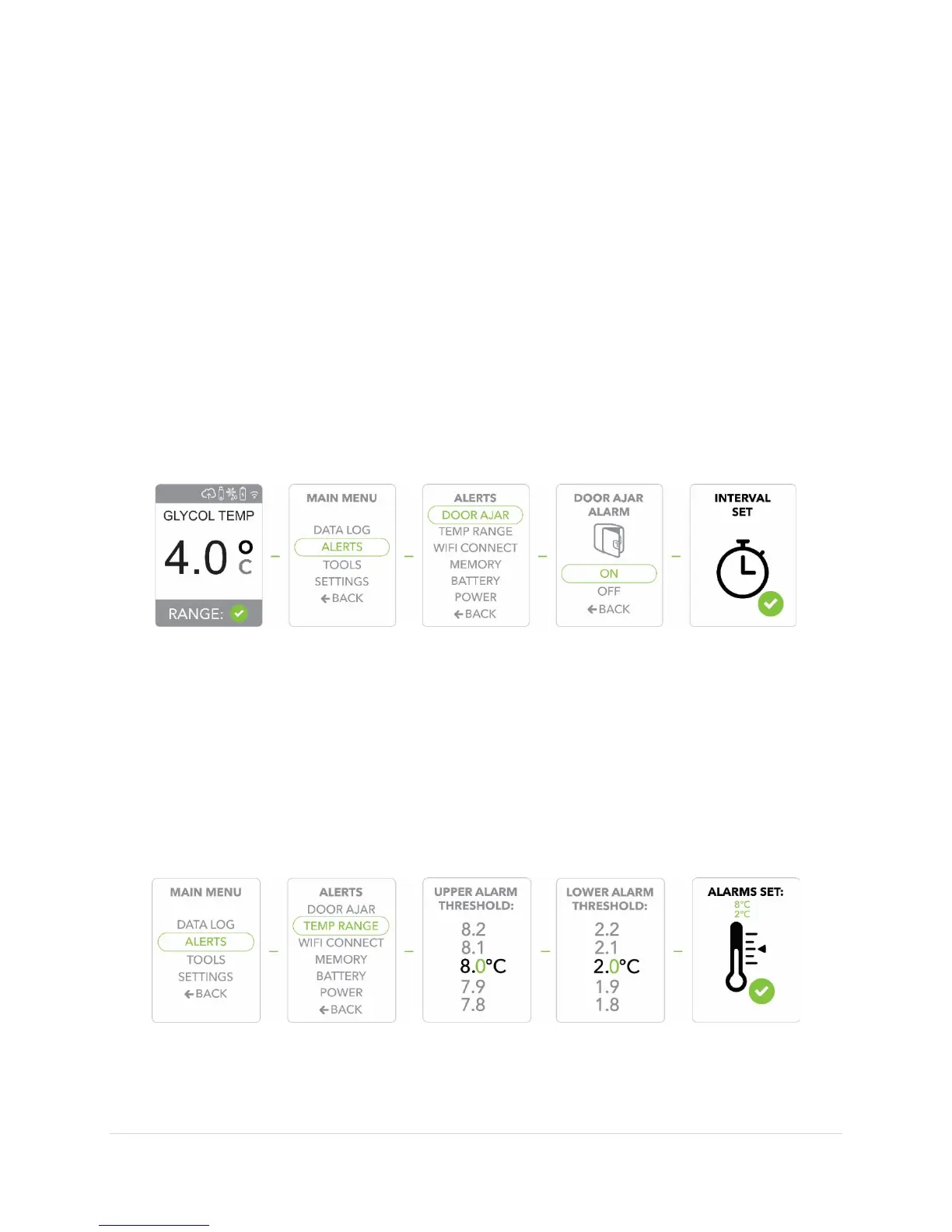
Adjusting the Door Ajar Alert
1) Press the
button to display the
2) Use the
arrows to move to the
option, Press the
button to
confirm/select
3)
to
, Press the
button to confirm/select
(the
Door Ajar setting is a 1-minute interval).
4) Use the
buttons to set the
alert to
or
and the
button to confirm/select your choice.
5) When the
is set, your last display will be
. The display will revert
to the default screen.
Adjusting the Temperature Range Alert
1) Press the
button to display the
2) Use the
arrows to move to the
option, Press the
button to
confirm/select
3)
to
, Press the
button to confirm/select
4) Use the
buttons to move through the numbers to set the upper and lower alarm
thresholds, each time using the
button to confirm/select your choices.
5) When the
is set, your last display will be
. The display will
revert to the default screen.


 To Next Page