Page
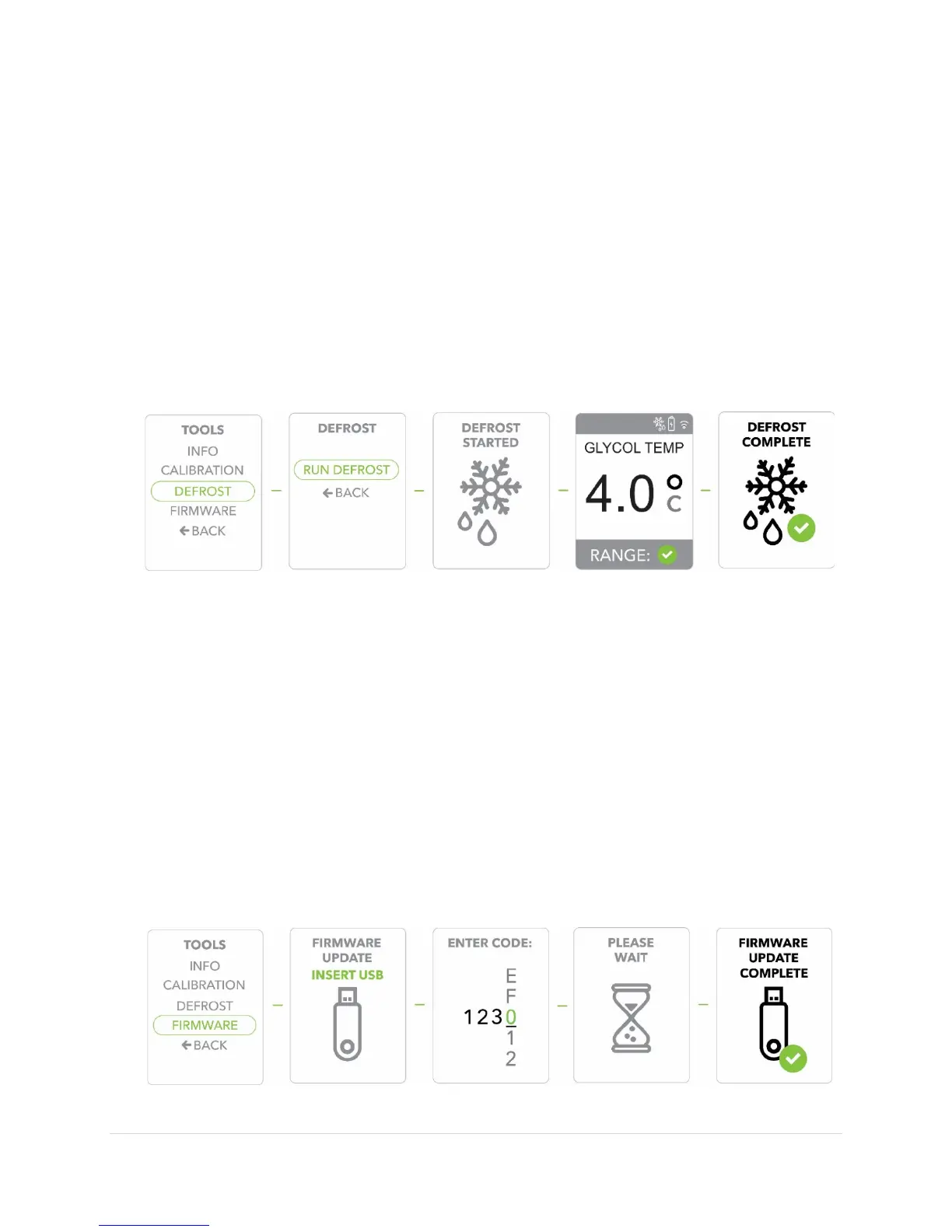
Defrosting your Refrigerator
1) Press the
button to display the
2) Use the
buttons to move to the
option, Press the
button
to confirm/select
.
3) Scroll to the
option, Press the
button to confirm/select
4) Select
and Press the
button to confirm/select
5) You will see
and the display will revert back to the default screen.
6) The
cycle will take a few minutes and the display will show
when finished the
cycle.
Updating Firmware
1) The first step required to update
is to insert a memory stick with the
updated
loaded onto the memory stick.
2) Press the
button to display the
3) Use the
buttons to move to the
option, Press the
button
to confirm/select
.
4) Scroll to the
option, Press the
button to confirm/select
5) Use the
buttons to enter the last
digits of the product
(see
/
) one number at a time, each time pressing the
button to
confirm.
6) It will only take a few seconds for the updated
to upload them you will see
. The unit will then shut down and restart in a few
seconds.


 To Next Page