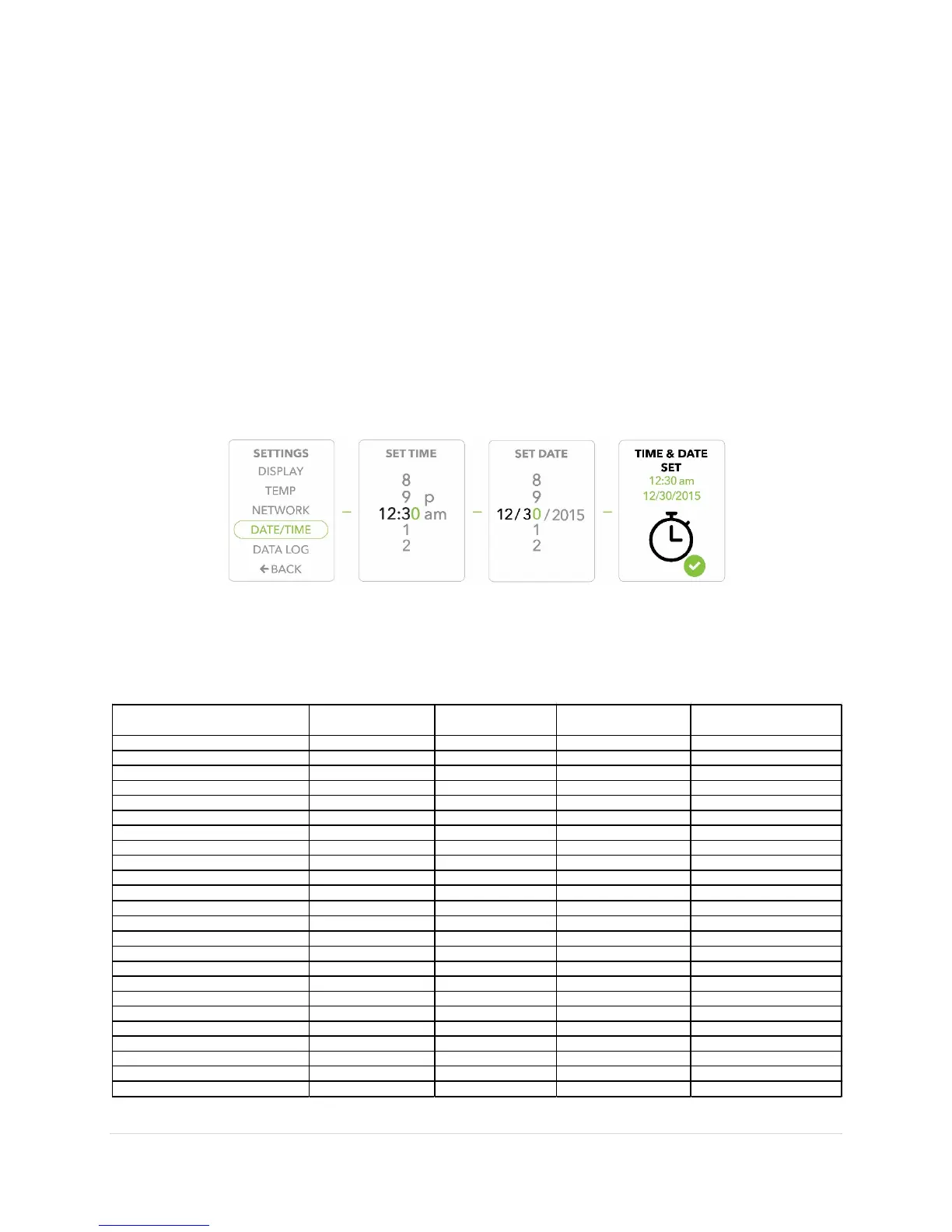
the next.
In the event of a reset or power outage, the following table illustrates the various product
Door Ajar Alarm On/Off ON ON, reverts to default ON, reverts to default ON, reverts to default
Door Ajar Alarm Interval Setting 1 minute N/A N/A N/A
Temperature Set Point 4.0 °C Yes Yes Yes
Temperature Upper Alarm Threshold 8.0 °C Yes Yes Yes
Termperature Lower Alarm Threshold 2.0 °C Yes Yes Yes
Temperature Display Setting °C Yes Yes Yes
Temperature Resolution Setting 1 °C Yes Yes Yes
Temperature Display (Control/Glycol) Glycol Yes Yes Yes
Wi-Fi Enabled On/Off ON Yes Yes Yes
Wi-Fi Connect Alarm On/Off ON ON, reverts to default ON, reverts to default ON, reverts to default
Wi-Fi Connect Delay Setting 60 Seconds Yes Yes Yes
Wi-Fi SSID None/User Selected Yes Yes Yes
Wi-Fi Password None/User Entered Yes Yes Yes
Memory Alarm On/Off ON ON, reverts to default ON, reverts to default ON, reverts to default
Memory Capacity Alarm Setting 25% Yes Yes Yes
Battery Alarm On/Off ON ON, reverts to default ON, reverts to default ON, reverts to default
Battery Alarm % Remaining Setting 30% Yes Yes Yes
Power Out Alarm On/Off ON ON, reverts to default ON, reverts to default ON, reverts to default
Power Out Alarm Delay Setting 10 Seconds N/A N/A N/A
Time and Date 4/28/15, 4:56:01 PM Yes - After manually set Yes - After manually set No, reverts to default
Data Log Interval 15 minutes Yes Yes Yes
Glycol Temperature Calibration Value -0.9 °C Yes Yes Yes
Control Temperature Calibration Value -1.2 °C Yes Yes Yes
First Pumpdown Flag TRUE Yes Yes Yes


 To Next Page