7.0 Connecting the DLV50 to PC/Winmeter 5.0
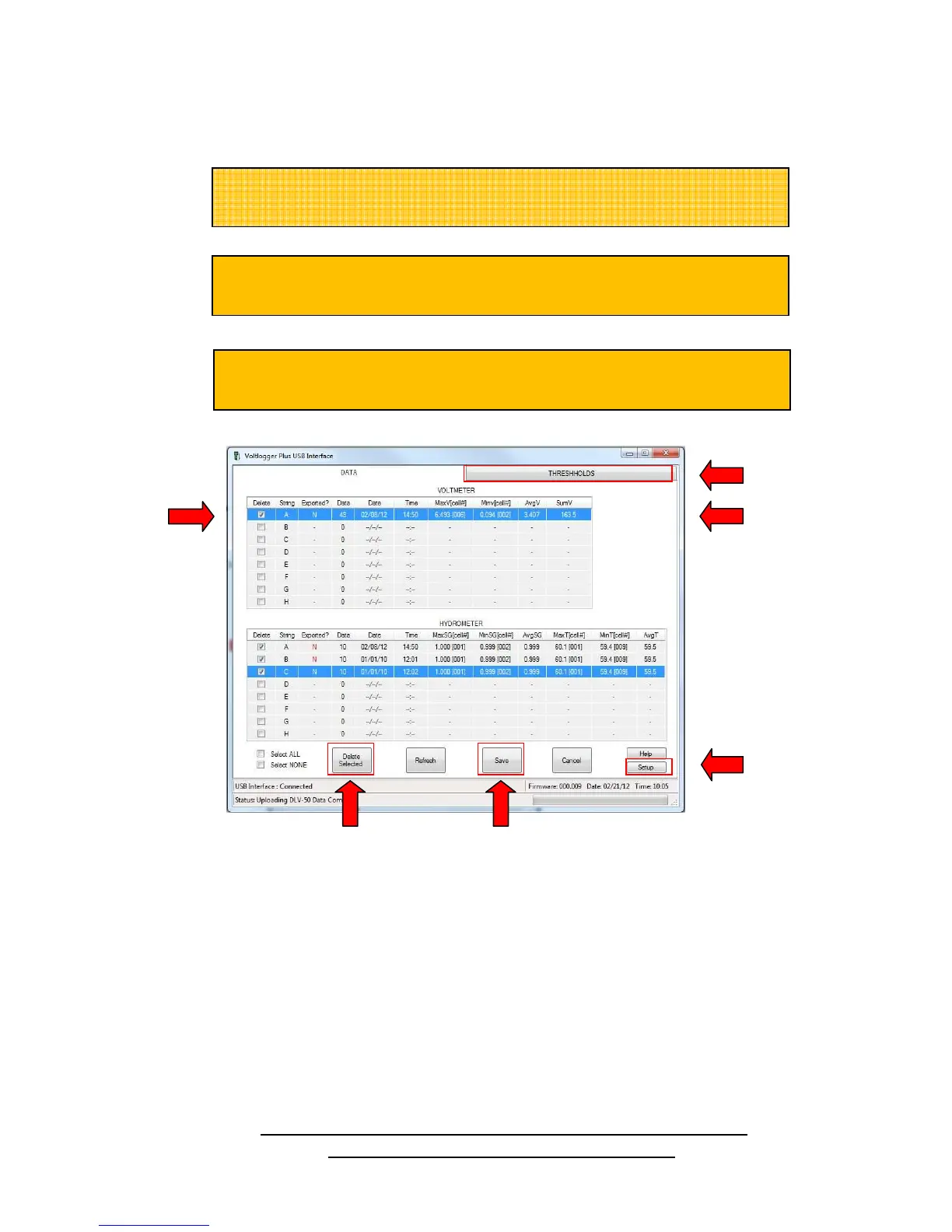
(i) Connect the DLV50 to a PC (via USB cable) with Winmeter 5.0 software installed.
Once data transfer is complete the user can easily:
(A) Select & delete any/all strings that contain obsolete data.
(B) Click “Thresholds” tab to edit/remove any thresholds (voltage, SG & temp.) for any string.
(C) Click “Setup” to update the DLV50 firmware or change the Winmeter auto-launch setting.
(D) Double-click any data row to preview string data.
(E) Click “Save” to begin the report generation process.
NOTE : Please refer to the Winmeter 5.0 Help file for additional
instruction for battery test report generation.
If the Winmeter 5.0 Auto-start software is not enabled, RUN the
Winmeter 5.0 Software.
D
If the “Voltlogger Plus Interface” does not initiate automatically, select
“Download Device” -> “Via USB (search for device)”.
data, threshold and date & time settings with Winmeter 5.0.



 To Next Page