PQ3470-en-GB_V1.9 10/15
13
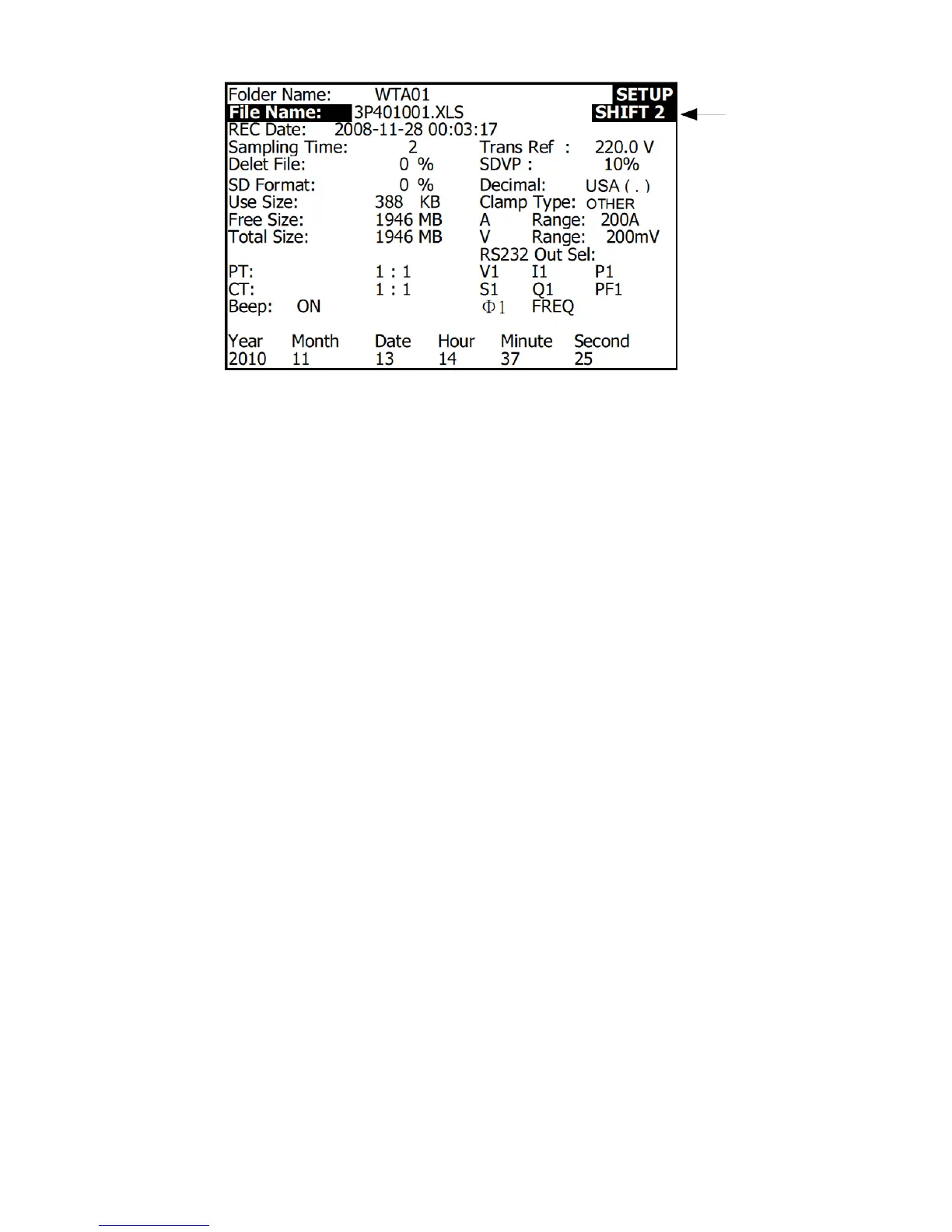
Setup Mode Screen with SHIFT 2 icon
4.4.2 The Setup Mode Parameter Menu
Folder Name: Select a file name on the SD CARD; the range is WTA01 to WTA10
File Name: Set a file name on the SD CARD (50 filenames are permitted)
REC Date: Show a file’s date-time stamp (Year / Month / Date / Hour / Min / Sec)
Sampling Time: Set the datalogger sampling rate from 2 to 7200 seconds
Delete File: Delete an existing data file from the SD CARD
SD Format: Format the SD CARD
PT: Set the Potential Transformer ratio from 1 to 1000
CT: Set the Current Transformer ratio from 1 to 600
Audible Tone: Set the keypad beeper ON or OFF
Trans. Ref.: Set the Transient voltage reference
SDVP: Set the threshold for the Swells/Dips transient Voltage Potential in percent (0-100%)
Clamp Type: Select from the clamp type menu
A (Amps): Set the Current range
V (Volts): Set the Voltage range
RS232 Out Select: RS232 output function (up to nine items can be output); refer to the
RS232 section of the user guide for detailed information
Year: Set the current year
Month: Set the current month
Date: Set the current date
Hour: Set the current hour
Minute: Set the current minute
Second: Set the current second


 To Next Page