PQ3470-en-GB_V1.9 10/15
26
5.6 – Zero Adjustment for the ‘Watt Hour’ Function
Press and hold the "Exit” key for at least 6 seconds, the measurement values for
"WH", "SH", "QH" will reset to a Zero value.
5.7 – Harmonic Function Measurements (View only)
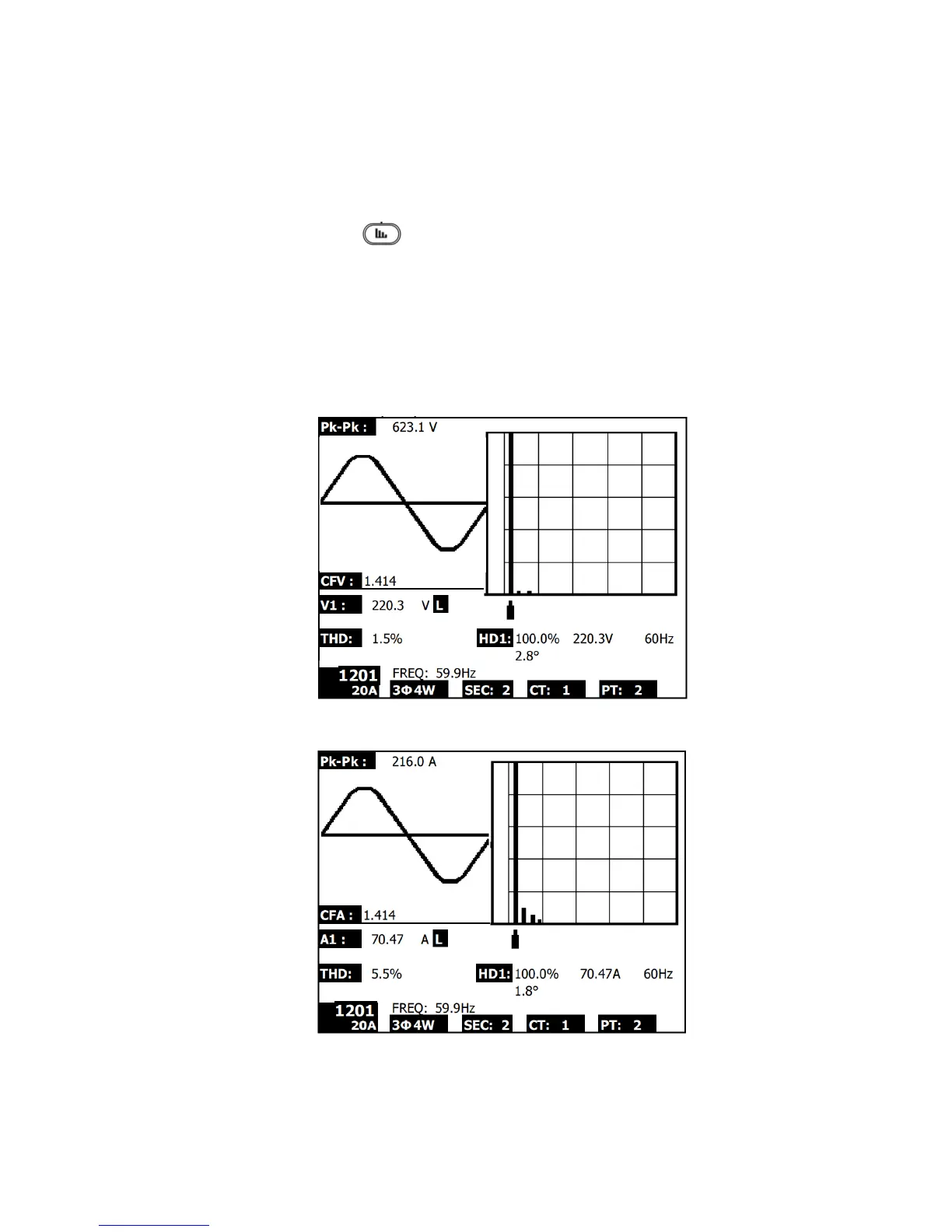
1. Press the ‘Harmonic’ key to enter Screen 1.
2. Press the ‘V/A 1. 2. 3’ key to select the phase and units.
3. If the waveform is distorted, press the "V/A range Key" to switch to VH or AH to remove
distortion from the waveform (as shown in Screen 3 and Screen 4)
4. Press the ‘Left’ key or the "Right Key" to show the nth harmonic value of the current or
the voltage. (H01 – 1
st
harmonic shown in figure)
Harmonics - Screen 1– Voltage – Phase 1 – Low range (VL)
Harmonics - Screen 2– Amps – Phase 1 – Low range (AL)
NOTE: If the waveform is clipped at the peak or too small in the LCD, press the RANGE
button to select HIGH or LOW range for a better display. The range indicator is the symbol
after the unit of RMS value, L or H.


 To Next Page