PQ3470-en-GB_V1.9 10/15
29
5.9 – Voltage Current Waveform
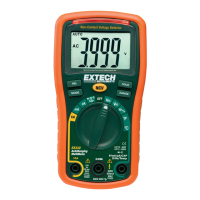
1. Press Waveform to enter the Voltage Waveform screen as shown in Screen 1
below, and then Press the "1Φ /3Φ” key to switch the Voltage waveform from V1
to V2 to V3, etc.
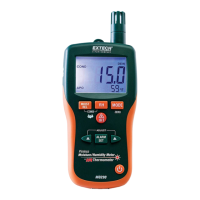
2. Press the Waveform key again to enter the Current Waveform screen as shown in Screen 2
below, and then press the "1Φ /3Φ” key to switch the Current waveform from A1 to A2 to
A3, etc.
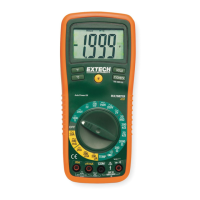
3. Press the Waveform key again to enter the Voltage/Current Waveform screen as shown in
Screen 3 below, and then press the "1Φ /3Φ” key to switch the Voltage/Current
waveform from V1/A1 to V2/A2 to V3/A3, etc.
Figure 5-9c: Waveforms - Screen 1
Figure 5-9b: Waveforms - Screen 2
Figure 5-9c: Waveforms - Screen 3



 To Next Page