CONTROL PANEL AND ICONS
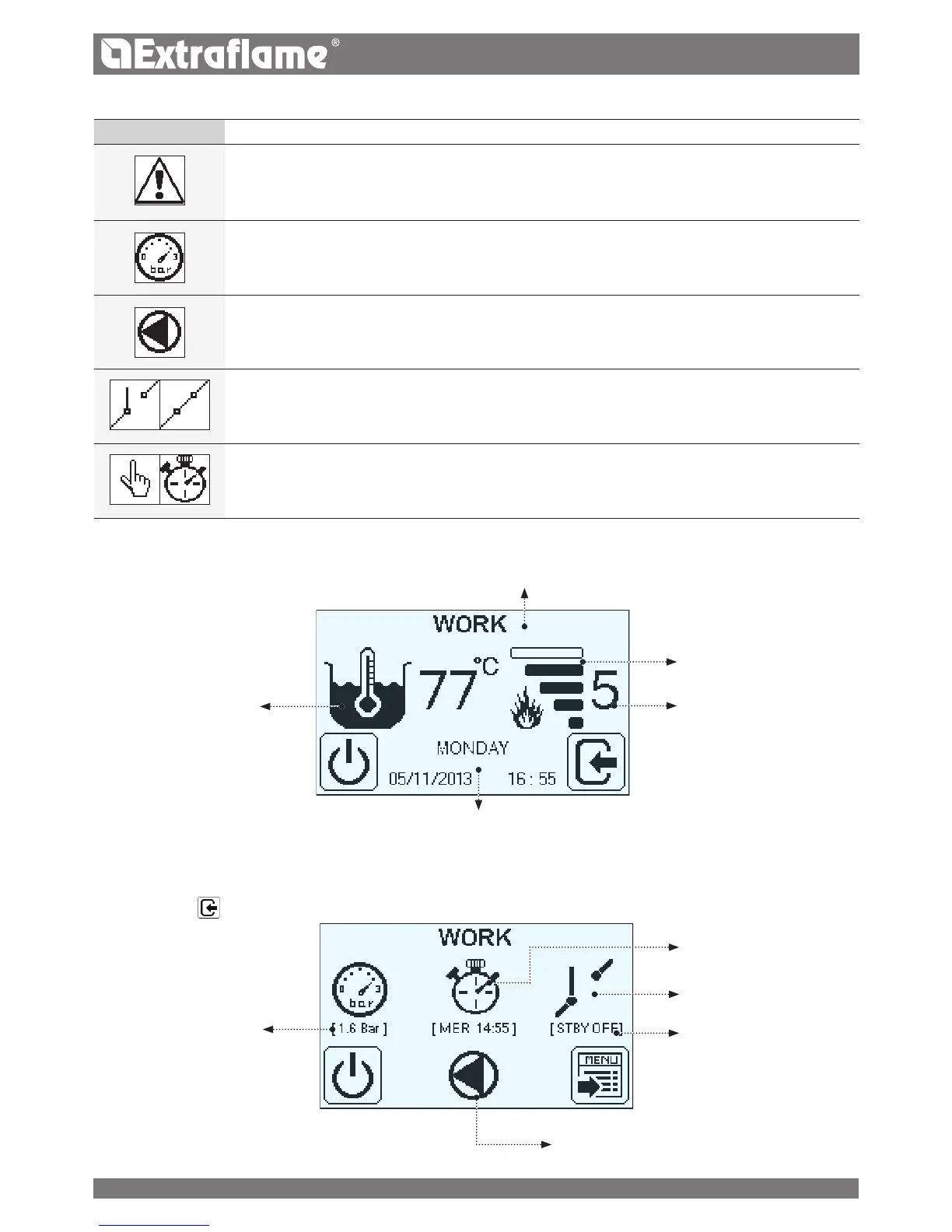
DISPLAYING THE VARIOUS
TEXT MESSAGES
POWER SET
ACTUAL POWER
TEMPERATURE
H20 BOILER
By briey pressing
appear additional information, such as:
DETECTED PRESSURE IN THE
BOILER
STATUS OF THE CONTACT.
EXTERNAL
PUMP, IF ACTIVE
CHRONO ACTIVE
OR MANUAL MODE
icon meaning
• Indicates the presence of an alarm. The machine will turn o.
• This indicates the system pressure detected by the machine.
• It indicates the pump operation: O = pump OFF; ON = pump on
Flashing ling = the safety device is active (H2O temperature > 85°C)
• Indicates the contact of the external additional thermostat
Contact closed: the contact of the additional external thermostat is closed.
Contact open: the contact of the additional external thermostat is open.
• Indicates the operating status of the machine, with manual operation or weekly programming.
Hand icon: the weekly programming function is o (manual management)
Chrono icon: activates the weekly programming function
STANDBY FUNCTION
DAY, DATE, TIME, YEAR
15


 To Next Page