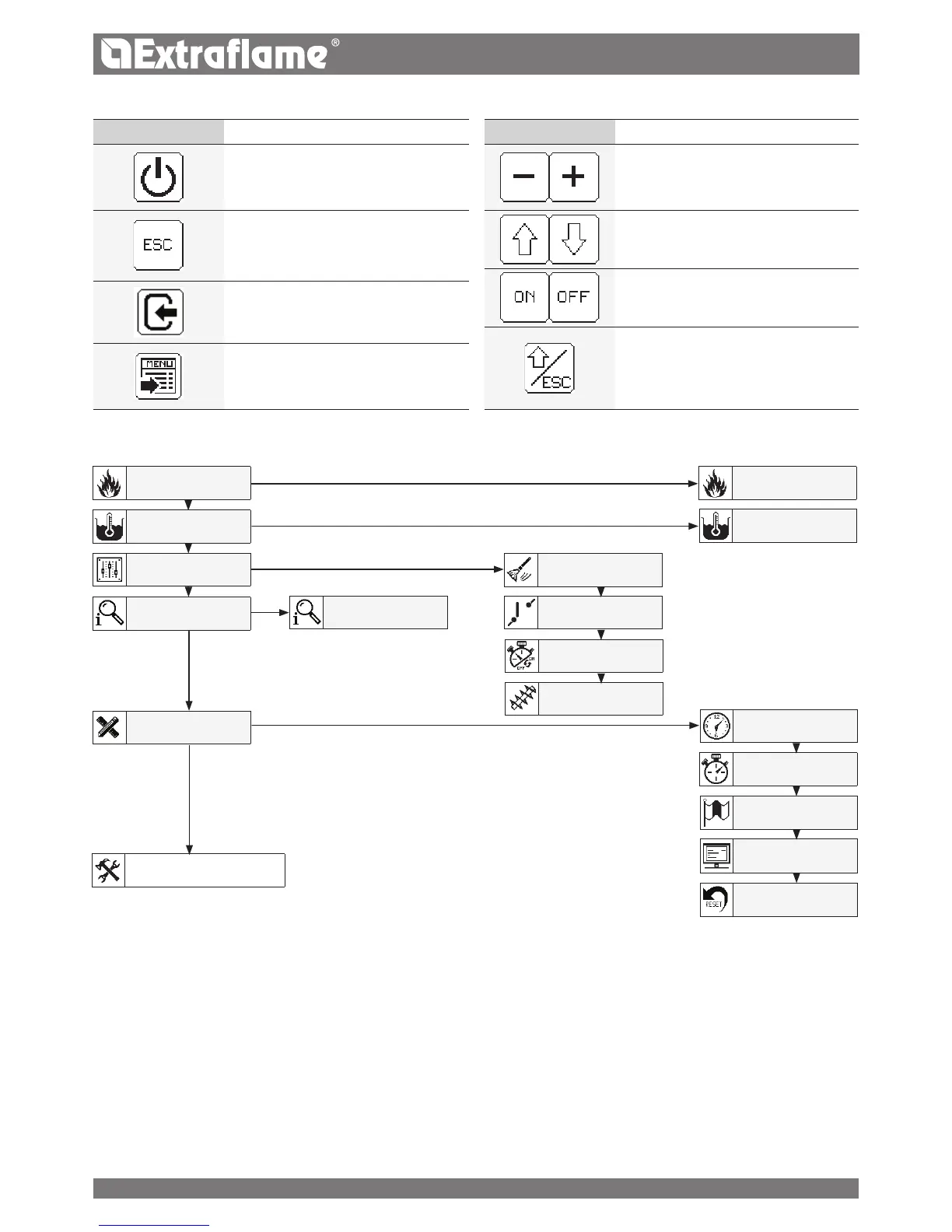
MENU STRUCTURE
BASIC INSTRUCTIONS
The following recommendations must be followed the rst times the
generator is ignited:
� It is possible that slight odours are produced due to the drying
of the paints and silicones used. Do not remain in the environment
for long periods.
� Do not touch the surfaces as they could still be unstable.
� Air the room well several times.
� The hardening of the surfaces is terminated after several
heating processes.
� This appliance must not be used to burn waste.
Before igniting the generator, the following points must be veried:
� The hydraulic system must be completed in compliance with
the guidelines of the regulations and the manual.
� The tank must be full of pellets
� The combustion chamber must be clean
� The burn pot must be completely free and clean
� Check the hermetic closure of the re door and the ash drawer
� Check that the power supply cable is connected correctly
� The bipolar switch in the rear right part must be positioned on 1.
SET POWER
SET TEMPERATURE
USER REGULATION
STATUS
USER MENU
TECHNIC SET
RESERVED TO THE TECHNICIAN
STATUS 1 2
BURN POT CLEANING
STAND BY
ENABLE CHRONO
PELLET
SET H2O
SET CLOCK
SET CHRONO
LANGUAGE
DISPLAY
KEYS LOCKED BRIGHTNESS
RESET
key funcTion
Press and hold for more than 2 seconds to
turn on or turn o the boiler.
Press and hold for more than 2 seconds to
exit the menu.
Briey pressing you can go back to a step.
Allows access to additional info.
Allows access to the user menu.
key funcTion
Allows increases/select (+) or decrease (-)
a mode (SET)
Allows you to scroll through the menus
Allows to enable (ON) or disable (OFF)
It allows to go back a step if pressed briey,
if held longer allows to exit until the main
scream.
SET POWER
KEY FUNCTIONS
16


 To Next Page