recommendaTions example
The ignition and switch-o times must be within the arc of one
day, from 0 to 24 and not over several days:
Before using the chrono function, set the current day and time.
Therefore check that the points listed in the “Set clock” sub-
chapter have been followed, so that the chrono function works.
As well as programming it, activate it as well.
Switch-on time 07:00
CORRECT
Switch-o time 18:00
Switch-on time 22:00
INCORRECT
Switch-o time 05:00
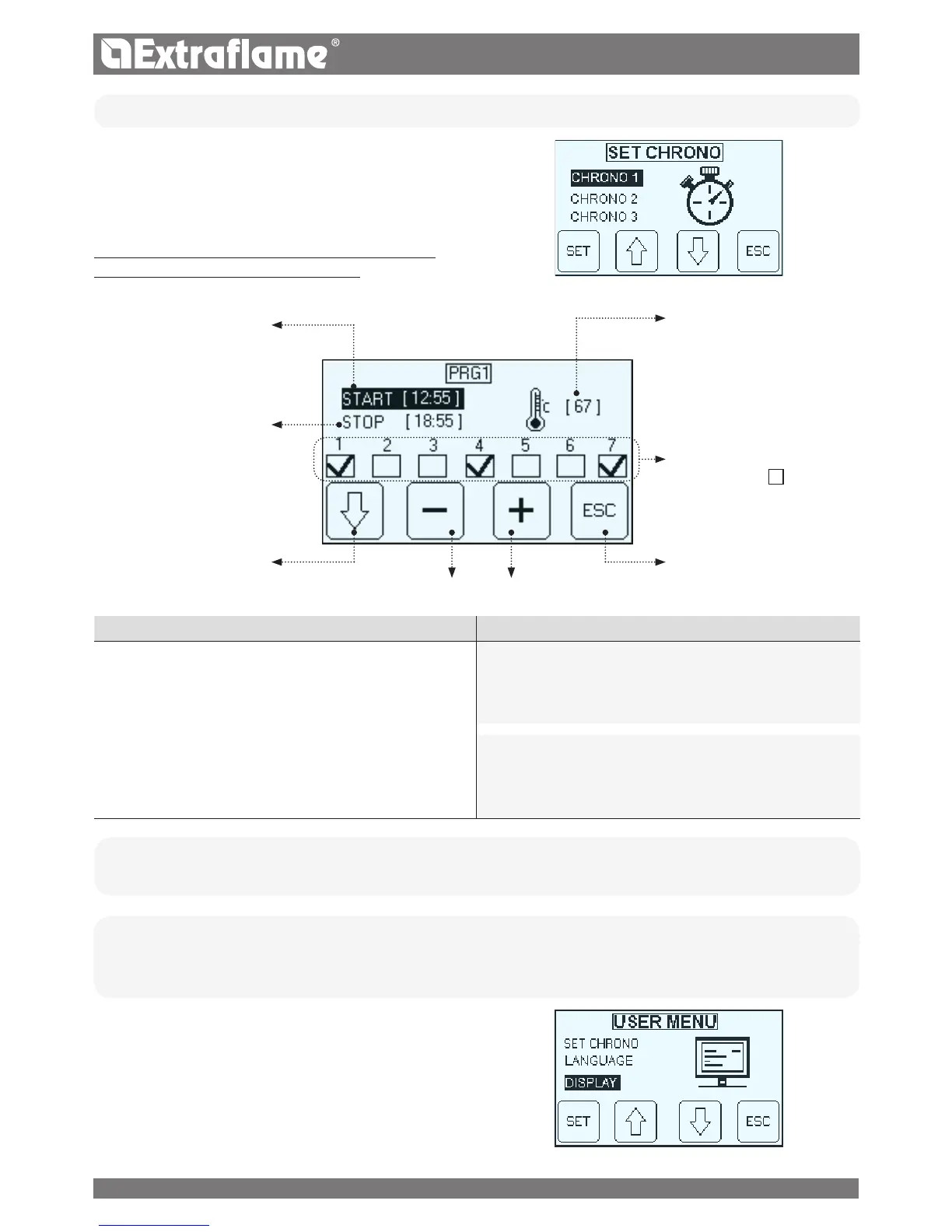
• CHRONO
The chrono allows to program 4 time spans within a day to use every
day of the week.
The switch-on and switch-o time can be set in every time slot,
along with the days of use of the programmed time slot and the
desired water temperature (65 - 80°C).
TO ENABLE THE CHRNONO, FOLLOW THE INSTRUCTIONS
DESCRIBED IN "ENABLE CHRONO" CHAPTER
Ignition hour
Shutdown hours:
Temperature set
Days enabled
R
Days not enabled
1 = Monday
2 = Sunday
Forward
Back
Setting
• LANGUAGE
(See chapter before ignition)
• DISPLAY
- Buzzer
- Brightness
- Contrast
The Display menu allows you to:
� Enable / disable the buzzer.
� Adjust the brightness of the display
� Adjust the contrast of the display
22


 To Next Page